I’ve been using the Asus Vivobook S 15 OLED for a while now. The laptop is sleek, spacious, and just big enough to give my hands plenty of room to move—perfect for those long work sessions. Coming from MacBooks, this feels like a fresh upgrade, especially when it comes to typing comfortably. After dealing with 60Hz displays for a while, jumping to 120Hz feels like a whole new world—everything is smoother and more responsive.
Asus Vivobook S 15 OLED
Rs 1,24,990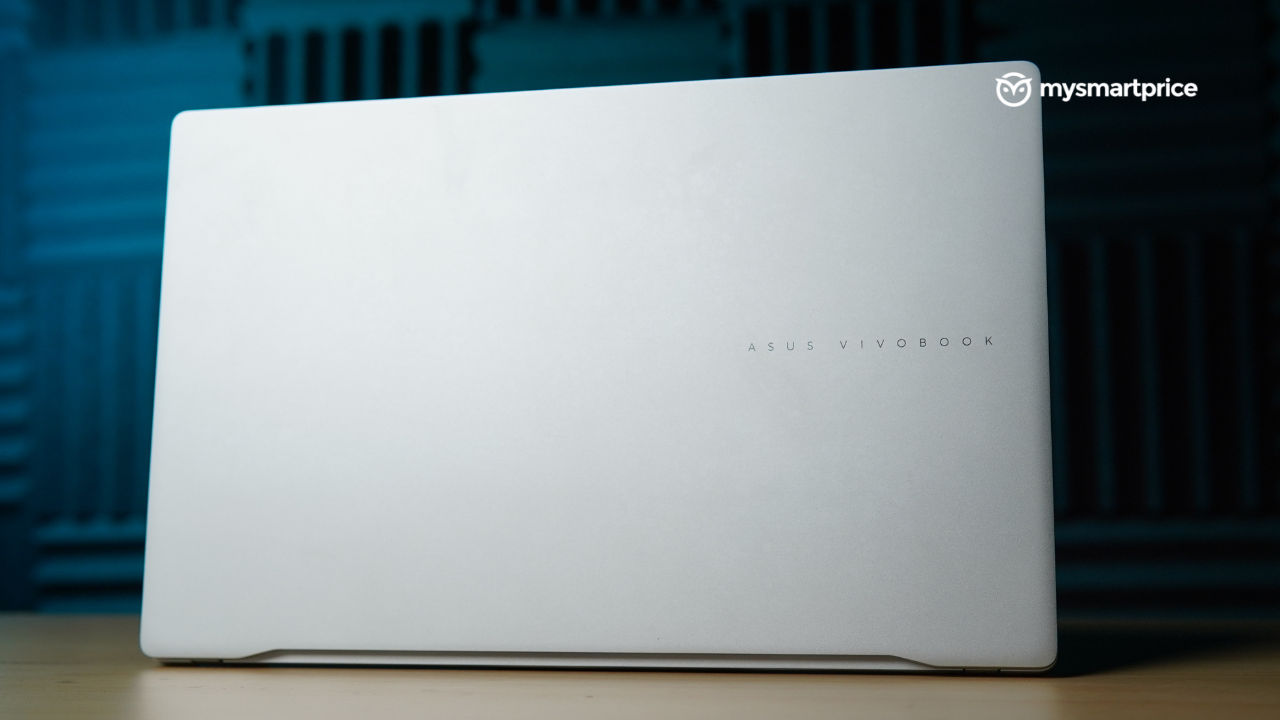
What Is Good?
- Rich colour quality, 120Hz display
- Looks like a school notebook, very sleek
- Can handle multiple tasks without a sweat
- Battery life is amazing, charging speeds too
- Immersive audio experience
- Keyboard is spacious, doesn't make noises
What Is Bad?
- No touch screen
- Trackpad makes loud noises
- Got really warm while charging
Powered by the Qualcomm Snapdragon X Elite, this is only the second laptop I’ve tried with this chipset. The first was the HP Elitebook Ultra G1q, which shared similar performance but had a more MacBook-like design.
What really stands out, though, is that this is Asus’ first CoPilot+ PC. Beyond just performance, it gives me confidence in my privacy and security, which is a huge deal for me. Hence, I’ve spent enough time with it now to give you the lowdown on whether it’s worth your investment. Let’s check it out.
Pricing and Availability in India
The Asus Vivobook S 15 OLED is available in a a single variant on the Asus eStore and Flipkart.
| Storage variant | Price in India |
| 16GB RAM and 1TB Storage | Rs 1,24,990 |
Design and Display
The Asus Vivobook S 15 OLED instantly reminds me of those Classmate notebooks from school—funnily enough, it even opens like one. Wrapped in a sleek metal design, it feels premium and modern. Compared to my daily driver, the MacBook Air M2, this laptop offers noticeably more space. The addition of a number keypad on the right not only expands the keyboard but also makes the display feel larger. What truly stands out is the ample room to rest my hands while typing—a small detail that makes a big difference in my daily workflow.
| Design | Specification |
| Dimensions |
352.6 x 226.9 x 1.47~15.9mm |
| Weight | 1.42kg |
| Ports (Right side) | 2x USB Type-A |
| Ports (Left side) | HDMI port, 2x USB Type-C, micro SD card reader, 3.5mm audio jack |
| Connectivity Options | Wi-Fi 7 2×2, Bluetooth 5.4 Wireless Card |
This laptop feels a bit heavier than the HP EliteBook Ultra G1q I reviewed earlier, but that doesn’t bother me. What matters is how sleek and stylish it looks, and it checks both boxes effortlessly.

That said, the light-coloured metal finish tends to pick up smudges easily, and they’re hard to miss. Think of it like a pristine white shirt—beautiful but quick to show stains.
The grey rubber risers at the base have started showing noticeable stains, likely from being placed on different surfaces. Over time, they seem prone to picking up dirt, which can be a bit annoying.
| Display | Specifications |
| Type | OLED display |
| Size | 15.6-inch |
| Aspect ratio | 16:9 |
| Resolution | 2880 x 1620 pixels |
| Refresh rate | 120Hz |
| Screen brightness | Claimed: 600 nits, Tested: 434 nits Minimum: 05 nits |
Another quirk I noticed is with the hinge—at angles of 30 degrees or lower, it can’t fully support the weight of the display, causing it to slip into sleep mode. Coming from MacBooks, where lighter displays stay put unless manually adjusted, this felt rather surprising.
The 15.6-inch OLED display is a treat for the eyes, delivering punchy colors and impressively deep blacks. Watching dark-themed shows like From on Amazon Prime Video was a visual delight, with every detail standing out beautifully. The 120Hz refresh rate takes things up a notch, making interactions seamless and far more fluid than the 60Hz panel on the HP Elitebook Ultra G1q.

The display’s ability to open flat at 180 degrees is a game-changer, especially during meetings or collaborative sessions. It allows someone sitting across from you to see the screen clearly without any awkward maneuvering. That said, it’s not a touchscreen, so if you’re hoping for that feature, this might not be the one for you.
One standout feature of this laptop is the smart dimming functionality. When I look away—whether chatting with someone or momentarily distracted—the screen dims automatically to save battery. And as soon as I glance back, it brightens up again, a small yet impactful touch for efficient battery management
Audio-wise, it’s just as impressive. The sound remains clear and distortion-free at any volume. That said, the bottom-firing speakers do cause noticeable vibrations when the laptop is on your lap, but it’s more of a quirk than a real hindrance to the experience.
Webcam
This laptop comes with a 1080p webcam and a mechanical privacy shutter. It’s a clever touch, especially considering how many people resort to sticking tape over their webcams for privacy.

On top of that, the IR camera lets me unlock the laptop without needing to enter a password. It’s a nice touch when it comes to privacy. For anyone working with sensitive data, whether it’s for a small business or something larger, this feature definitely comes in handy.
Keyboard and Trackpad
The keyboard on this laptop offers plenty of room to work with, courtesy of the dedicated number pad on the right. The quiet keys are a blessing—not just for me but for my peace-loving colleagues too. And let’s not forget the backlit feature—it’s a game-changer during late-night work sessions when ambient light is almost non-existent.

| Keyboard and Trackpad | Specifications |
| Keyboard | Asus ErgoSense keyboard, single zone RGB backlight |
| Trackpad | Dimensions: 129.7 x 84.8mm Asus ErgoSense touchpad, Noise reduction technology |
The trackpad is impressively large, and I didn’t experience any missed touches while typing—a definite win for me. That said, the clicks can feel a bit firm and are sometimes louder than ideal. What really stands out, though, are the clever gestures that let you adjust brightness and volume effortlessly. It’s a smart touch that saves you from constantly reaching for the function keys.

Hardware and Software
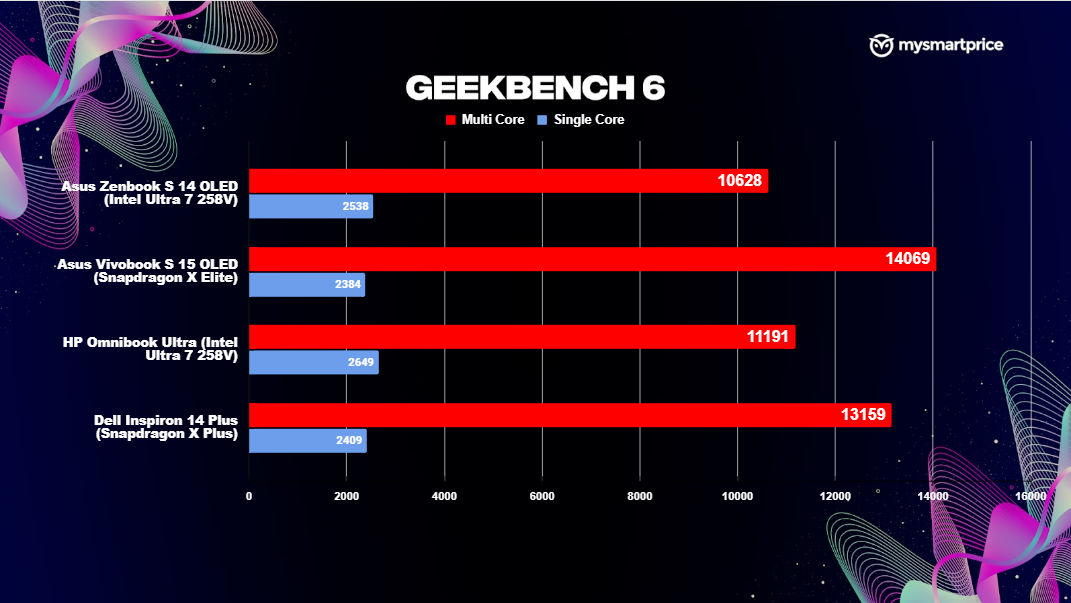
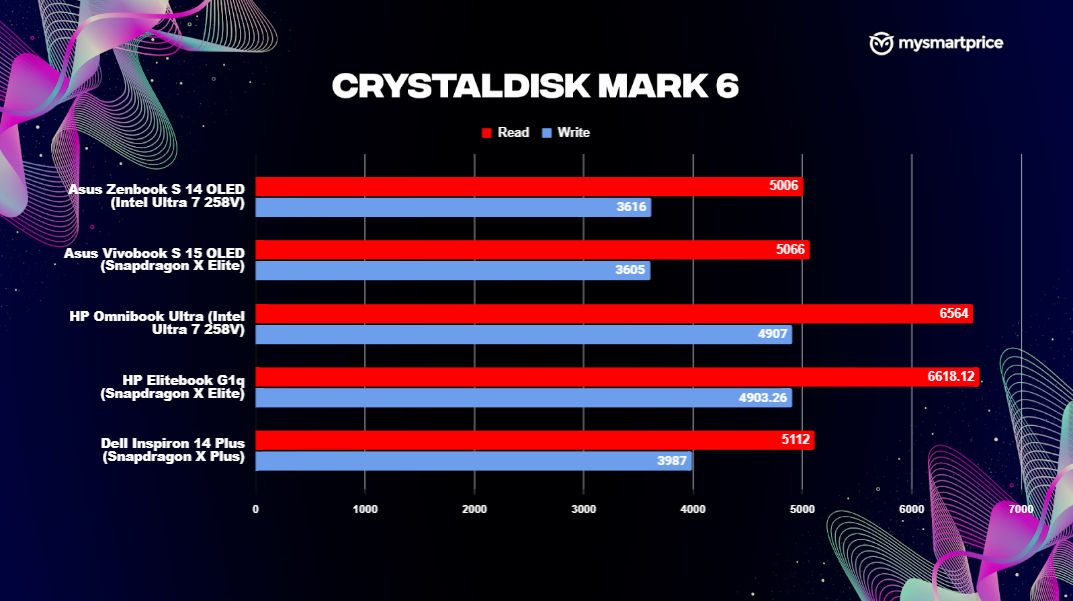
The Asus Vivobook S 15 OLED runs on the Qualcomm Snapdragon X Elite processor, also seen in the HP Elitebook Ultra G1q. Meanwhile, the Dell Inspiron 14 Plus opts for the Qualcomm Snapdragon X Plus, a slightly less powerful counterpart to the X Elite.

Let’s see how these laptops stack up in benchmarks. On Cinebench R23, the Asus Vivobook S 15 OLED struggled to keep up, posting the lowest single-core and multi-core scores among the competition. Considering this test highlights a laptop’s prowess with processor-intensive tasks, the Vivobook’s numbers might make you pause if heavy workloads are a priority.

| Hardware | Specification |
| CPU | Qualcomm Snapdragon X Elite with Qualcomm AI Engine up to 45 TOPS NPU |
| GPU | Qualcomm Adreno GPU |
| NPU | Qualcomm Hexagon NPU 45 TOPS |
| RAM | 16GB 8488 MHz LPDDR5X |
| Storage | Up to 1TB PCIe® 4.0 NVMe® M.2 SSD |
I also put the Asus Vivobook S 15 OLED through its paces with Geekbench 6 and Cinebench 2024, then compared the results with some of its competitors.
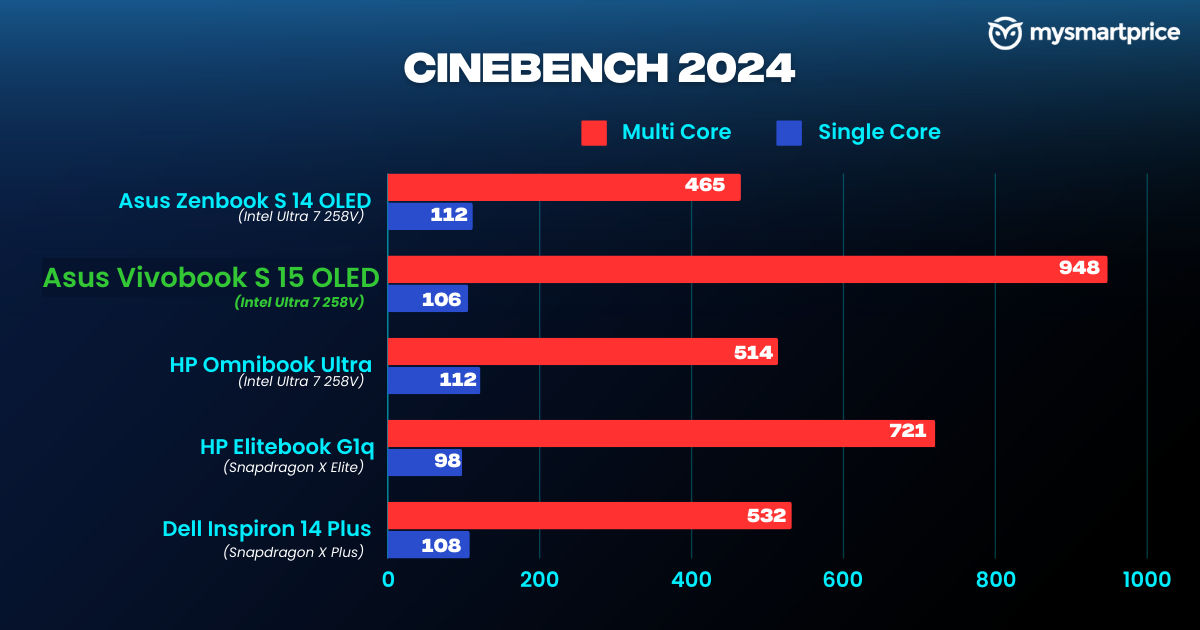
In real-world usage, this laptop handled all the tasks I threw at it without breaking a sweat. From binge-watching Netflix, jamming to music on YouTube, and passing time with random videos, to managing CMS and handling emails and meetings – it was smooth sailing. No hiccups or heating issues to speak of. However, when charging, the bottom got pretty hot, and I had to move it off my lap to avoid burning myself. Other than that, I didn’t experience any major heating, lag, or stuttering during my time with it.
However, if gaming is your forte, laptops like the Asus TUF A14 or HP Omen Transcend 14 would be the way to go.
Asus’ first CoPilot+ PC laptop brings AI front and center. The keyboard has a dedicated CoPilot key that made it super easy for me to tap into AI-powered tools. You’ll find a similar key on the HP Elitebook Ultra G1q as well. The AI experience is surprisingly fun! While I didn’t find myself reaching for it daily, having that AI assistant just a click away is oddly comforting.
Oh, and Microsoft’s controversial feature, Recall, isn’t available on this device yet. Other features like Windows Studio Effects, which brighten up your video calls, Automatic Super Resolution for sharper graphics during games, and Live Captions for real-time subtitles are genuinely helpful in everyday use.
When it comes to software, this laptop runs like any standard Windows device. What sets it apart is the MyAsus app, which acts as a one-stop hub for system maintenance, updates, and even customer support.
Battery and Charging
The Asus Vivobook S 15 OLED boasts a 70 Wh battery, outperforming the HP Elitebook Ultra G1q by 11 Wh and the Dell Inspiron 14 Plus 7441 by 16 Wh. Asus claims over 18 hours of battery life, and the numbers largely back that up.
In the PCMark Battery Test, the Vivobook clocked an impressive 14 hours and 44 minutes. Compared to its rivals, it outlasted the HP Elitebook by over two hours and the Dell Inspiron by 40 minutes.

But theory aside, here’s my experience: after a full charge in the morning, the battery dropped to 69 per cent after 9 hours of use. While I didn’t use it non-stop, my activities included streaming music on YouTube for over an hour and mainly checking out how the laptop is; with the screen saver running during idle periods. Safe to say, it delivered consistent and reliable performance.
Charging was equally impressive—it went from zero to full in just 59 minutes. No complaints here; both battery endurance and charging efficiency are spot-on.
Verdict
The Asus Vivobook S 15 OLED is priced at Rs 1,24,990, and for good reason. As the first laptop to run on the Qualcomm Snapdragon X Elite chipset and support CoPilot+, it sets itself apart in a crowded market. My time with it was nothing short of enjoyable—performance, display, and even the design left a strong impression.
This laptop opens like a notebook, giving it a wider stance compared to other models, but that extra width doesn’t take away from its sleek, premium aesthetic. The 120Hz OLED display takes the multimedia experience up a notch, though it’s worth noting that it lacks a touchscreen, something the HP Elitebook Ultra G1q offers.
The audio is top-tier, and performance never skipped a beat. Whether you’re a student in need of a reliable daily driver or a business professional requiring solid security features, this laptop fits the bill.
Right now, with a hefty discount bringing the price down to Rs 94,990, it’s a steal—making this laptop not just a great performer but also a solid investment.