After spending a month with the Zenbook Duo, I’m genuinely sad that this laptop has to return. Writing reviews and features requires a lot of research, and the Zenbook Duo made that part very easy for me. This is by far the most practical two-screen laptop I have used.
Asus Zenbook Duo Review
Rs 239,990
What Is Good?
- A multi-tasking heaven, versatile
- Good quality, OLED touch displays
- Good performance
- Wireless keyboard works well
- Great software optimisation for dual-screen
- Reliable battery life and good charging speeds
What Is Bad?
- Tends to run warm under heavy load
- Tinny speakers
- Port options could’ve been widened
- Average camera quality
- Keyboard cannot be used on the lap
It’s not Asus’ first foray into the land of dual screens. Other companies, such as Lenovo, have also tinkered with this, but the use cases on the Asus take it out of the gimmick cave.
The Zenbook Duo sports a dual 14-inch OLED display, a hinge to turn it into a multi-tasking monster, a stylus for creative professionals and more. The laptop comes with up to an Intel Core Ultra 9 185H, along with up to 32GB RAM and 2TB SSD. Sounds like this one’s gonna cost more than a kidney, right? Well, not really. However, it’s still not a perfect laptop with some shortcomings. Let’s find them out in this review.
Asus Zenbook Duo Review: Build and Design
At first glance, the Zenbook duo looks like any other traditional laptop, just slightly chunkier, much like a McMaharaja burger with three different layers. To put things into perspective, it’s thicker than the Apple MacBook Pro (M2) when the keyboard is placed inside. The lid follows the same design language as the Zenbook 14 OLED, and I like the minimalistic approach. The laptop is mostly made of aluminium-magnesium alloy, with a matte finish on the underside and the lid.
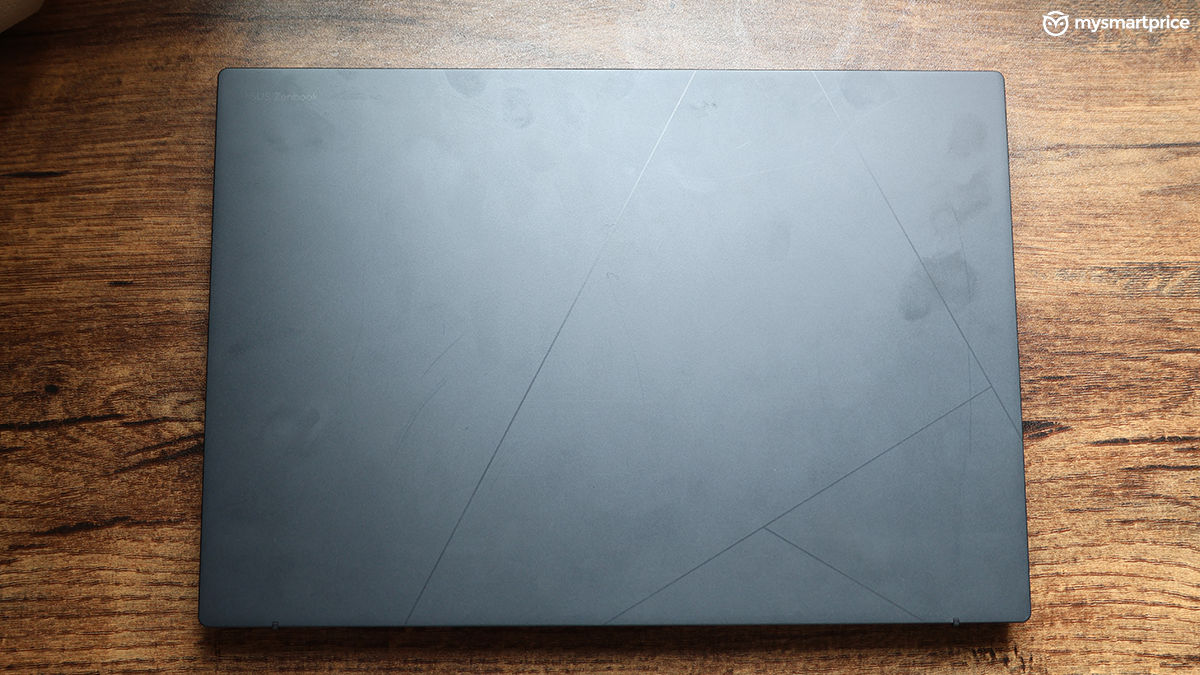
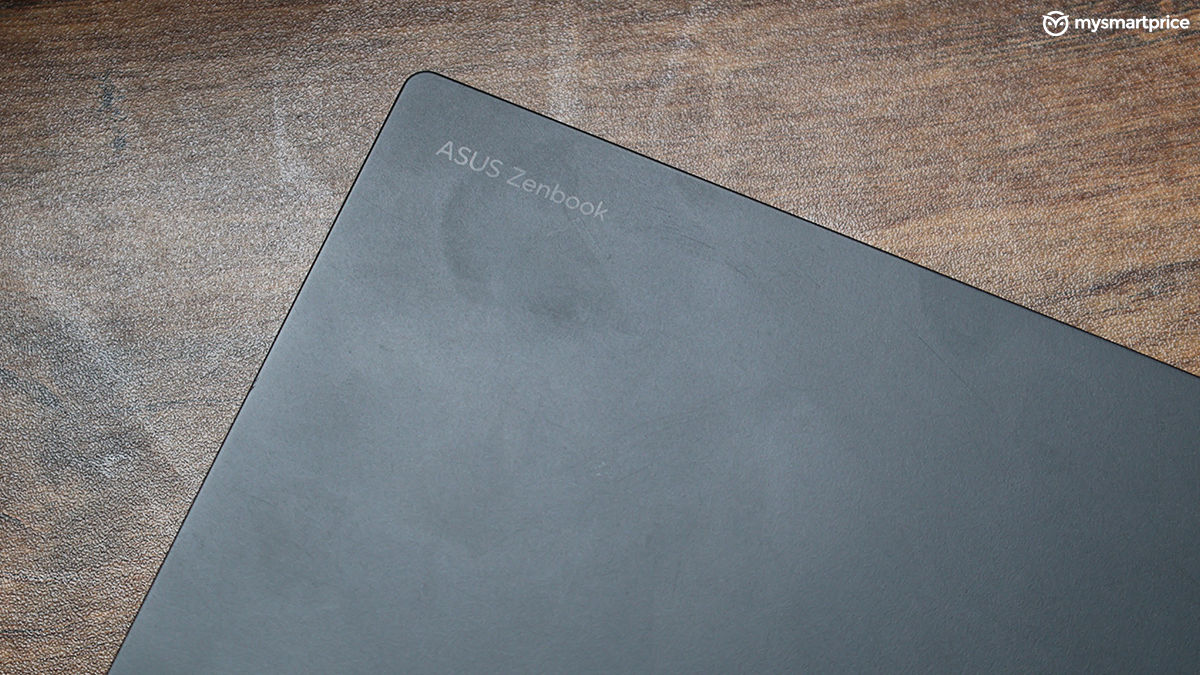
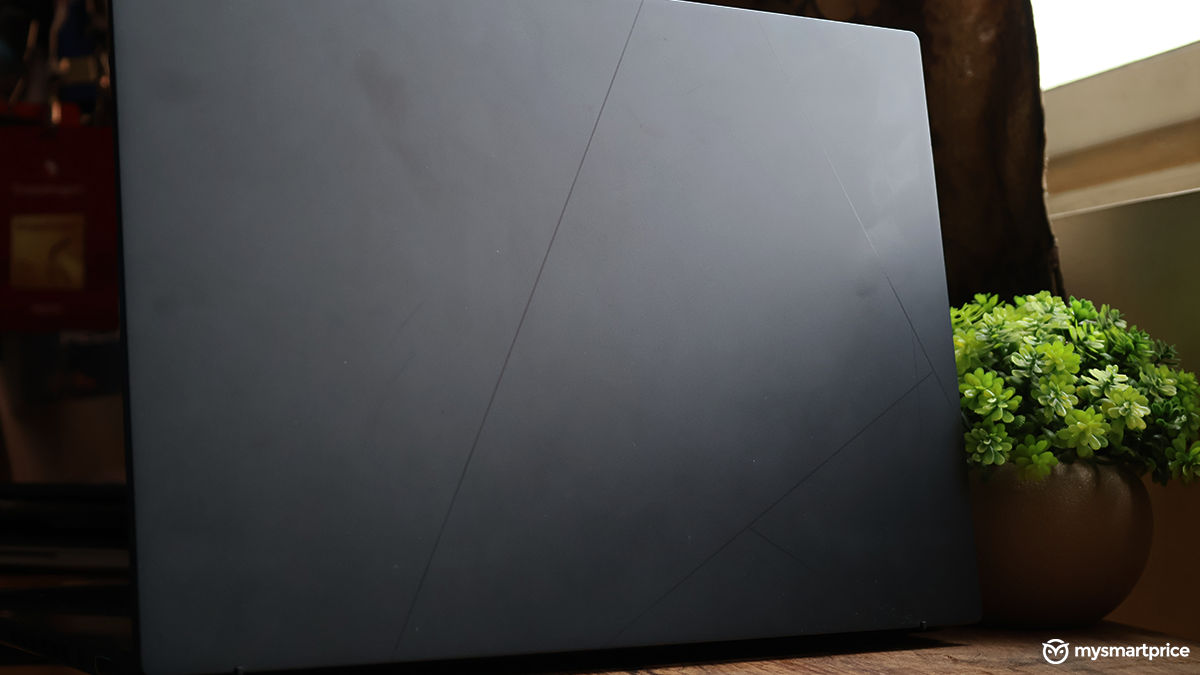
While it does not collect much dust, the lid will attract oily fingers, so do note that. There’s no flex on the lid, but it does wobble a bit if you furiously type on the laptop. As is tradition with most Asus laptops, the Zenbook Duo also comes with a MIL-STD 810H military standard rating to give you a sense of safety against unfortunate drops.
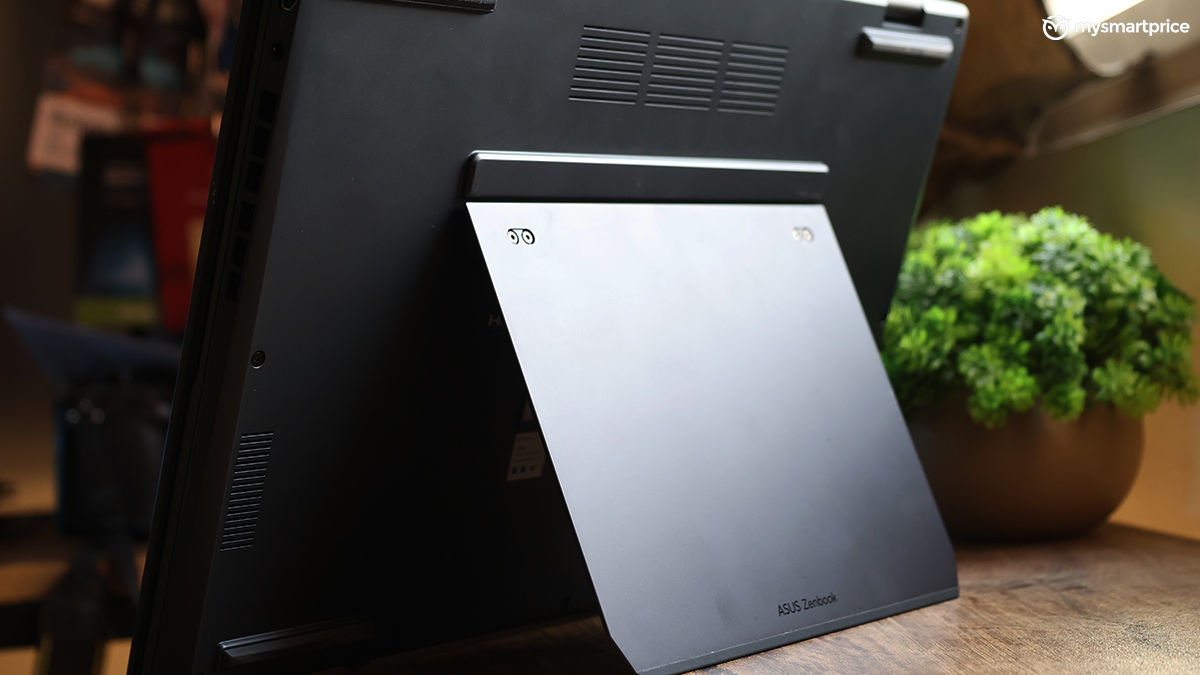
The underside of the laptop is not so traditional. While the CPU is said to be the brain of the computer, with this one being an acrobatic multitasker, I would argue the kickstand at the back is also the brain of this machine — if that makes sense.

Anyway, the dual-hinged kickstand is made of metal and is sturdy enough to hold the weight of the laptop. While it should last the test of time, the hinge also seems replaceable. However, I’m not sure if Asus plans to sell it in the future. You get the usual set of risers and vents at the back.
| Ports | Specification |
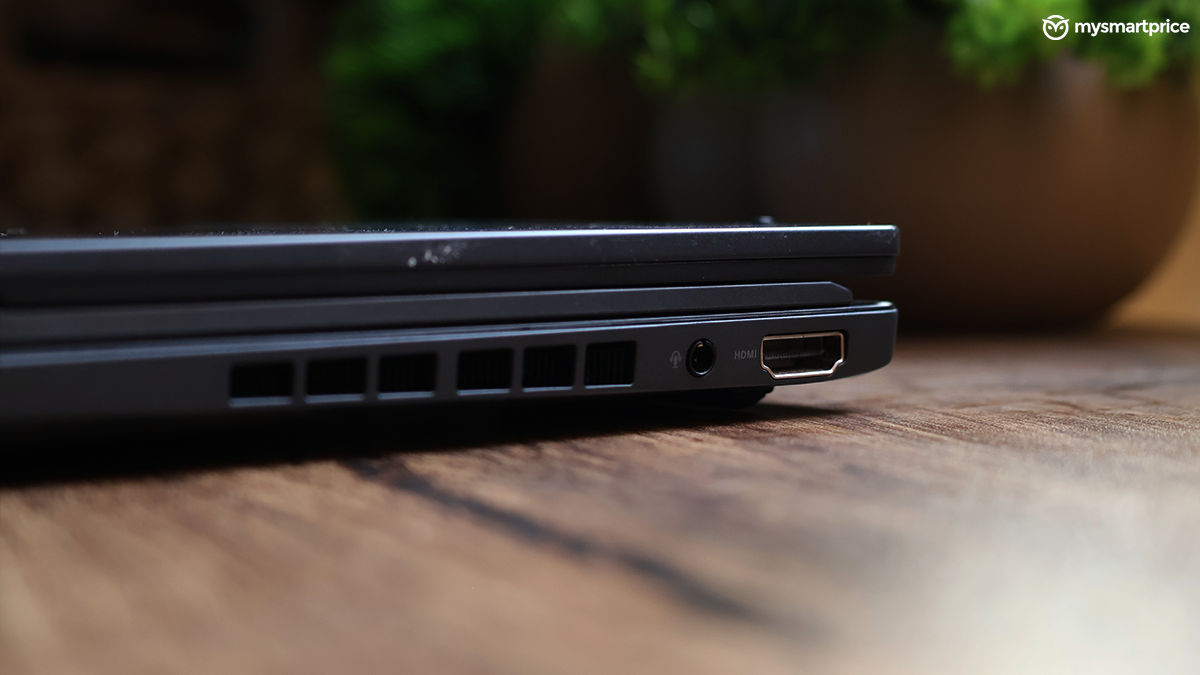
| Ports (Right side) | Full-size HDMI 2.1 port and 3.5mm audio jack |
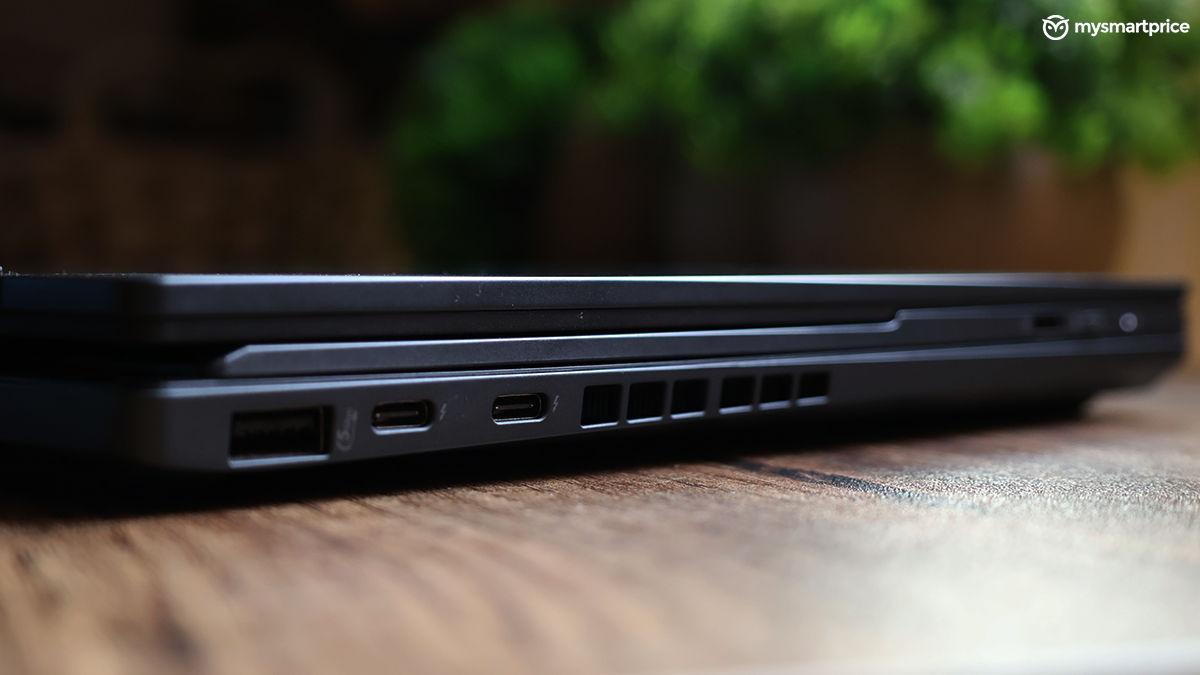
| Ports (Left side) | USB 3.2 Gen 1 Type-A, 2x Thunderbolt 4 ports |
| Connectivity Options | Dual-band Wi-Fi 6E (802.11ax), Bluetooth 5.3 |
Carrying the laptop inside your backpack is not an issue; surprisingly, it’s not very heavy at 1.65kg (including the keyboard). The port selection should ideally be sufficient for most, but another USB-A port and an SD Card reader would have been the ketchup on top of this McMaharaja.
You also get an infrared camera at the front for your meetings and Windows Hello. It’s average at best, with the camera requiring multiple seconds to recognise my face, even in a well-lit room. The video quality is not the best with a lot of noise creeping in. It is also compatible with Windows Studio Effects for features like background blur, automatic framing, and eye contact, all of which work seamlessly.
Asus Zenbook Duo Review: Displays and Audio
It’s time for the Zenbook Duo’s party trick — the two displays. Both displays are 14-inch FHD+ touch OLED panels. They are visually the same, with the bottom display being slightly more functional. The included keyboard can be attached to the bottom portion with the help of a few magnetic pins.
| Display | Specifications |
| Type | OLED |
| Size | Dual 14-inch displays |
| Aspect ratio | 16:10 |
| Response rate | 0.2ms |
| Resolution | 1920 x 1200 pixels |
| Refresh rate | 60Hz |
| Screen brightness | 500 nits |
| Certifications and other features | 100% DCI-P3 colour gamut, Display HDR True Black 500, Pantone Validated, TÜV Rheinland-certified, SGS Eye Care Display |
The display is almost perfect. It’s certified for Dolby Vision, validated by Pantone for colour accuracy, and offers complete coverage of the DCI-P3 colour gamut. It’s also a touch panel, so multitasking is made much easier.

Watching shows such as Fallout on the upper display while the bottom display was used for scrolling through X (formerly Twitter) was a fun affair. The colours are vivid, and the display is OLED, so you’ll enjoy watching movies with darker scenes.
The viewing angles are also great, but the display is a bit reflective when sitting under tube lights. I’d say the display is almost perfect because it comes with a 60Hz refresh rate. Now, this might not be a big deal for many, but after using a 144Hz panel, it took me more than two weeks to get used to a slower refresh rate panel. Besides, a faster panel helps with a smoother overall experience. The display is also protected with a layer of Corning Gorilla glass to avoid any scratches.
Different Use cases
The Zenbook Duo has multiple use cases, and it’s built for every multi-tasker out there.
Traditional laptop: It goes unsaid; the Zenbook Duo can be used as a conventional laptop with the keyboard attached to the bottom display. It’s not entirely traditional as the keyboard acts as an added layer, so you have to elevate your wrists a bit more, but you get used to it shortly.

Multi-tasking monster: This is essentially its USP. It’s almost like a desktop replacement. You can detach the keyboard and open both displays to keep it on a desk. This is how I used it almost every time. You can also place it vertically

The forgetful mode: This is obviously not its official name, but something I have come up with. See, the bottom display also has a virtual keyboard which can be used if you forget the physical keyboard back home. This was extremely useful — and I speak from experience. You can summon the virtual keyboard using gestures.

Sharing mode: Since the display goes down to 180 degrees, you can use both the upper display and the lower display to share content during meetings or presentations by laying it flat on the table. The upper screen can then be rotated.
The ScreenXprt app gives you quick access to various settings to perform these stunts. While the Zenbook Duo’s display department is beyond exceptional, the speakers are just average. The dual Harmon Kardon speakers on the laptop’s underside produce audio that lacks bass and sounds very tinny. It’s not ideal for listening to music, but watching a movie should not be an issue.
Asus Zenbook Duo Review: Keyboard and Trackpad
The Zenbook Duo has a detachable keyboard that connects to the secondary display magnetically. It also supports Bluetooth connectivity, so you can use it with other laptops. The magnetic connectors are strong, and the keyboard does not come off easily. The keyboard is slim and has decent key travel. Using the keyboard on the desk is not an issue, but it does get awkward when used on your lap. I often felt like I might snap the keyboard in half.
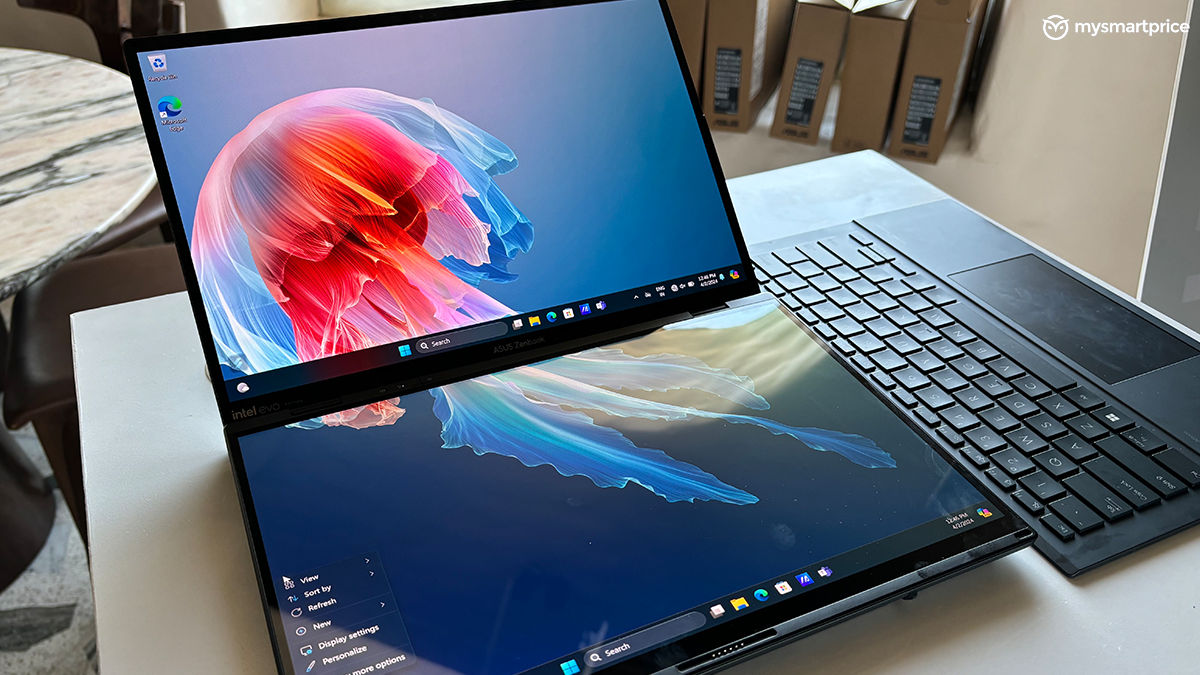
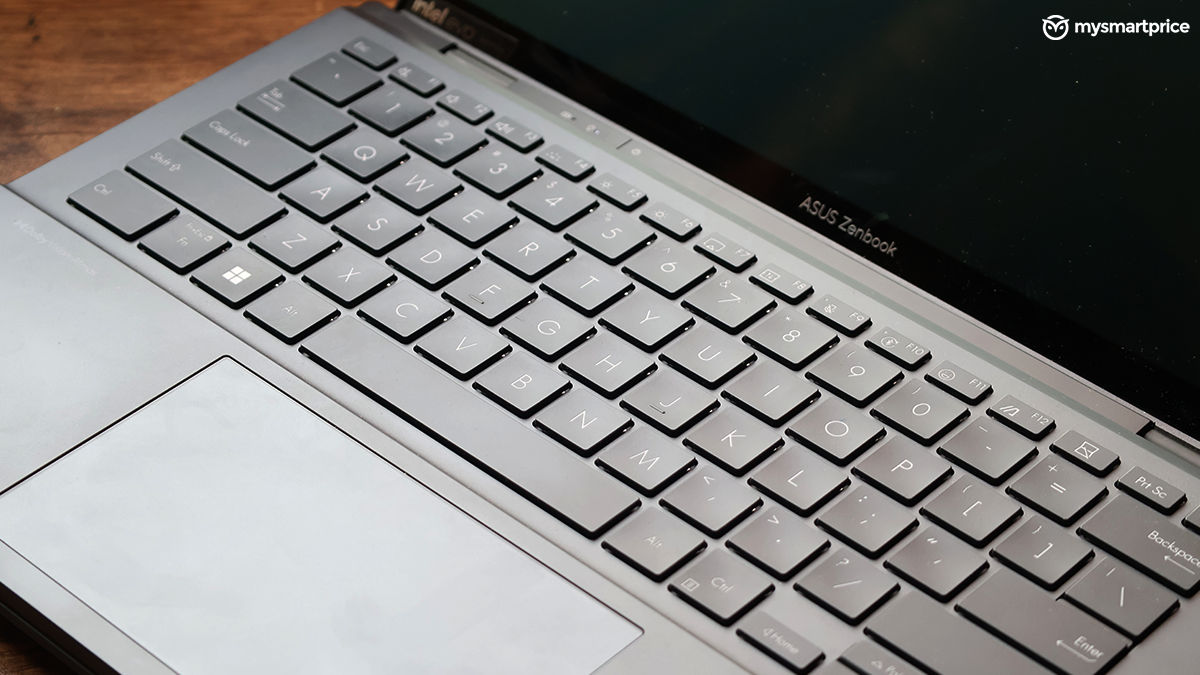
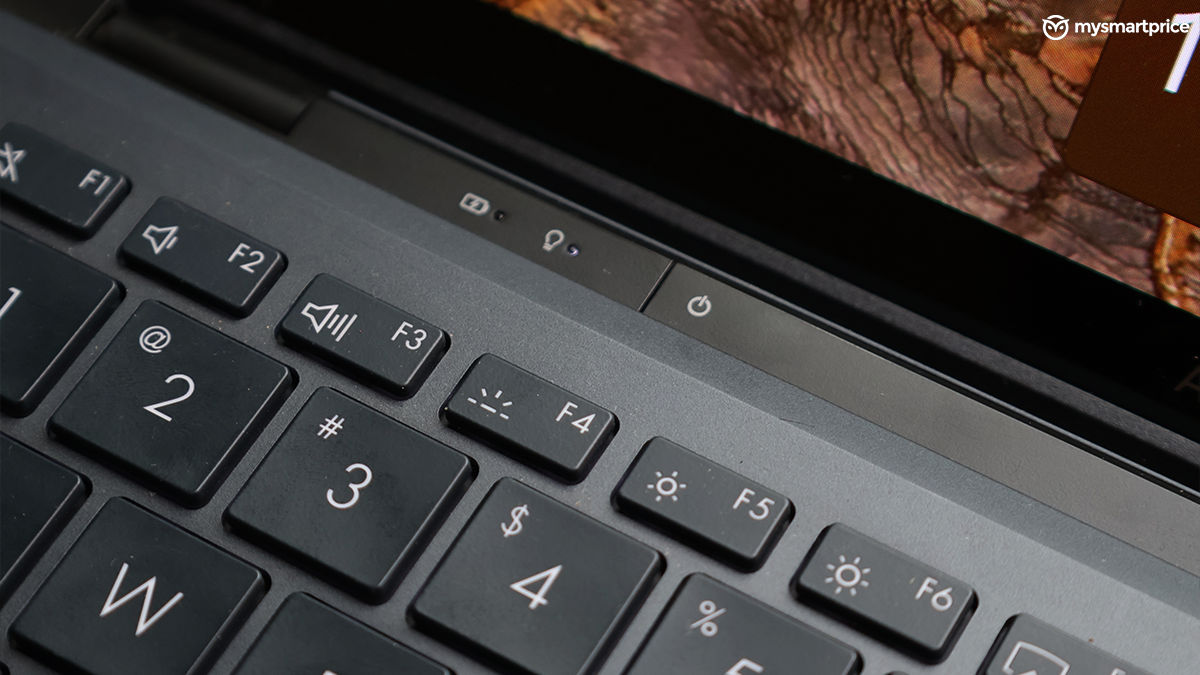
The keyboard does not come with a dedicated numpad, nor does it implement one inside the trackpad, as we saw on the Zenbook 14 OLED — but that’s not a dealbreaker. The trackpad is wide and works well with gestures. The click feedback is also acceptable, but nothing special to write home about. You also get a toggle to switch off the Bluetooth mode, a USB-C port for charging, and a battery indicator.
Asus Zenbook Duo Review: Performance
The Zenbook Duo comes in multiple variants; however, they all come with Intel’s new Meteor Lake lineup. My testing unit has an Intel Core Ultra 9 185H processor with a TDP of 35W. The new processor is also paired with Intel Arc, replacing the Iris Xe GPUs.

Besides that, you can also find a dedicated Intel AI Boost NPU to accelerate some AI-related tasks, such as music generation in Audacity, image generation in GIMP, and more. This is paired with 32GB LPDDR5X RAM and 2TB of PCIe 4.0 NVMe SSD.
| Hardware | Specification |
| CPU | Intel Core Ultra 9 185H, 5.1GHz, 16 cores, 22 threads |
| TDP | Up to 35W |
| GPU | Intel Arc Graphics |
| NPU | Intel AI Boost |
| RAM | 32GB LPDDR5X, 7467 MHz |
| Storage | 2TB SSD, PCIe 4.0 NVMe M.2 |
The Zenbook Duo sails through daily tasks with ease. I’ve had more than 20 Chrome tabs open on each display, with Adobe Photoshop and a few other programs running in the background. There was not a single instance of the laptop stuttering. Multi-tasking is a breeze on this laptop. For example, running Adobe Premiere Pro open on the upper display while Real Madrid took Bayern out for a run on the lower display was a menial task for the laptop. Creative workloads are also handled well, and the included stylus makes colour correction a fun task.

While all that is good, the Zenbook Duo does not unleash the full potential of the Core Ultra 9 185H purely because of heating issues in such a tight form factor. The laptop throttles in most of the synthetic benchmarks and during gaming as well. The underside of the laptop also starts to warm up after spending considerable time pushing it through the paces.
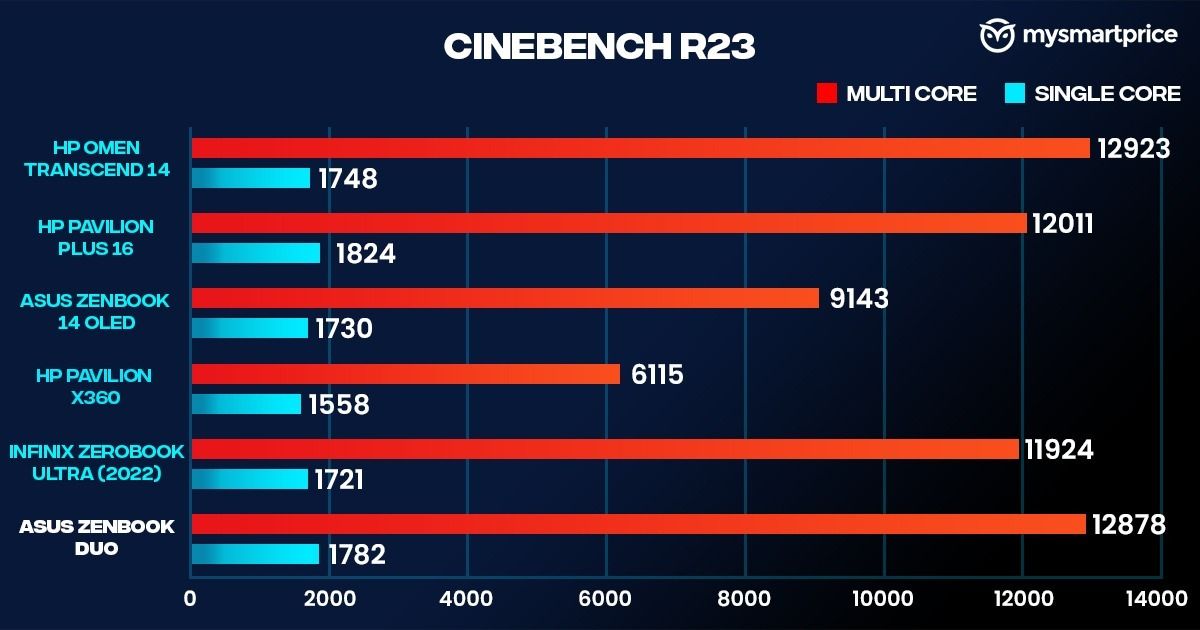
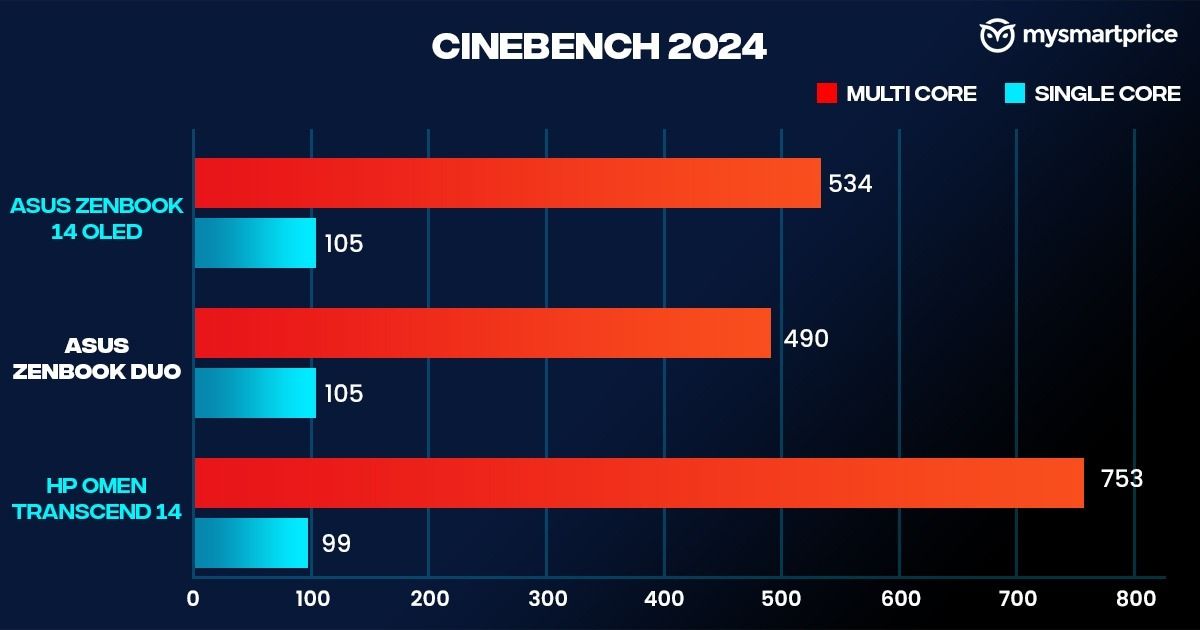
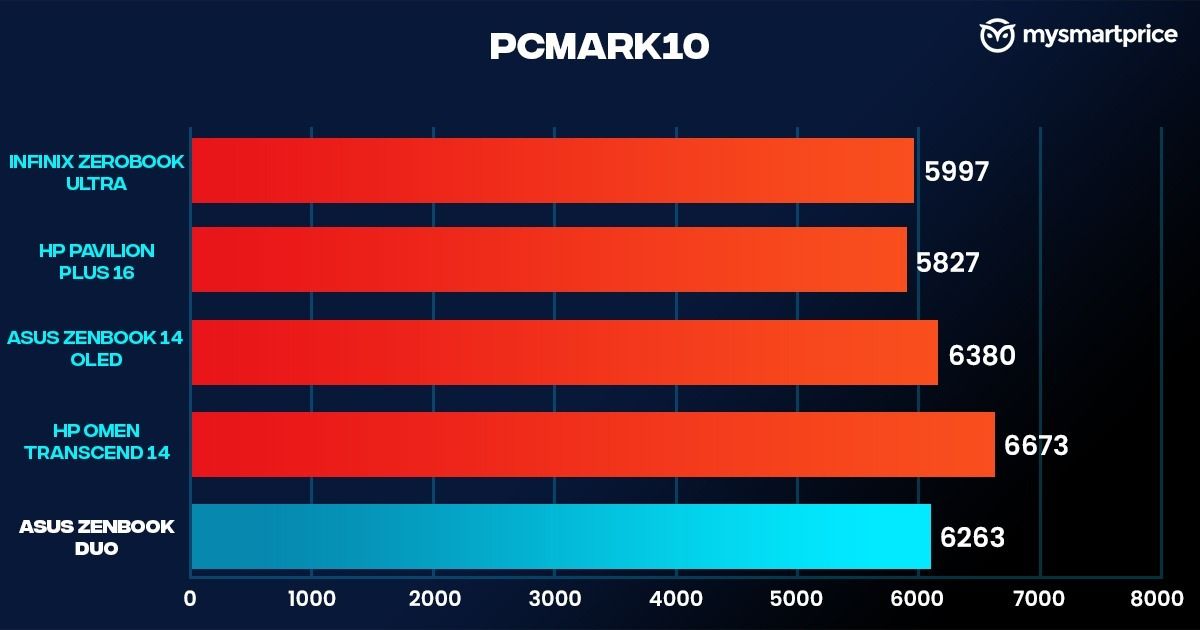
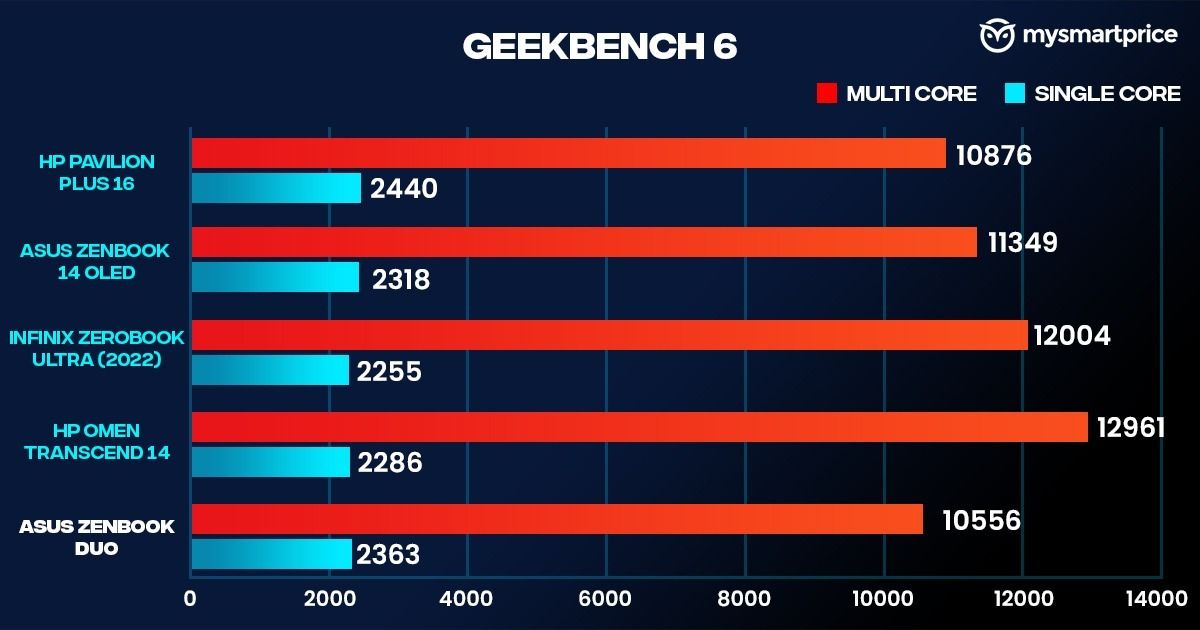
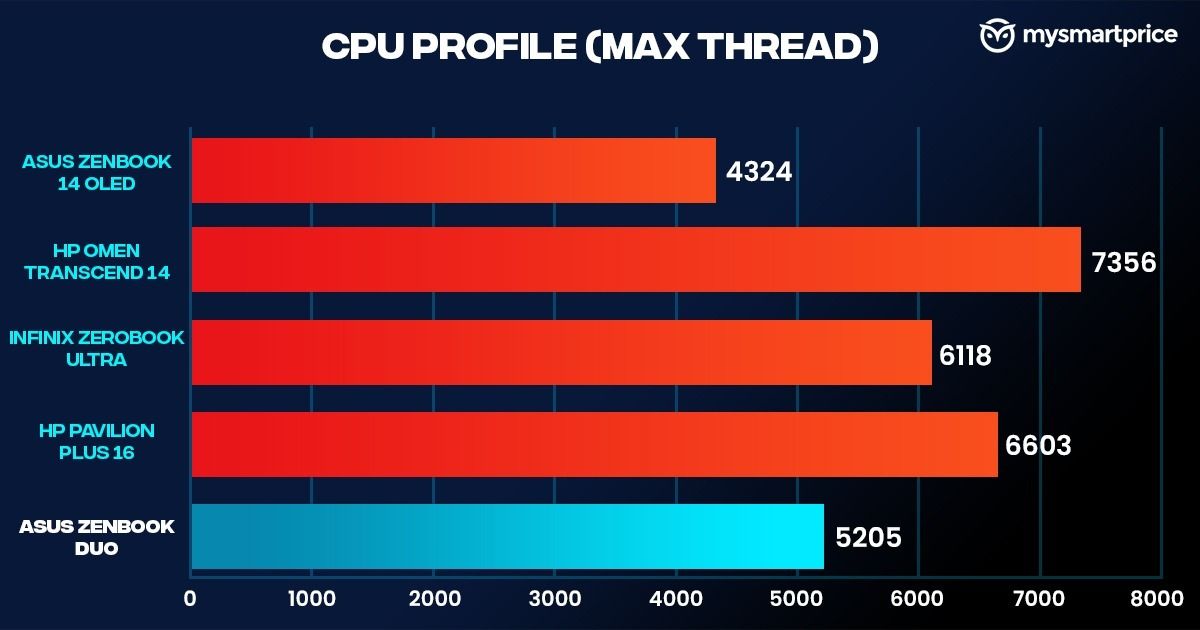
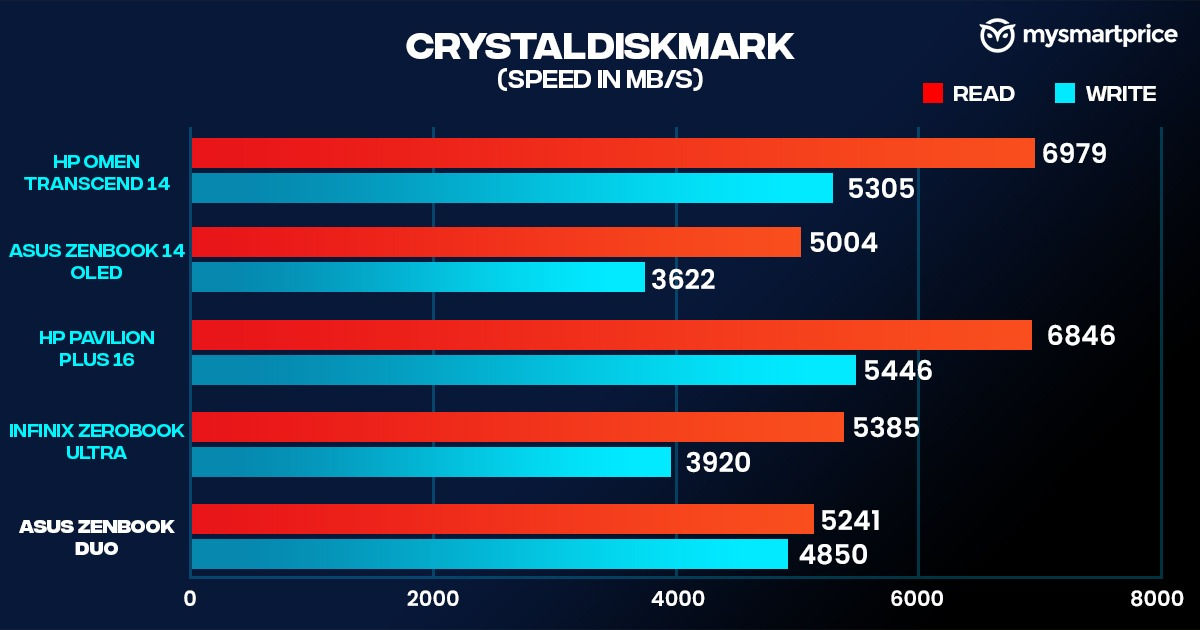
The Zenbook Duo falls behind the Zenbook 14 OLED in the Geekbench 6 multi-core test and the PCMark 10 benchmark. Remember, the Zenbook 14 OLED runs on the Intel Core Ultra 7 155H. While the multitasker takes a fair lead over the traditional laptop in Cinebench R23’s multi-core score, the marginal difference in single-core performance doesn’t stand out. The CrystalDiskMark score shows us some impressive read and write speeds, which is what I experienced during file transfers.
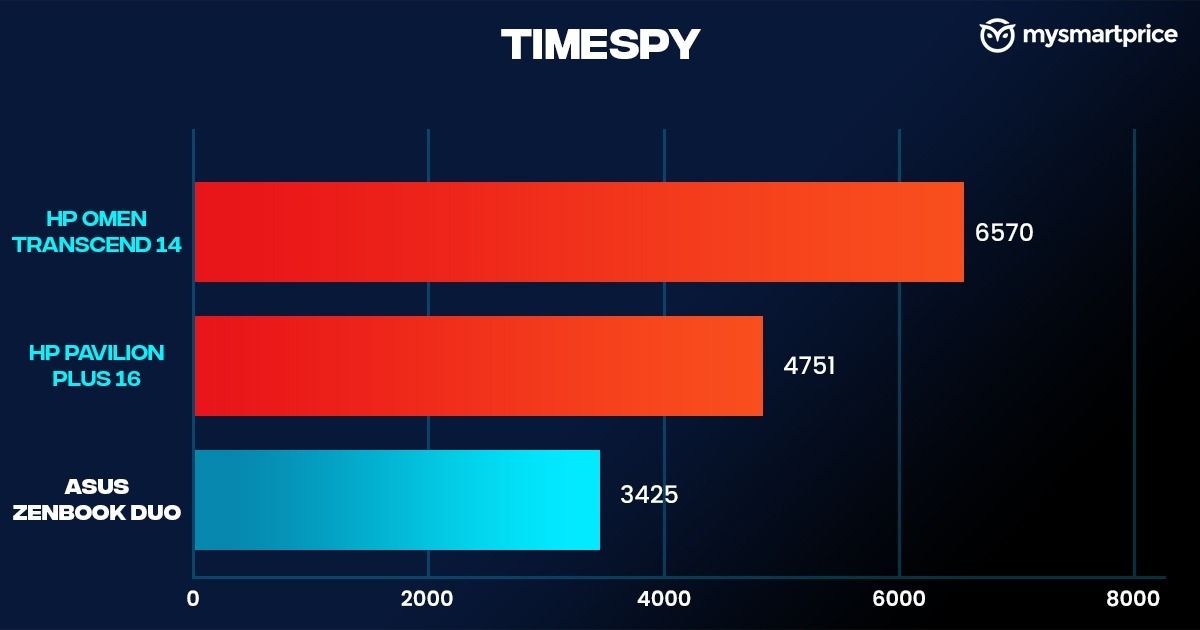
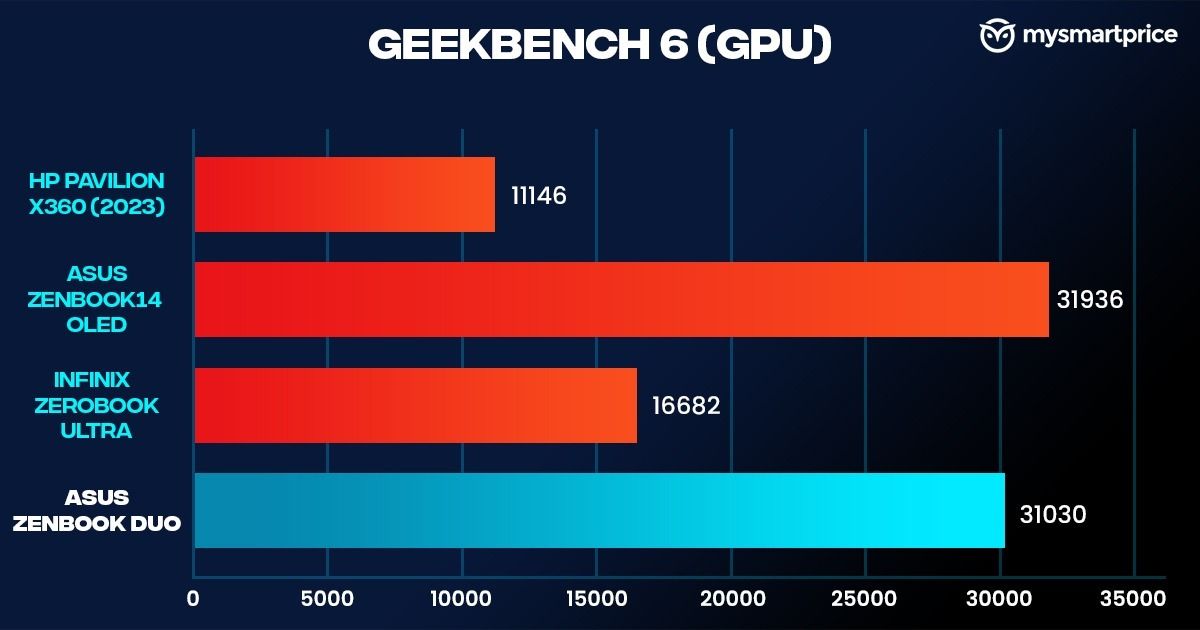
Gaming is not its forte, but the Intel Arc can handle a few casual games if you tweak the settings in its favour. Games like Counter Strike 2 can be handled promptly with the graphic presets pushed to low.
| Games | Average Frame Rates (FPS) |
| Counter-Strike 2 | 91fps |
| Dying Light 2 (Benchmark) | Very Low Preset (FSR, Balanced): 53fps |
| Shadow of the Tomb Raider (Benchmark) | Highest preset: 34fps, Medium: 41fps |
| GTA V (Benchmark) | Low graphics preset: 98fps |
The game churned out an average of 98fps, which shortly fell to 85fps after the laptop’s underside reached about 58.1 degrees Celsius. Shadow of the Tomb Raider rendered a maximum of 41fps with the graphics set to medium.
Asus Zenbook Duo Review: Battery and Charging
Since the laptop has two screens, my expectations for its battery life were low. However, the Zenbook Duo impressed me in this area. Using both screens, the laptop easily lasted about five hours and 30 minutes. If you use the laptop in the traditional manner, this can be pushed to around eight hours of screen time. The PCMark battery life test also gave us a score of seven hours and four minutes.

Asus includes a cute little 65W USB-Type C charger. It can fully charge the laptop in about two hours and 15 minutes.
Asus Zenbook Duo Review: Verdict
As I wrote earlier, this is not the first dual-screen laptop, but undoubtedly the most practical one. It’s a no-brainer for people who want a multi-tasking machine that is also portable. Actually, it’s one of the best laptops available on the market.
Both the displays are OLED and support touch, so things are easier when dealing with multiple Chrome tabs. The magnetic keyboard execution is also perfect and almost flawless, along with multiple use cases with the help of ScreenXprt. The battery life is also quite exceptional. There are not a lot of significant flaws with the laptop besides the subpar camera, speakers, and throttling issues in some high-intensive workloads.
That said, the price of this machine should also be considered. But if you are a researcher, a creative professional, a writer, and, more importantly, a multitasker, this will be worth your penny.