Considering that hardly a year has passed since handheld PCs began enchanting the passionate PC community of India with their extensive feature set, MSI struck when the iron was still hot by launching its handheld Claw A1M a few months back. The brand picked the Intel Core Ultra series as the processor of choice for the Claw to steal the show from its competitors. From the consumer’s perspective, the more options, the merrier it gets.
MSI Claw A1M
Starting at Rs 64,990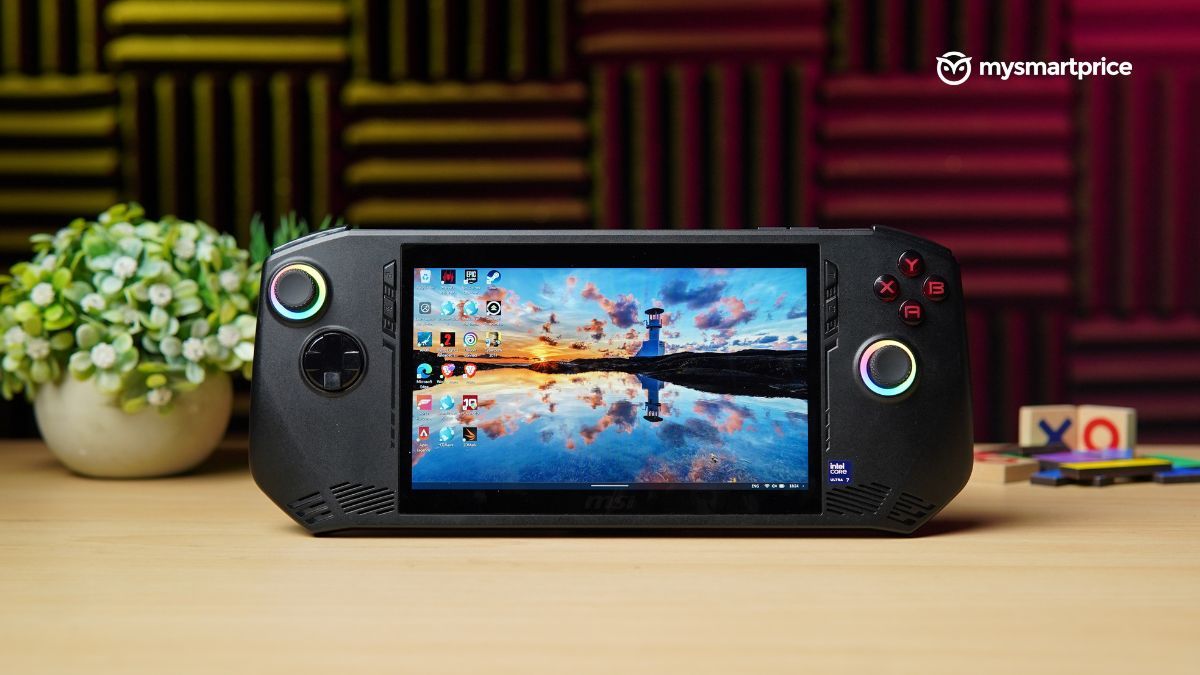
What Is Good?
- Ergonomic, smudge-free exterior
- Tactile buttons and responsive joysticks
- Terrific audio quality
- Reliable battery life
- Smooth, vibrant 120Hz display
What Is Bad?
- Not as powerful as other handhelds
- Mushy shoulder buttons
- Lack of a protective layer on the screen
But did MSI strategise choosing a different chipset to grab attention, or has it truly optimised the Claw to harness the full potential of its powerful hardware? Read my review to find out.
Pricing and Availability in India
The MSI Claw can be purchased from leading online retailers and the brand’s store. It is available in three configurations: one with a different processor and two with the same processors but different storage options.
| Variant | Price on Amazon and Flipkart |
| Intel Core Ultra 5 135H Processor with 512GB SSD | Rs 64,990 |
| Intel Core Ultra 7 155H with 512GB SSD | Rs 76,990 |
| Intel Core Ultra 7 155H with 1TB SSD (Reviewed) | Rs 79,990 |
Design and Ergonomics
When you think of a powerful handheld, you may picture a flashy exterior with unique characteristics brimming from all corners. The MSI Claw is the opposite of that. Since all its counterparts have a minimal appearance, the brand could’ve seized the opportunity to design the Claw as distinctive as possible.
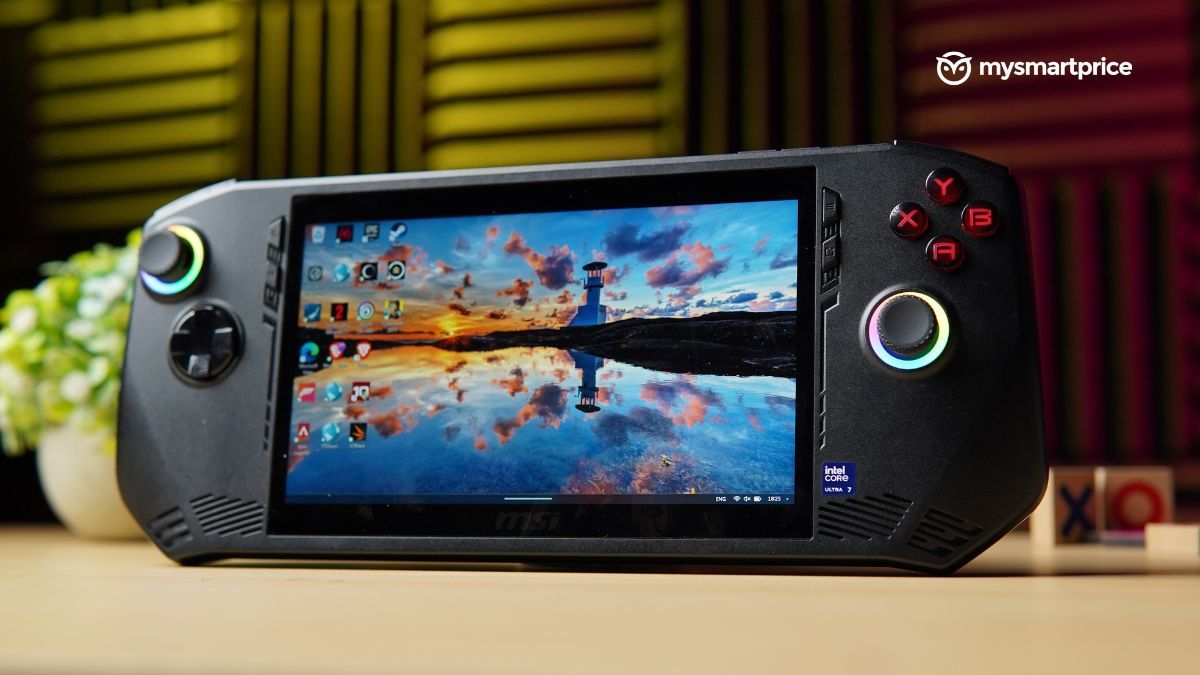
Instead, the handheld has a functional look with black as its only colour option. Fortunately, its matte property effortlessly shields the device from stains and smudges.
| Design | Specs |
| Dimensions | 294 x 117 x 21.2 mm (11.57 x 4.6 x 0.83 inches) |
| Weight | 675 grams |
| Colour | Black |
| Ports | 1x microSD card reader
1x audio jack (3.5mm) 1x Thunderbolt 4 Type C (support data transfer, Power Delivery 3.0, and DisplayPort) |
| Other Features | Hall-effect joysticks |
The Claw’s plastic build offers an advantage: excellent weight distribution. This design choice lets you play games for extended periods without hand fatigue, making it ideal for intense rounds of Apex Legends. Moreover, the handheld compels you to believe it can endure some of your rage quits with its sturdy frame.
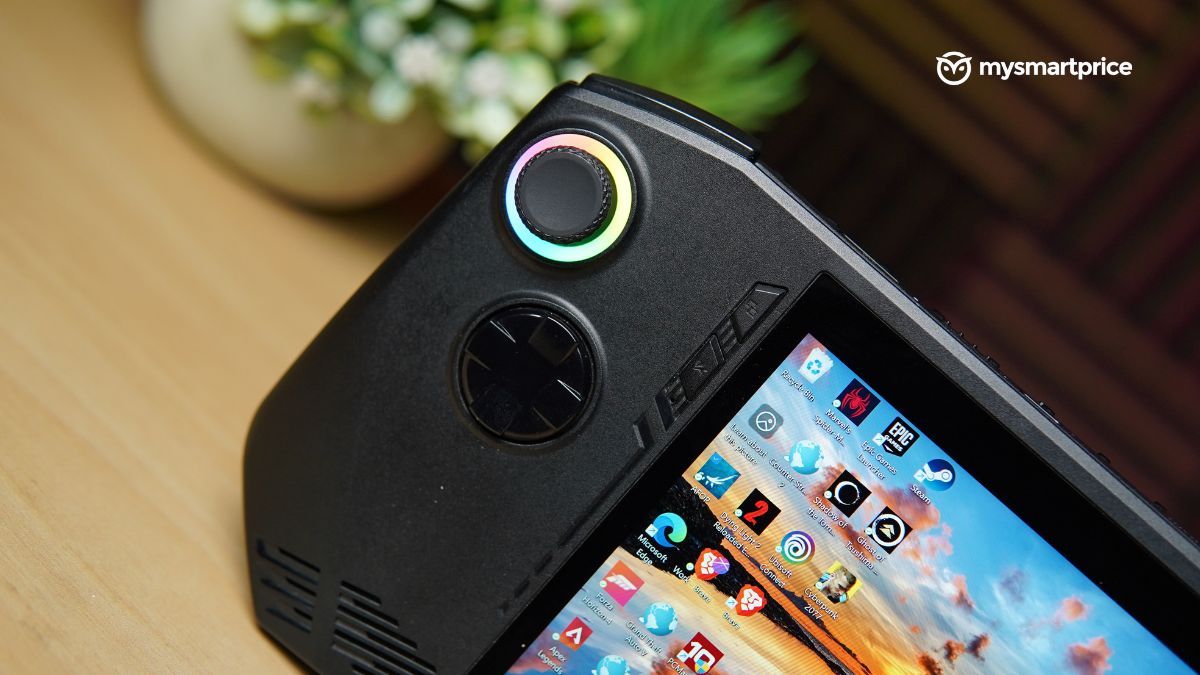
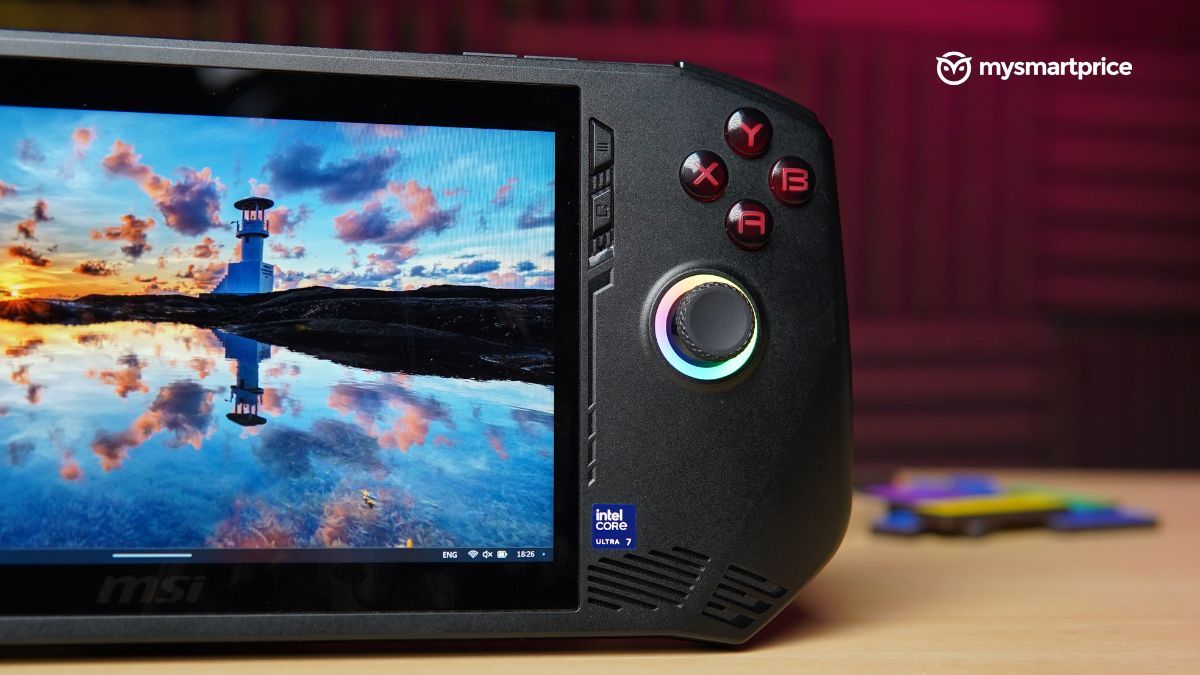
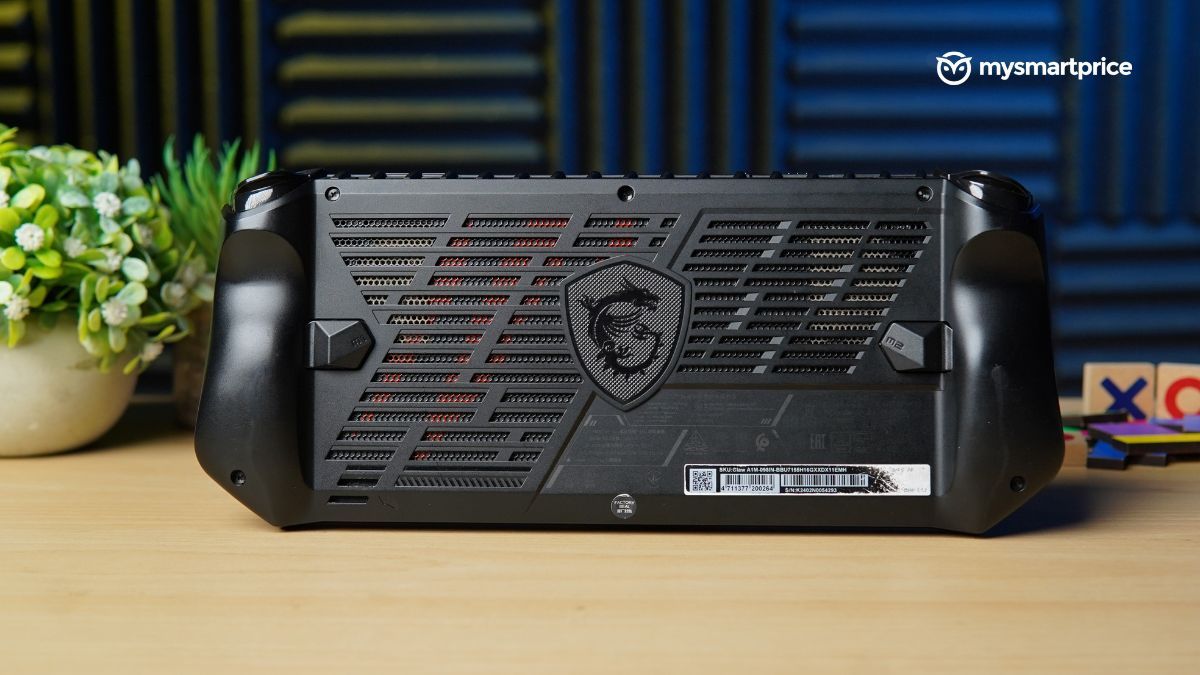
The Xbox users will feel at home using the handheld since the button layout is similar. You also get a set of two buttons on either side of the screen, such as dedicated MSI Center M and Control Center buttons, which make navigation in Windows a breeze. The device has two additional macro buttons at the rear that can be mapped per your preference.
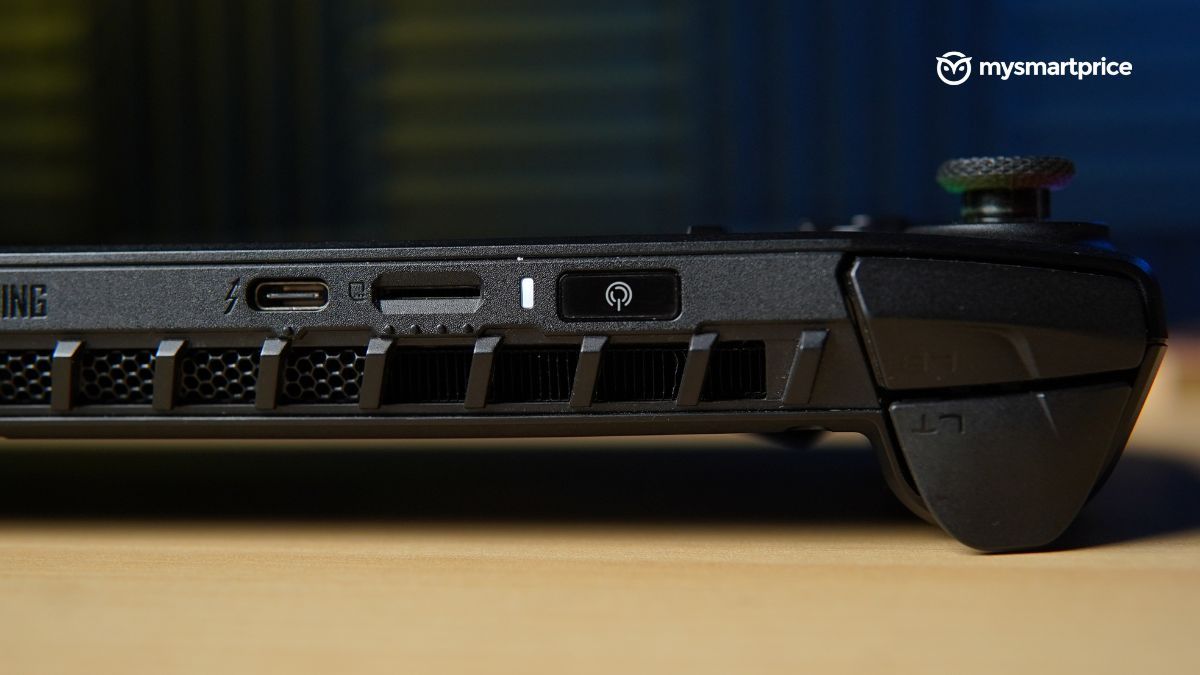
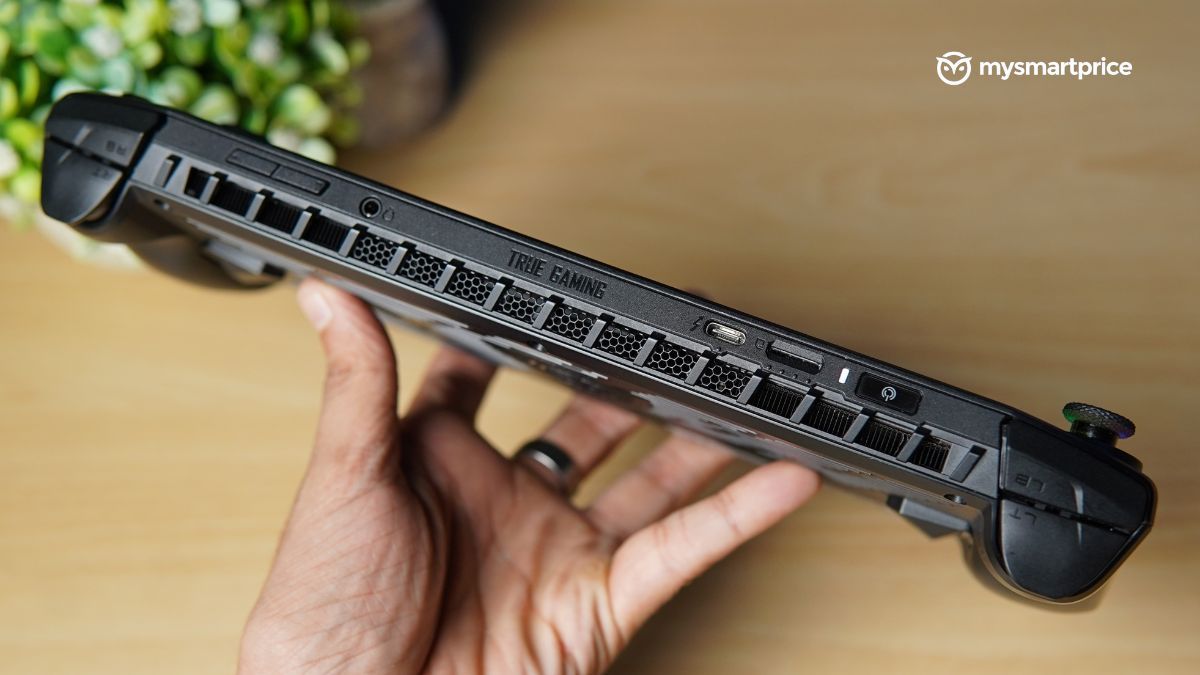
Speaking of buttons, almost every button, plus triggers had good tactile feedback. The exception was the shoulder buttons which were mushy and dampened my mood whenever I had to use them.
The joysticks were delightful to use, whether exploring cities via web-swinging in Spider-Man: Miles Morales or operating Windows because they were pretty responsive. Besides the RGB strips around them sprinkle some life into the handheld’s dull aesthetic.
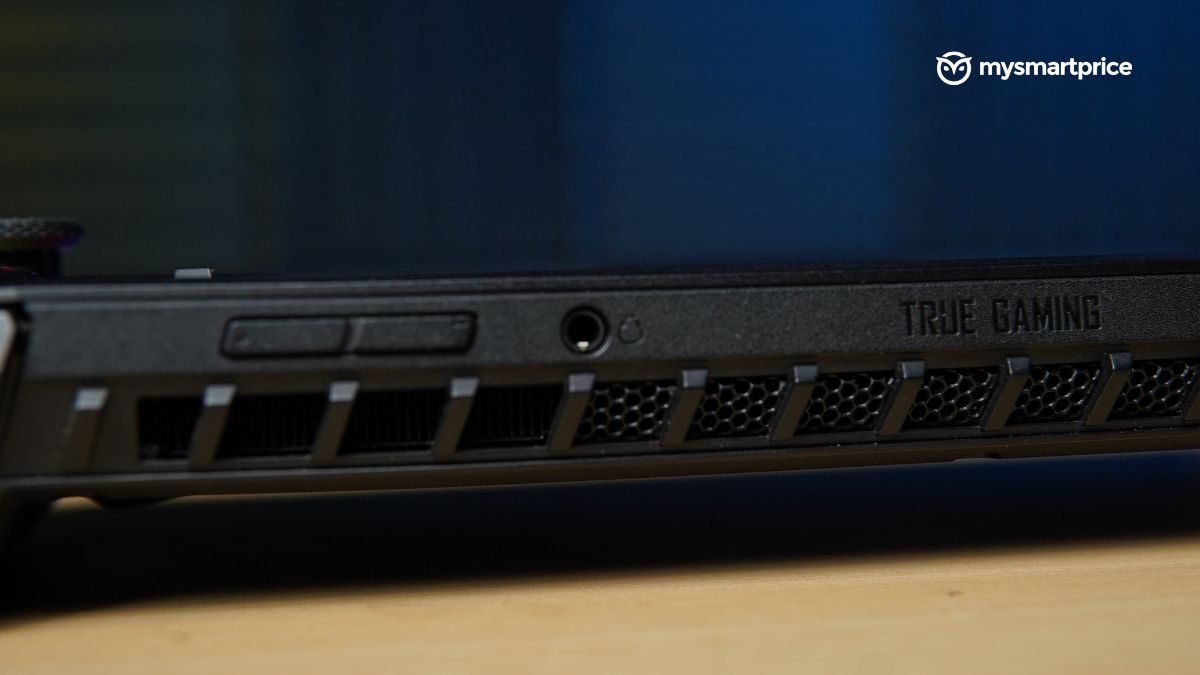
MSI aced ergonomics in its handheld beyond just design and button placement. Its contoured handles and deliberately placed notches provide a comfortable grip since they perfectly adapt to the palm’s natural shape. It also excels at keeping warm air away from your hands. The appropriately positioned vents handle heat exceptionally well.
Display and Audio
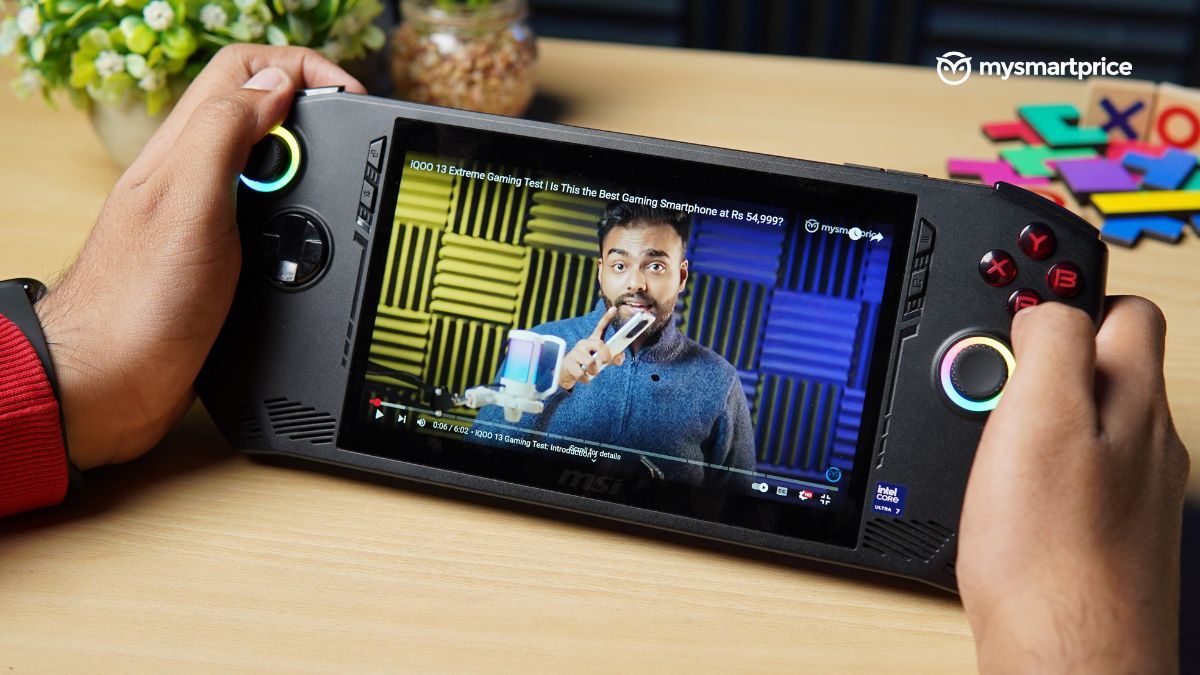
The IPS panel on the Claw supports a 120Hz refresh rate and has a peak brightness of 500 nits, so leading the race on Forza Horizon 5 won’t be an issue outdoors. Unlike every handheld in India, the screen doesn’t have a protective layer like the Corning Gorilla 5 on top, so one must contemplate tossing devices after a rage quit to avoid a significant hole in their pocket.
| Display | Specs |
| Size | 7-inches |
| Resolution | 1920×1080 |
| Type | IPS LCD |
| Brightness | 500nits |
| Aspect Ratio | 16:10 |
| Refresh Rate | 120Hz |
| Speakers | Stereo speakers, 2W x2, dual-array microphone |
Given its touch-enabled nature, the display is susceptible to collecting fingerprint smudges. These smudges don’t interfere with your gaming experience much, but an oleophobic coating would’ve been a welcome addition.
The city of Harlem, home to Spider-Man Miles Morales, was breathtaking owing to how vibrant the game appeared with on-point colour consistency. While blacks aren’t as deep as the OLED screen produces, it is darker, so pitch-black alleyways in Silent Hill still retain their eerieness.
Complementing the amazing visual is the equally terrific pair of 2W speaker outputs. The stereo speakers were loud even at half the volume with a fairly balanced sound signature.
MSI Center M and Windows Experience
The Windows 11 logo is the first thing you are greeted with once you boot the system. Yes, it is the Claw’s native operating system. It simply indicates that you are getting a full-fledged PC experience in the palm of your hand.
Windows generally has a rocky rapport with touch-enabled devices, which is also evident in this handheld. While it functions smoothly, for the most part, some flaws appear randomly. For instance, the keyboard and apps not functioning as designed.
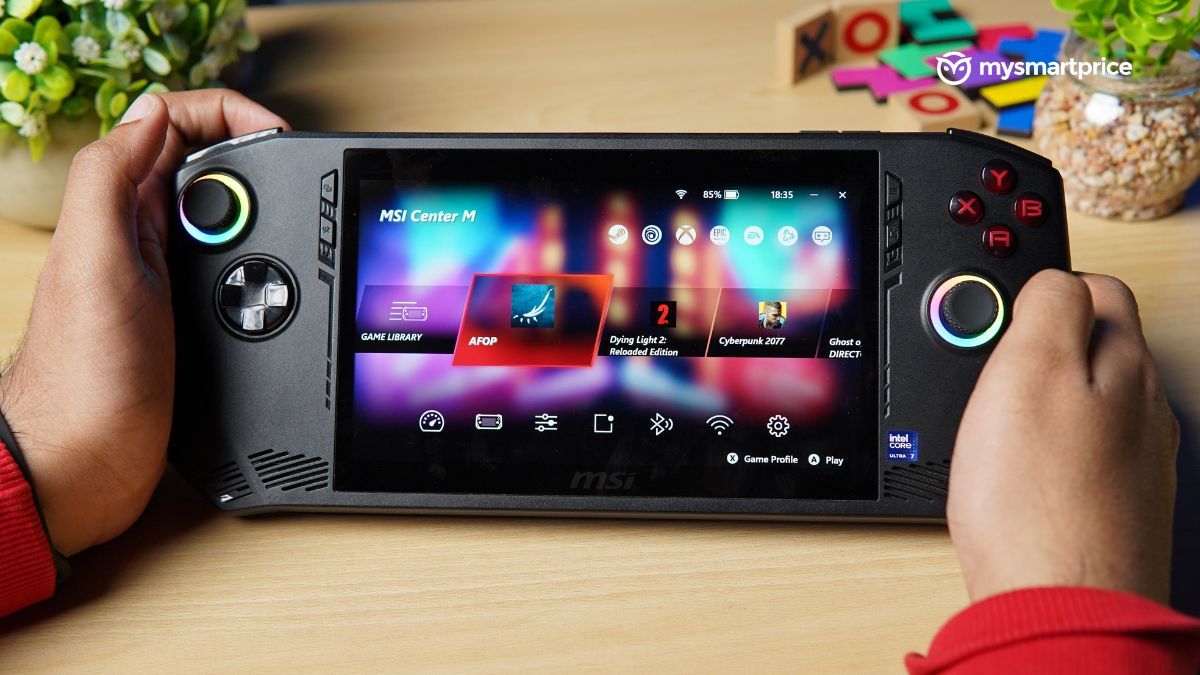
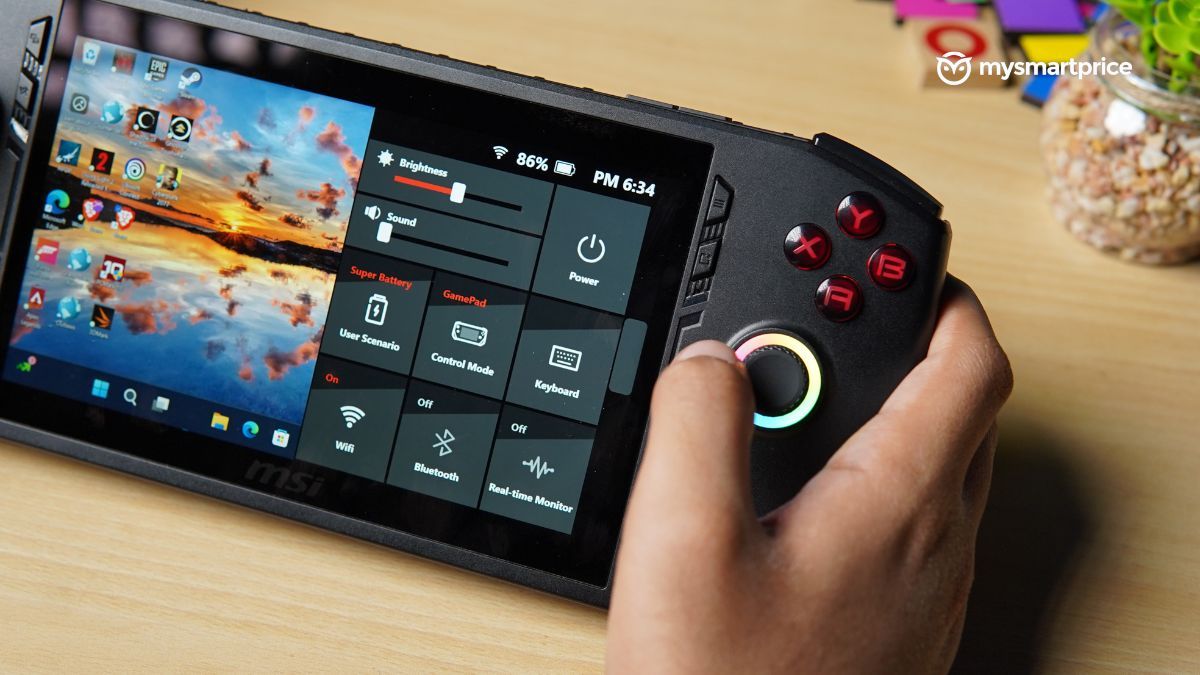
Thankfully, the brand has integrated its command centre, MSI Center M, to offset Windows’s quirks. This is similar to Asus’ Armoury Crate and Lenovo’s Legion Space. It offers various power modes, enabling you to optimise performance for gaming or battery life. Its quick settings bar lets you bring up the keyboard when you need to type and importantly presents a great alternative to the “Alt+F4” shortcut if a game starts acting up.
Gaming Performance
The MSI Claw provides three OS power modes with different TDPs, like the Lenovo Legion Go and Asus ROG Ally.
- Super Battery runs at 20W
- Balanced at 30W
- Extreme Performance at 35W
Once plugged into the charger, the Claw can output up to 43W of power.
| Hardware | Specs |
| Processor | Up to Intel Core Ultra 7 155H processor |
| Graphics | Intel Arc Graphics |
| Memory | 16GB RAM LPDDR5X (at 6400MHz) |
| Storage | Up to 1TB M.2 2230 SSD |
| Connectivity | Intel Killer BE Wi-Fi 7 + Bluetooth 5.4 |
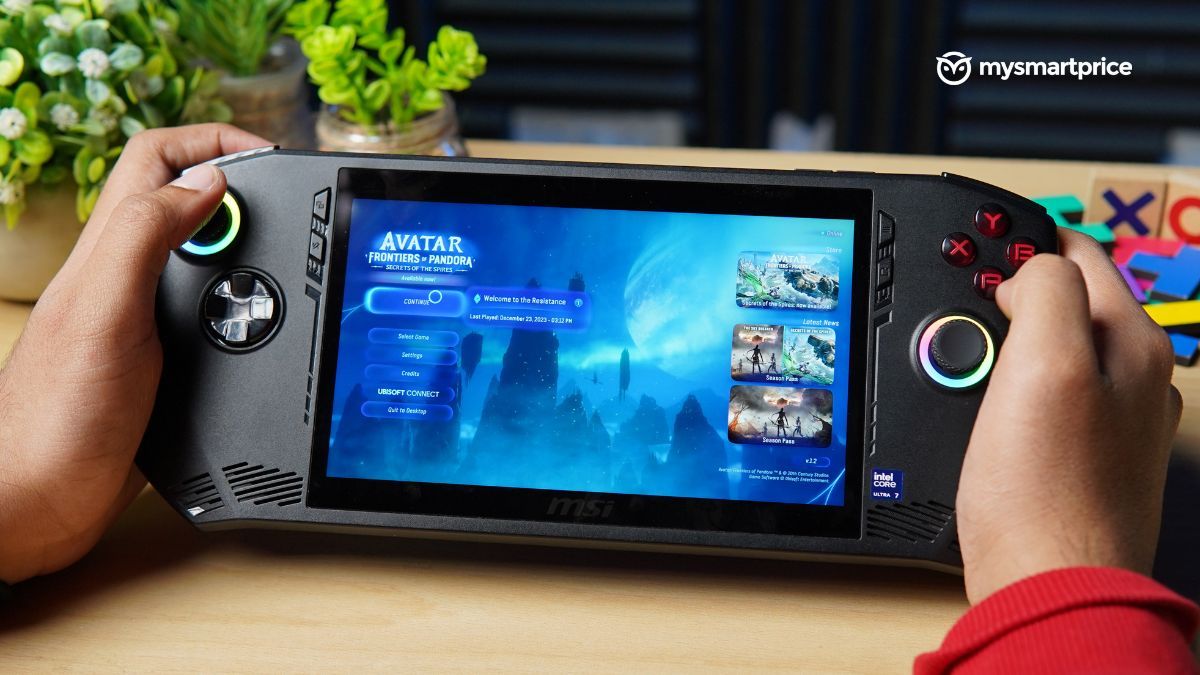
It can handle demanding AAA titles like Cyberpunk 2077, Avatar: Frontiers of Pandora, Dying Light 2, and more. However, you’ll have to switch to lower graphics quality and lower resolutions to experience a smoother performance.
The Claw gives promising results in synthetic benchmarks. When you plug it in, the Claw scores better than the Legion Go in Geekbench but the gap between them is negligible. On the equal playing field of 30W, the former falls slightly behind the Legion Go and you will see this story repeat itself in the 20W TDP mode as well.
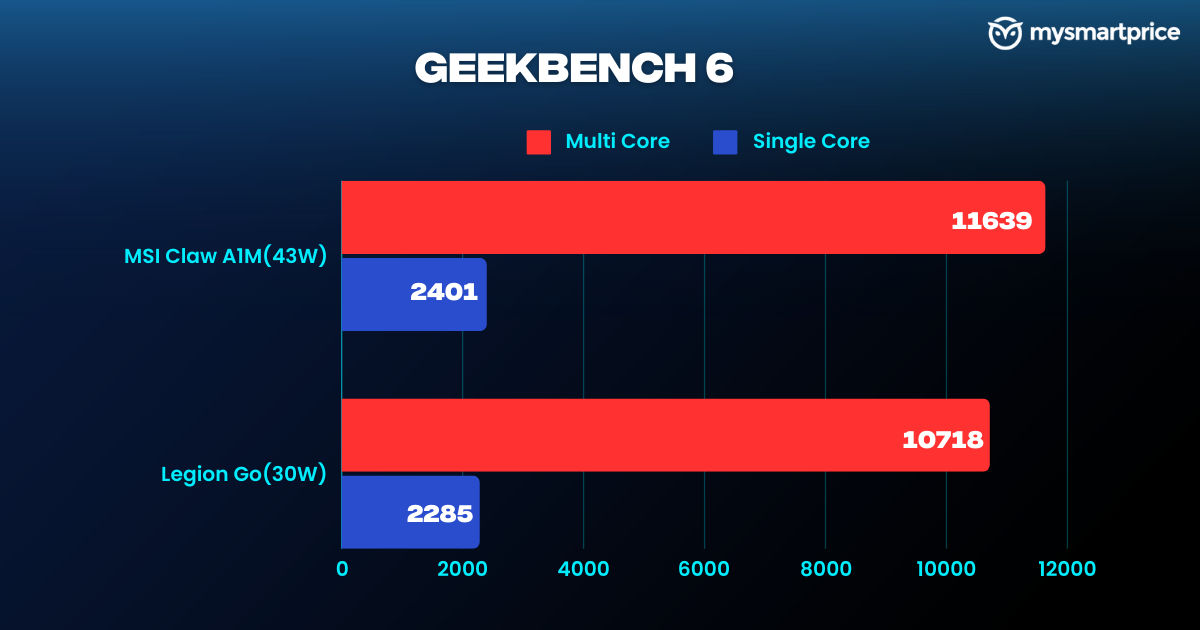
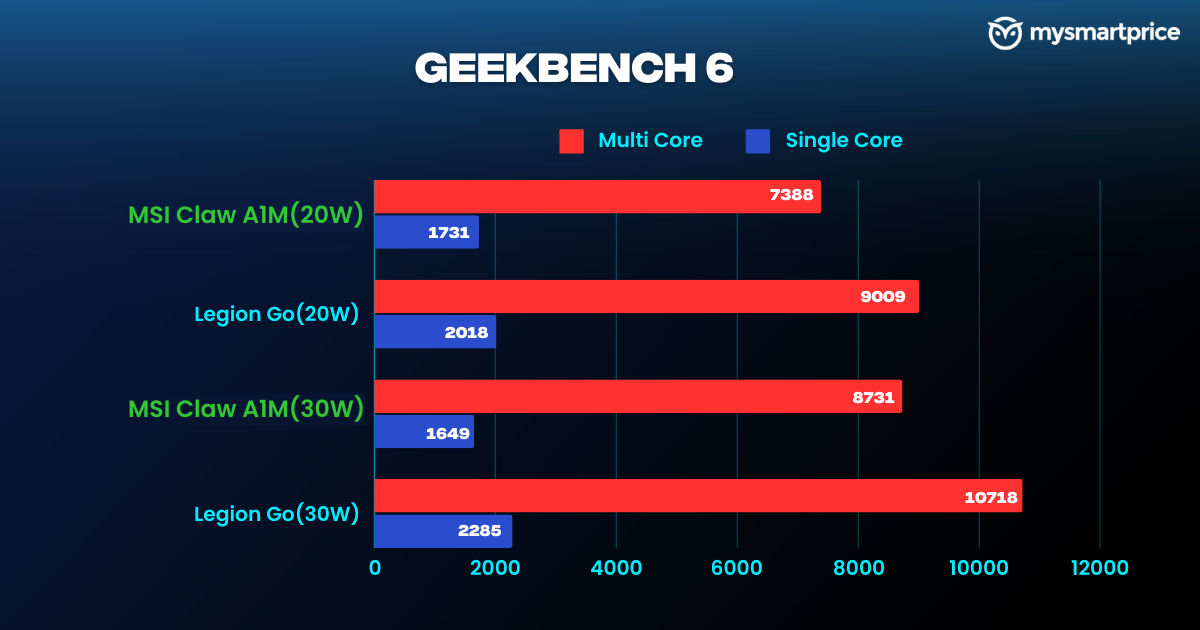
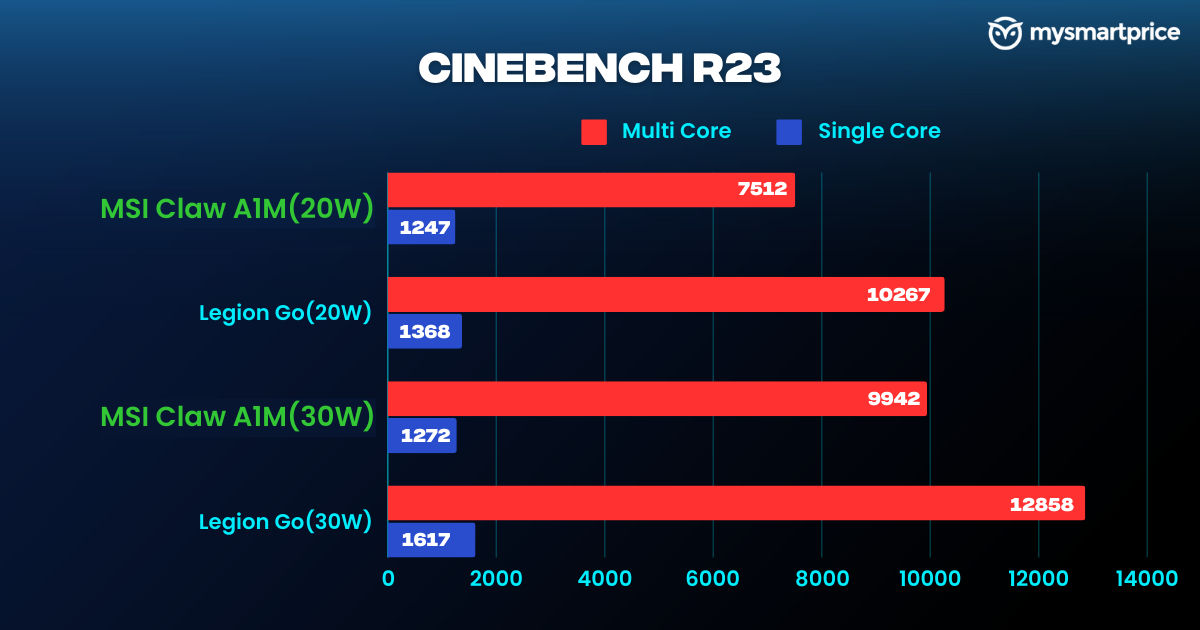
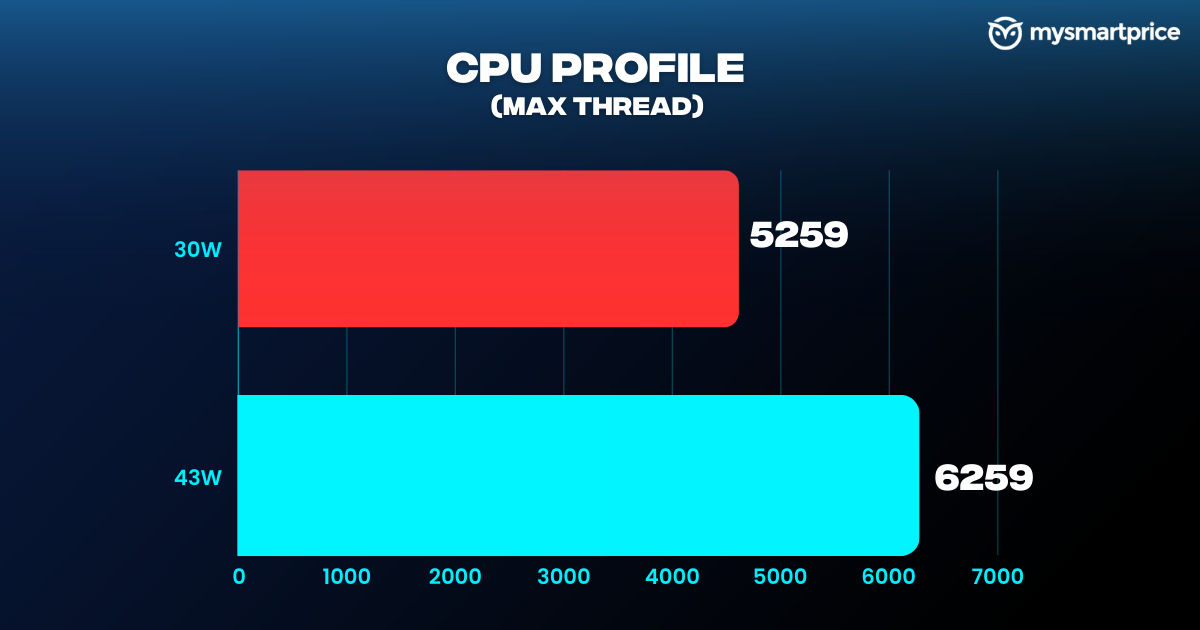
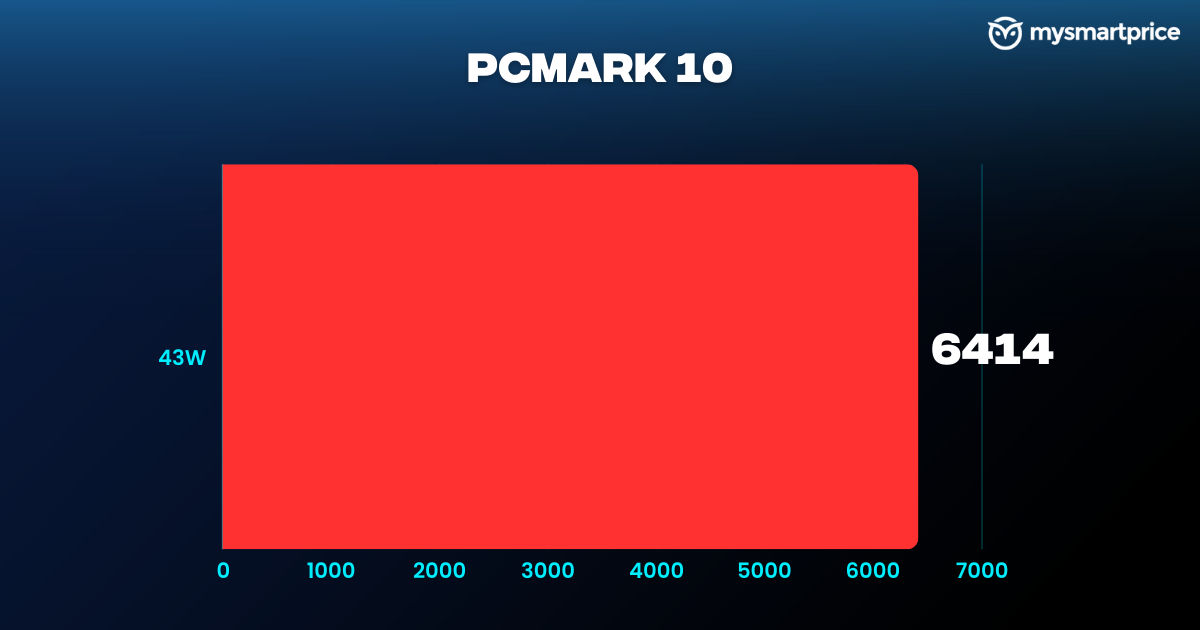
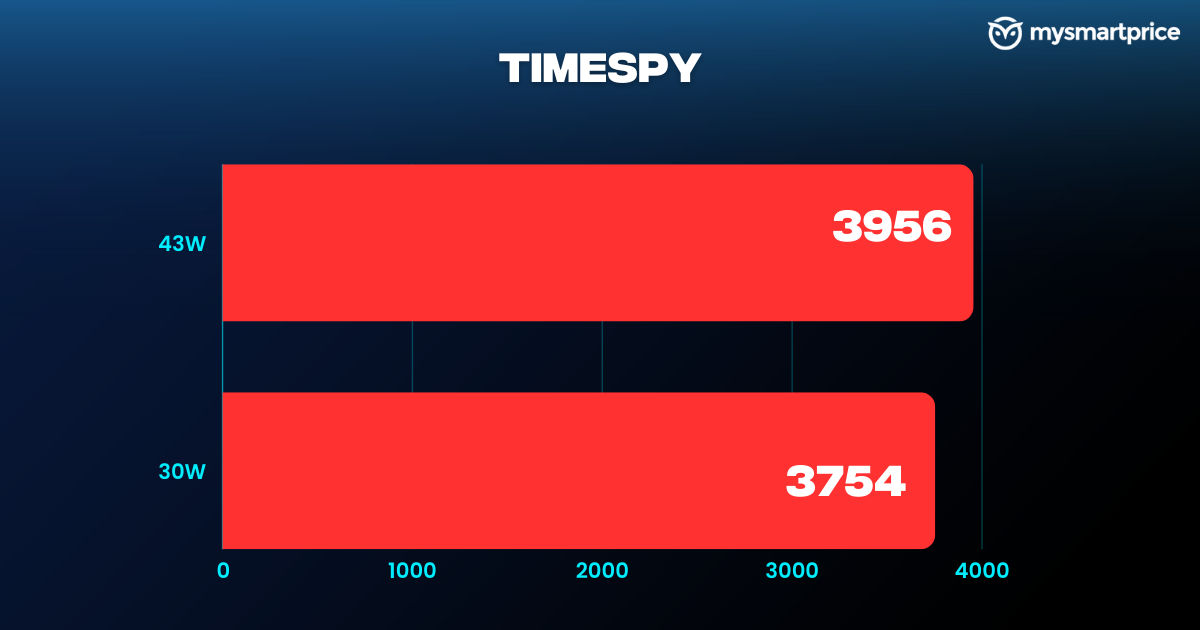
This eccentric nature of the Claw isn’t just limited to Geekbench 6 since it has also made its way into the Cinebench R23 benchmark. While it gains momentum over the Legion Go when on AC power, it trails behind the latter significantly when set to 20W or 30W TDP.
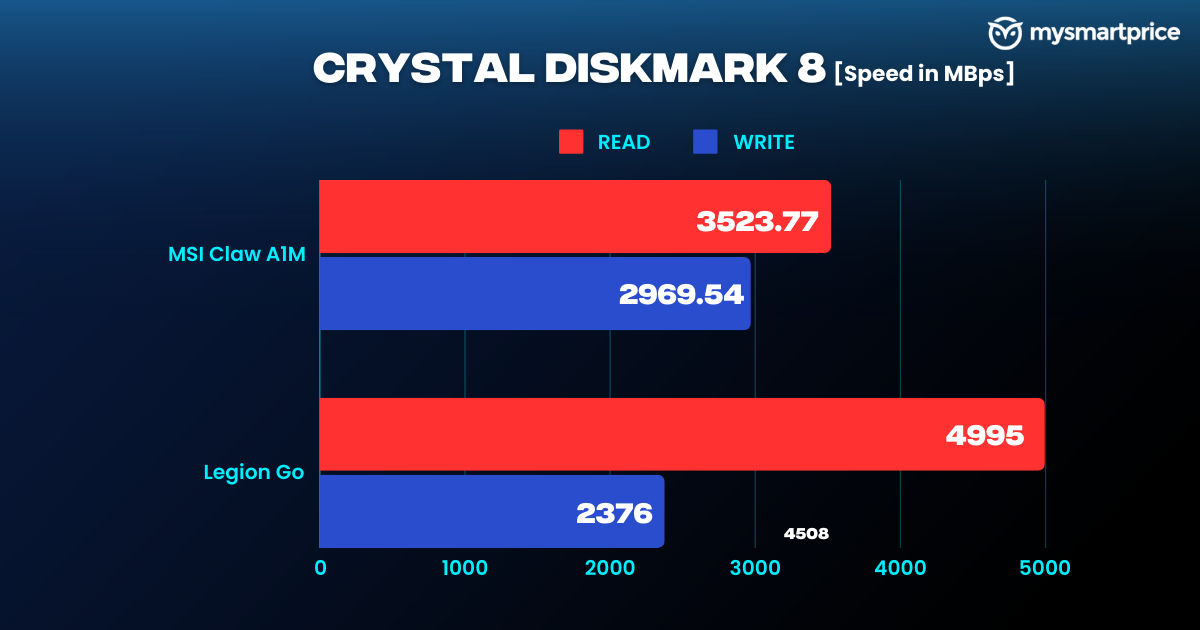
Inside the Claw, you get up to 1TB M.2 SSD, which uses the 2230 form factor. This is sufficient for most folks, but you can use an SD card if you desire more. However, the brand hasn’t explicitly mentioned how much storage the handheld supports. The built-in storage is also speedy, but not as swift as the the Legion Go. That said, game loading times weren’t long, and file transfers also proceeded smoothly.
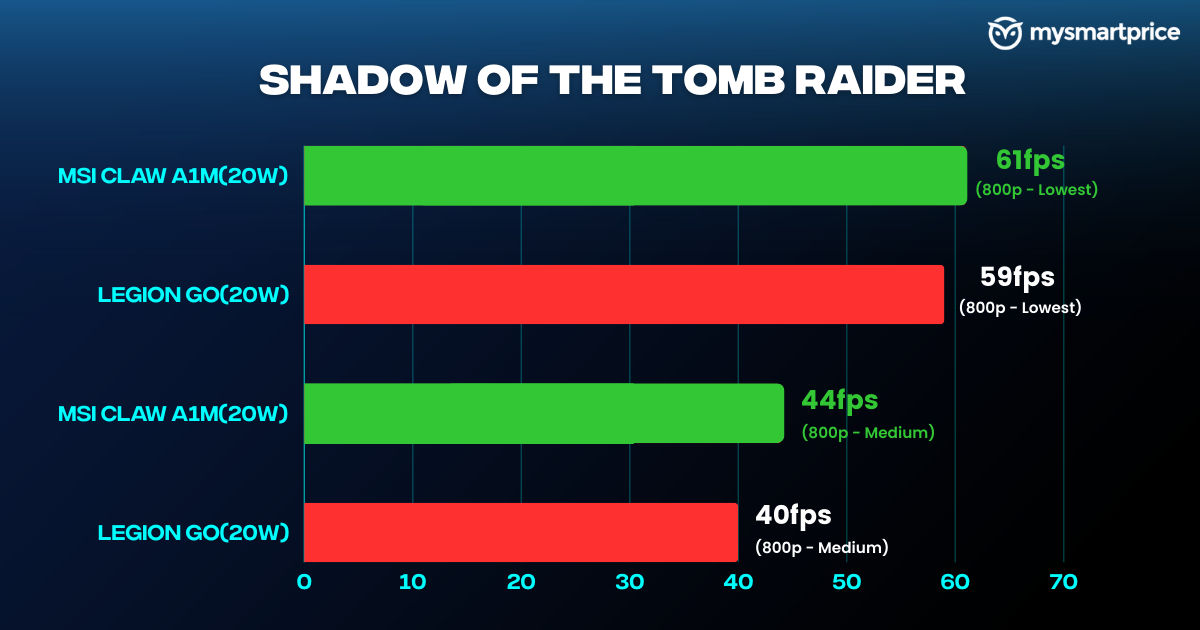
All the games mentioned here have been tested at 20W, 30W, and 43W TDPs at 800p and 1080p with different graphic settings.
Shadow of the Tomb Raider at 20W displays great numbers across all settings. With the graphics set to “Lowest” and resolution at 800p, the game easily crosses the 60 fps mark, showcasing the Claw can dunk on the Legion Go with a small margin. That said, the Claw loses its lead to the Legion Go by a considerable margin in Avatar: Frontiers of Pandora at 800p with Frame Generation as the game performed much better in the latter one.
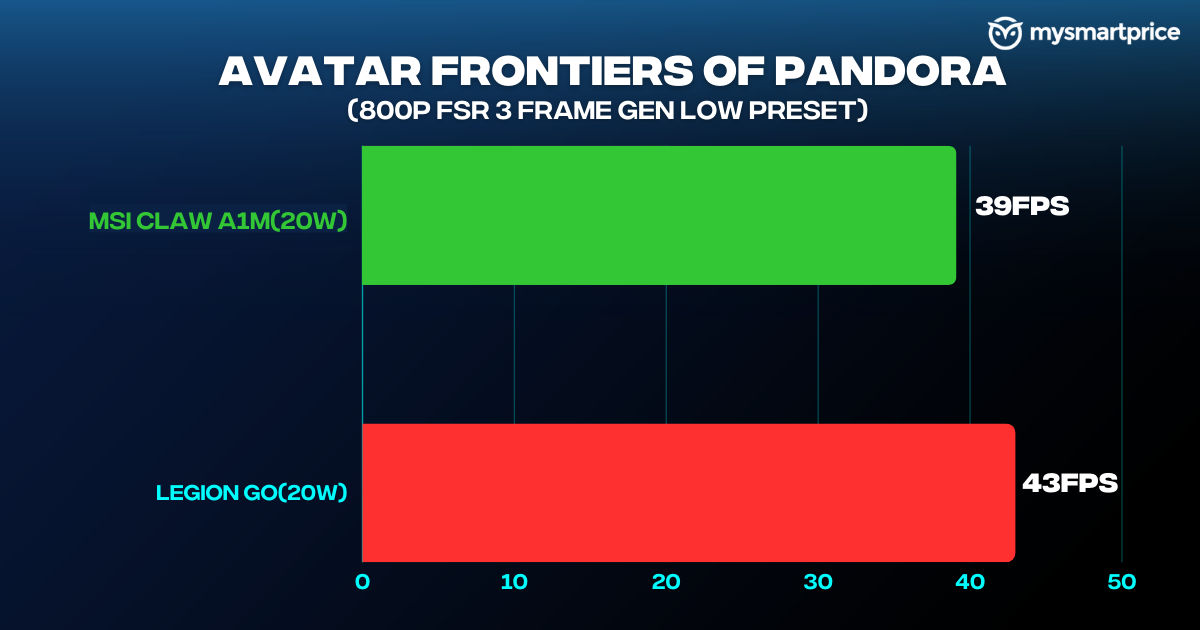
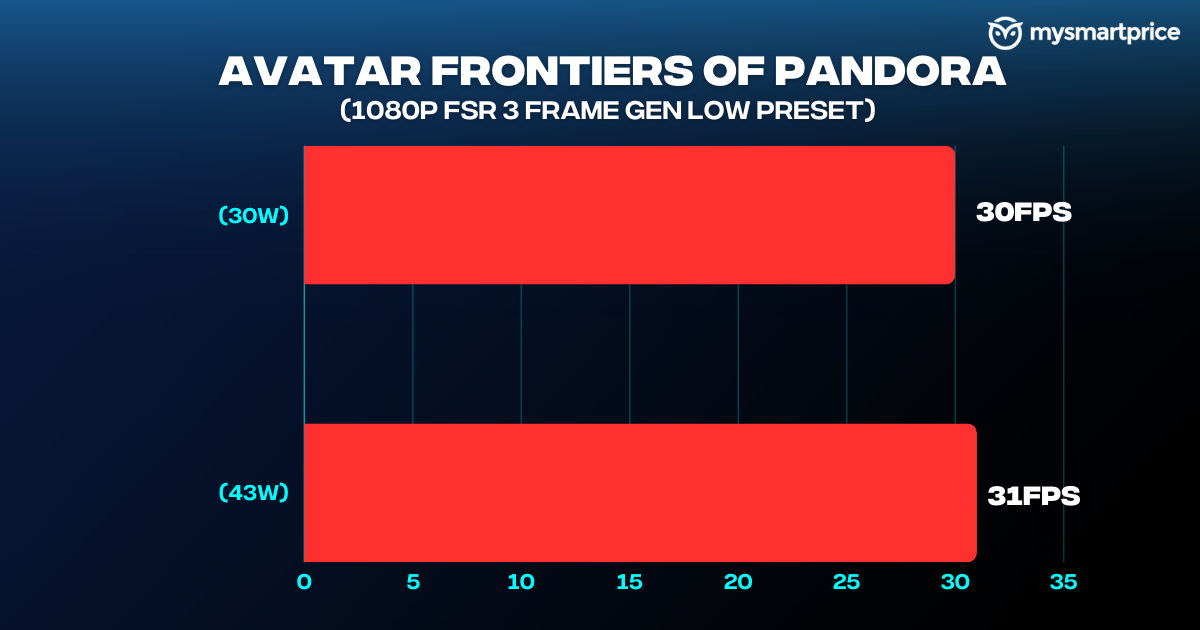
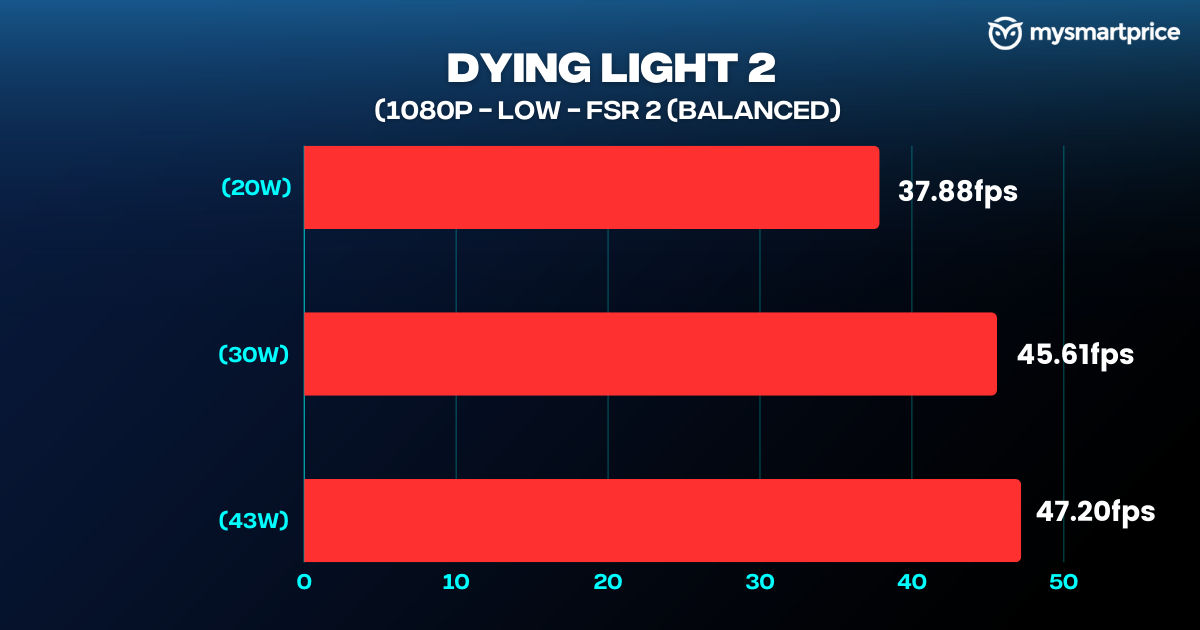
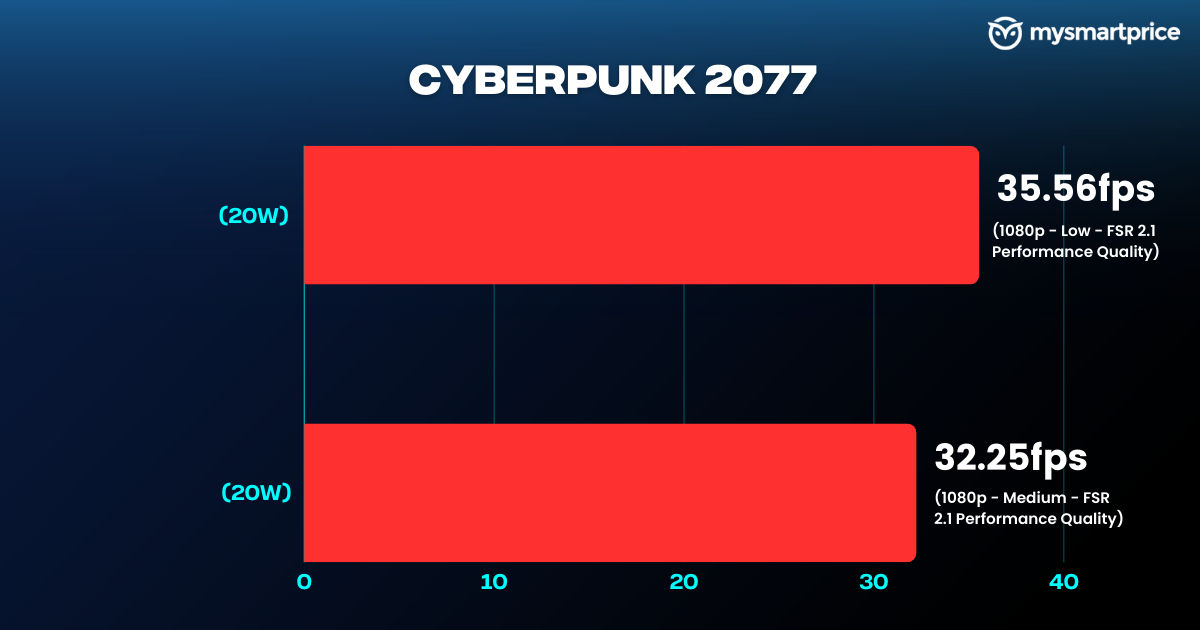
Cyberpunk 2077 runs at 35.56 fps at “Low” graphics. Dying Light 2 performs smoothly at 1080p with low graphics settings and AMD FSR enabled, delivering a playable 37.88 fps. Black Myth Wukong, one of the latest AAA titles, can run smoothly at 45.61 fps at the “Low” preset if you have picked the Balanced power mode. In Avatar: Frontiers of Pandora, the switch to AC power barely gained a performance leap.
I spent a couple of days finishing the story mode of Spider-Man Miles Morales. With the Claw plugged in, the game functioned extremely well without any major problems or frame drops.
There was a moment during my playthrough when the game stopped responding twice at a particular scene. I went above and beyond to resuscitate the Claw back to life with the help of the task manager but it also seemed to give up on me. Once the handheld PC was back to normal, I started implementing my trial-and-error methods to nip this issue in the bud. When I switched the upscaler from FSR to Intel XeSS, I never faced this again.
Battery and Charging
The MSI Claw’s massive 54.5Wh battery fuels its entire workload. I found the Claw’s battery reliable, especially when I switched to the Super Battery mode. It lasted a day of watching videos on YouTube and gaming sessions with some juice remaining. In our PCMark Battery Test, the Claw lasted for six hours and 16 minutes in the Balanced mode.
The included 65W USB-C charger takes almost two hours to charge the Claw fully.
Verdict
The MSI Claw is a solid handheld PC, that delivers a satisfying gaming experience. Its well-thought design, tactile face buttons, and strong performance make it a compelling choice for gamers seeking portability. While the Claw may not have flashy exteriors, it’s functional and effective.
While the Windows experience can sometimes be quirky, MSI Center M mitigates its flaws. The battery life is amazing, and the overall performance, especially when plugged in, is quite strong.
However, the lack of a protective screen layer is a notable omission, and the shoulder buttons could be more tactile. The next setback isn’t alarming but some hardcore PC nerds or gamers may have a bone to pick. While the Claw can perform extremely well during benchmarks and gaming on AC power, it falls back compared to competitors on an equal playing field.
Despite these minor drawbacks, the MSI Claw is ideal for those looking to game on the go.
That said, if your budget is not flexible enough, the Asus ROG Ally is still an excellent choice with prices dropping during sales. If you fall on the other side of the spectrum, the Legion Go can be a good choice if a bigger screen and Joycon-inspired controllers are on your bucket list.