In a world where laptops are constantly evolving, finding the perfect balance between power and portability can be challenging. The Lenovo Yoga Slim 7i looks to build on that by promising both in a sleek and ultra-slim package. With its premium design and impressive performance capabilities, the Yoga Slim 7i aims to be the ideal companion for both professionals and students. But does it live up to its promises? In this review, we’ll dive deep into the Lenovo Yoga Slim 7i to see how it fares in real-world usage, from productivity tasks to multimedia experiences.
Lenovo Yoga Slim 7i
Rs 1,08,990
What Is Good?
- Compact form factor
- Excellent performance
- Good thermal stability
- Colourful OLED display
- Tactile and silent keyboard
What Is Bad?
- Refresh rate limited to 60Hz
- Limited I/O ports
- No physical shutter for webcam
Lenovo Yoga Slim 7i: Price and Availability in India
Pricing for the Lenovo Yoga Slim 7i starts at Rs 1,08,990 for the Intel Core Ultra 7 155H variant with 32GB RAM and 1TB SSD storage. It is available for purchase on Amazon, Flipkart, Lenovo website, and partner offline retail stores.
Lenovo Yoga Slim 7i Review: Build and Design
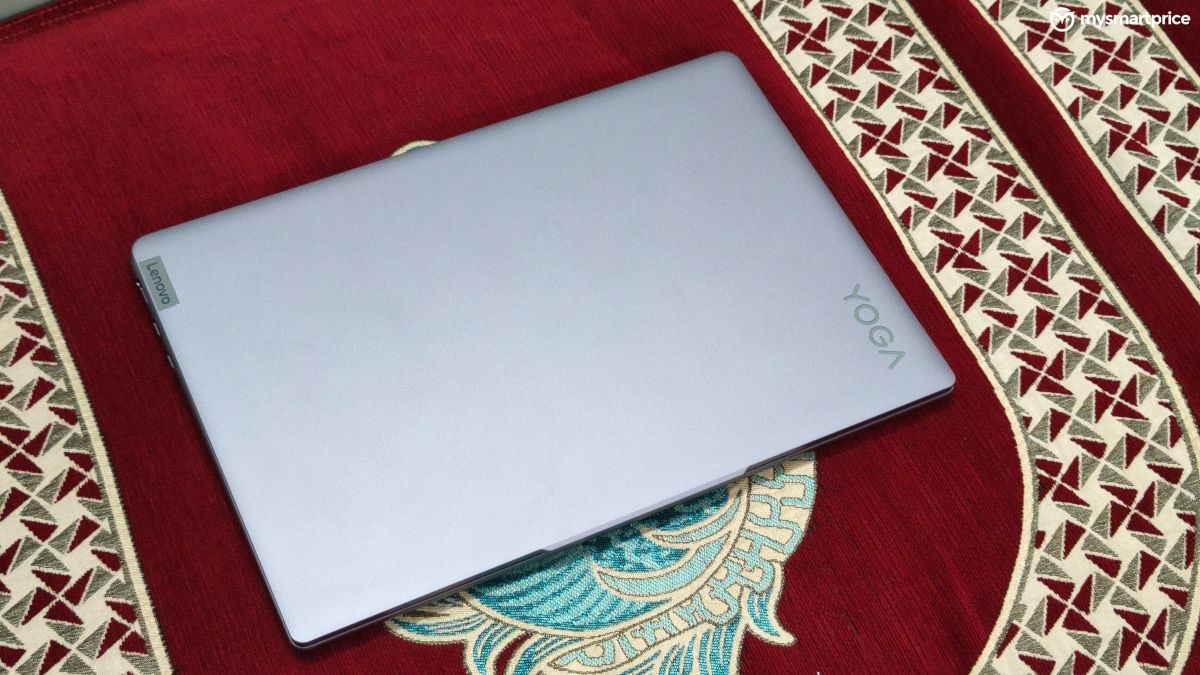
The Lenovo Yoga Slim 7i has an aluminium unibody chassis which feels sturdy. It’s a compact machine with overall dimensions similar to a standard A4-sized book. However, it feels a little heavy for its size at 1.39 kg. Don’t get me wrong as the laptop is quite easy to carry around, and the overall weight gives you a sense of confidence that it’s a robust machine.
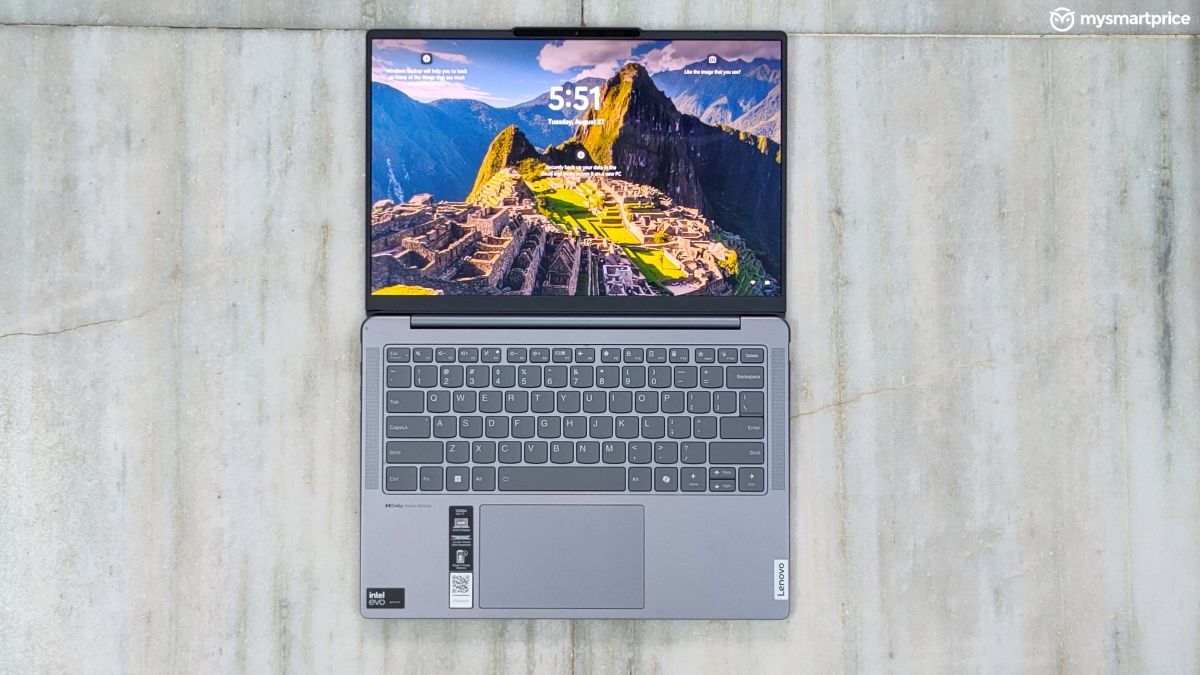
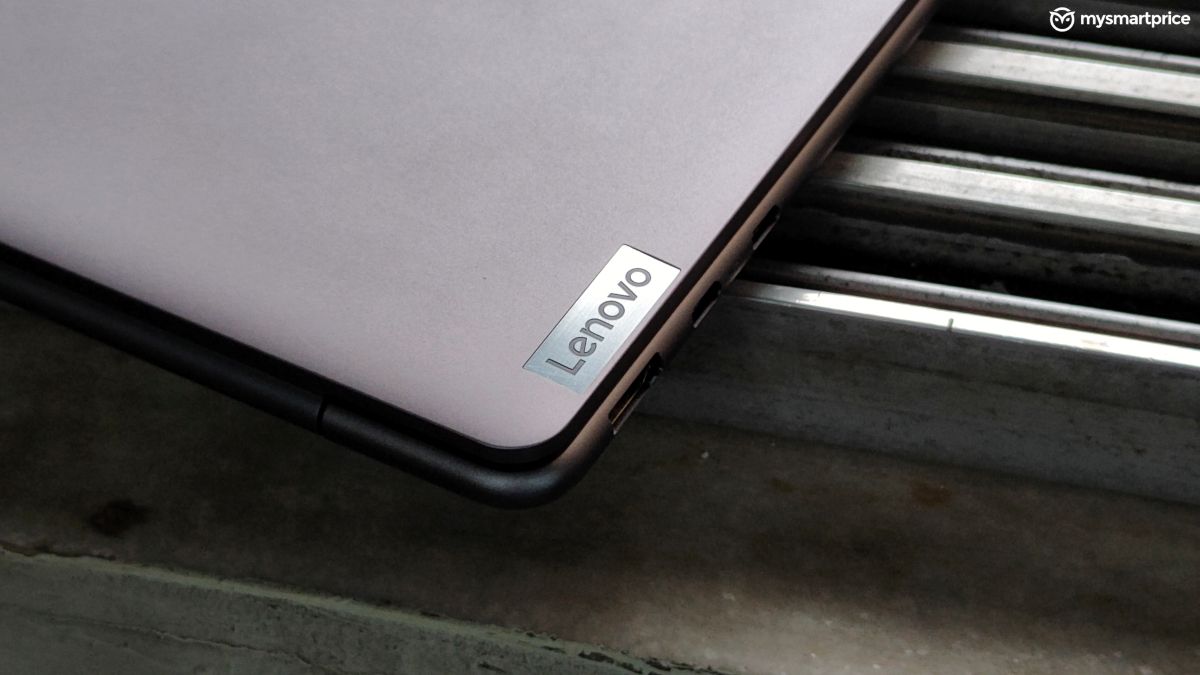
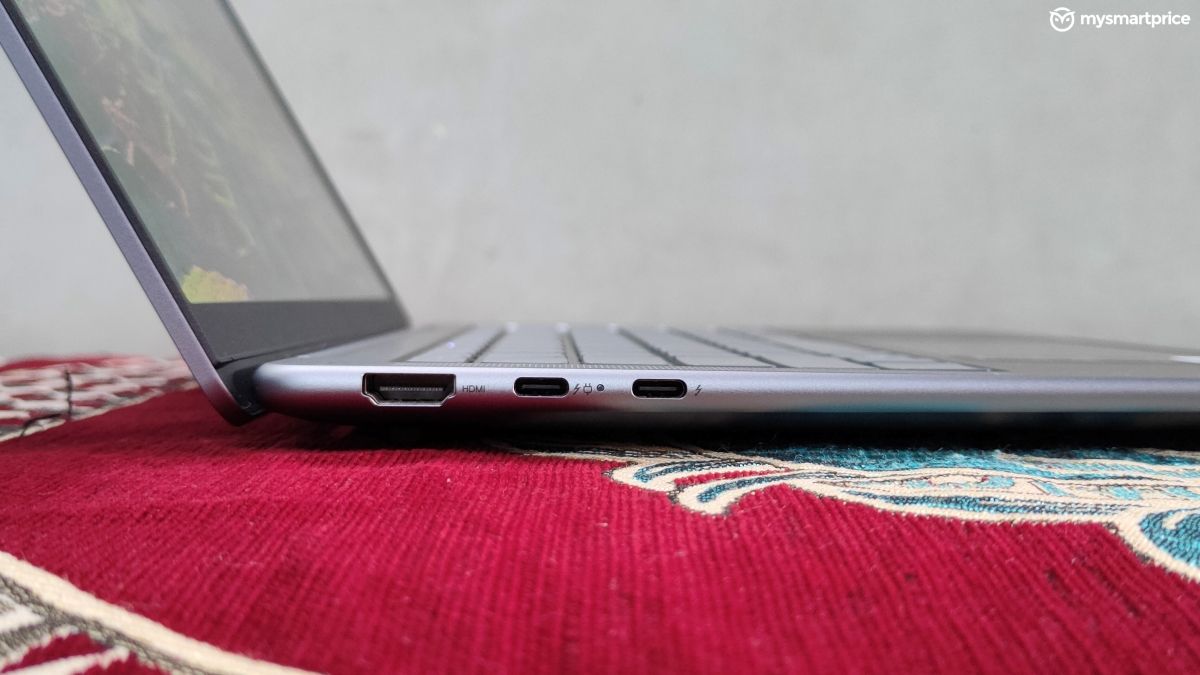
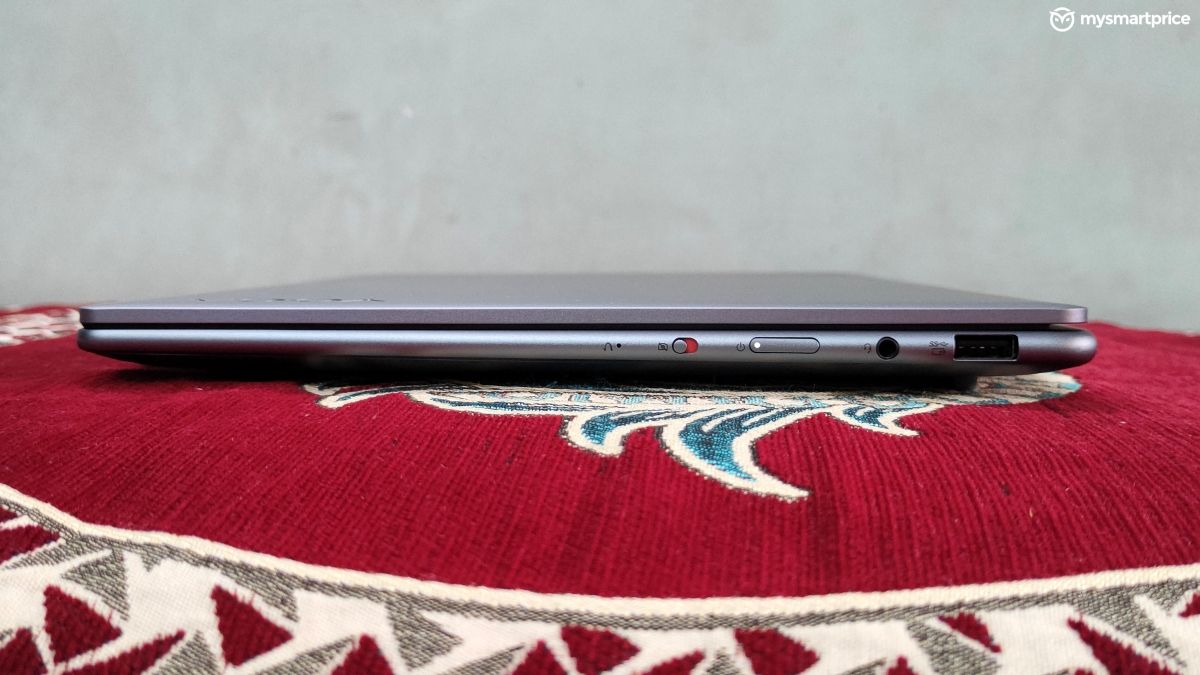
The hinge can open up to 180 degrees, allowing you to lay the screen flat. It is smooth enough to let you open the lid with a single finger, and sturdy enough to keep the screen in its place at any angle. I did not face any wobbling, even while typing aggressively.
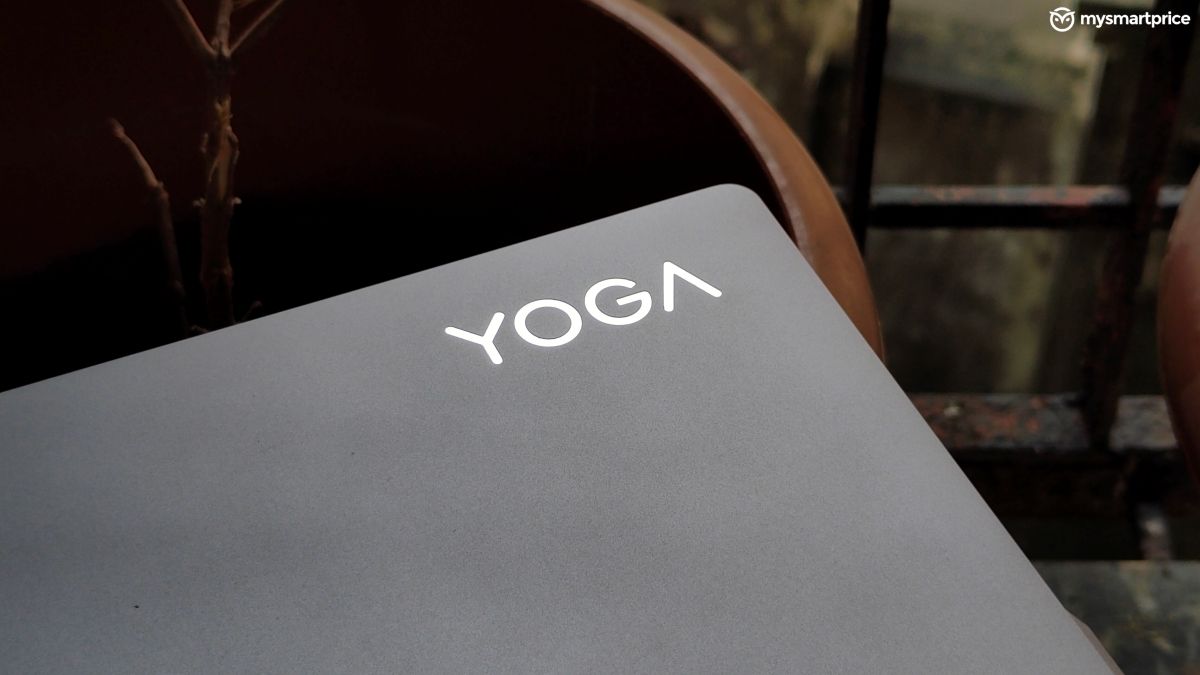
The lid has subtle Yoga and Lenovo branding, adding a professional look. The bottom part has tapering and rounded edges, which makes the laptop appear even slimmer. Lenovo has still kept the small notch for housing the IR camera and the webcam, and it also provides a good grip for opening the screen.
| Ports | Specification |
| Left | 1x HDMI 2.1
2x Thunderbolt 4 |
| Right | 1x USB-A 3.2 Gen 1
3.5mm combined headphone jack 1x power button 1x camera and mic switch |
| Connectivity | WiFi 6E, Bluetooth 5.3 |
Considering the compact nature of the laptop, you get enough I/O ports. But if you plan to use it while charging, then you might have to use a dongle for connecting additional accessories. The IR webcam present here supports Windows Hello and face recognition, both of which worked perfectly for me. The webcam can capture videos up to 1080p which is good enough for regular conferences, and the mic quality is decent as well. However, I would have appreciated a physical privacy shutter, instead of a mechanical switch.

Lenovo Yoga Slim 7i Review: Display and Audio
The OLED screen on the Lenovo Yoga Slim 7i produces excellent colours. The narrow bezels and the compact form factor ensure an immersive viewing experience. The blacks are deep and the panel gets adequately bright. I never felt the need to go above 40% brightness indoors.
| Display | Specifications |
| Type | OLED |
| Size | 14-inch |
| Resolution | 1920×1200 |
| Refresh rate | 60Hz |
| Peak brightness | 400 nits |
| Certifications and other features | 100% DCI-P3, Dolby Vision |
| Touchscreen | Optional |
The viewing angles are great and you won’t notice any colour shift issues. But being an OLED panel, the screen has a glossy finish which can be too reflective at times. It won’t bother you much unless there’s a bright source of light behind you. It’s not a Lenovo thing, but a common case with most OLED laptops, so this is not a major complaint, but something you should be aware of.

But what’s a major complaint, is the 60Hz refresh rate. Despite being a beautiful OLED panel that can serve punchy colours, the limited refresh rate feels like a huge drawback, and that too at this price. Lenovo should have provided at least 120Hz.
The speakers on the Lenovo Yoga Slim 7i output loud and crisp sound. They are compatible with Dolby Atmos. Even at full volume, I did not face any sound distortion. However, the overall sound profile is flat and does not have any bass. It’s not bad, but it’s not the best either.
Lenovo Yoga Slim 7i Review: Keyboard and Trackpad
The Lenovo Yoga Slim 7i has a backlit keyboard with a single white colour. You get a full row of function keys and a dedicated CoPilot button. The keyboard offers a pleasant typing experience with its tactile keys giving excellent feedback. The keycaps provide a rubber-like feel which also gives a good grip, and feels nice to the touch. They are evenly spaced and you won’t take much long getting used to the layout.

The best part about the keyboard is that the keys do not make any noise. Even while typing rapidly, you won’t bother your nearby colleagues with the key sound. The backlit can be adjusted across three levels and is bright enough even in a dark room.
The trackpad makes no compromises with its size and gives you plenty of space to use your gestures. The cursor accuracy is good, and so is the feedback from the left and right clicks. Overall, we enjoyed the keyboard and trackpad of the Lenovo Yoga Slim 7i with no complaints.
Lenovo Yoga Slim 7i Review: Performance
Our variant of the Lenovo Yoga Slim 7i is powered by the Intel Core Ultra 7 155H processor. This new series from Intel is designed for a sweet balance between performance and efficiency, along with dedicated NPUs for accelerating AI tasks.
| Hardware | Specification |
| CPU | Intel Core Ultra 7 155H, 4.8GHz, 16 cores, 22 threads |
| GPU | Intel Arc Graphics |
| NPU | Intel AI Boost, 1.4GHz |
| RAM | 32GB LPDDR5X |
| Storage | 1TB SSD, PCIe 4.0 NVMe M.2 |
The Lenovo Yoga Slim 7i sails through regular tasks like writing documents, managing excel sheets, presentations, and more with ease I was easily able to keep up to 25 Chrome tabs active without any reloading issues. With normal usage, the laptop maintains a stable temperature and does not feel warm to the touch.
Even after extended usage of around two hours, we did not face any significant heating. However, if you keep the laptop on your lap for long hours, then you may feel some heat as the cooling fans are downwards firing.
You can also push the Lenovo Yoga Slim 7i with video editing. I tried using Adobe Premiere Pro, which worked pretty fine for basic editing with a few text layers. However, I had to limit the preview to a lower resolution, to keep the timeline smooth. It’s not a machine meant for video editing, but you can get your job done with some patience. I did not face any significant thermal throttling while editing videos as well.
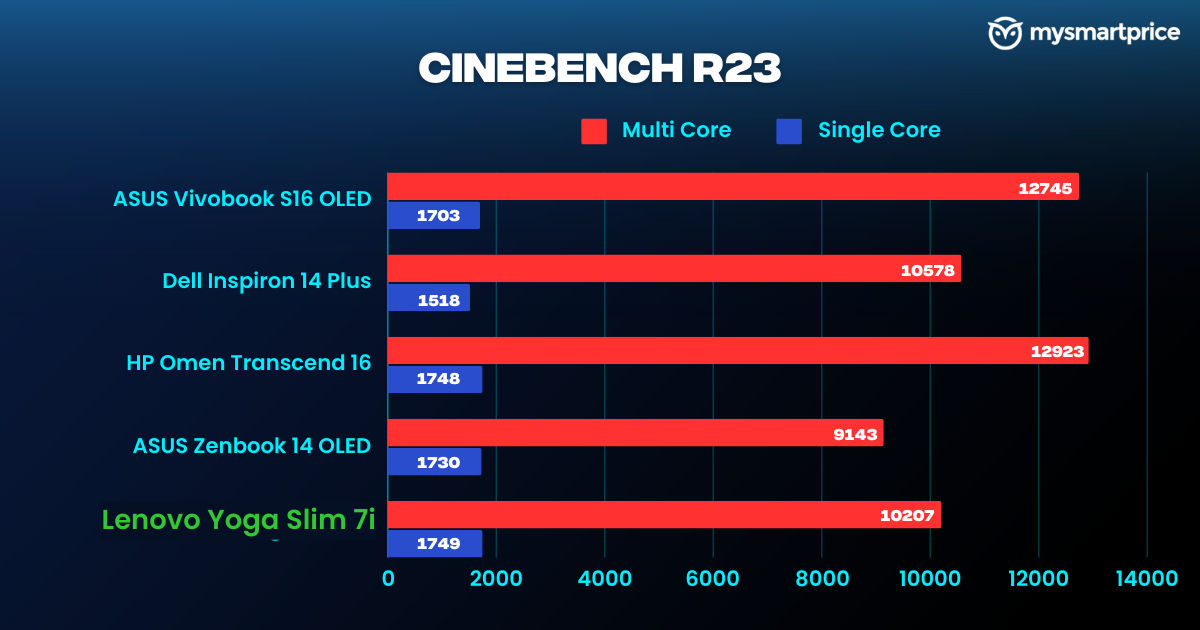
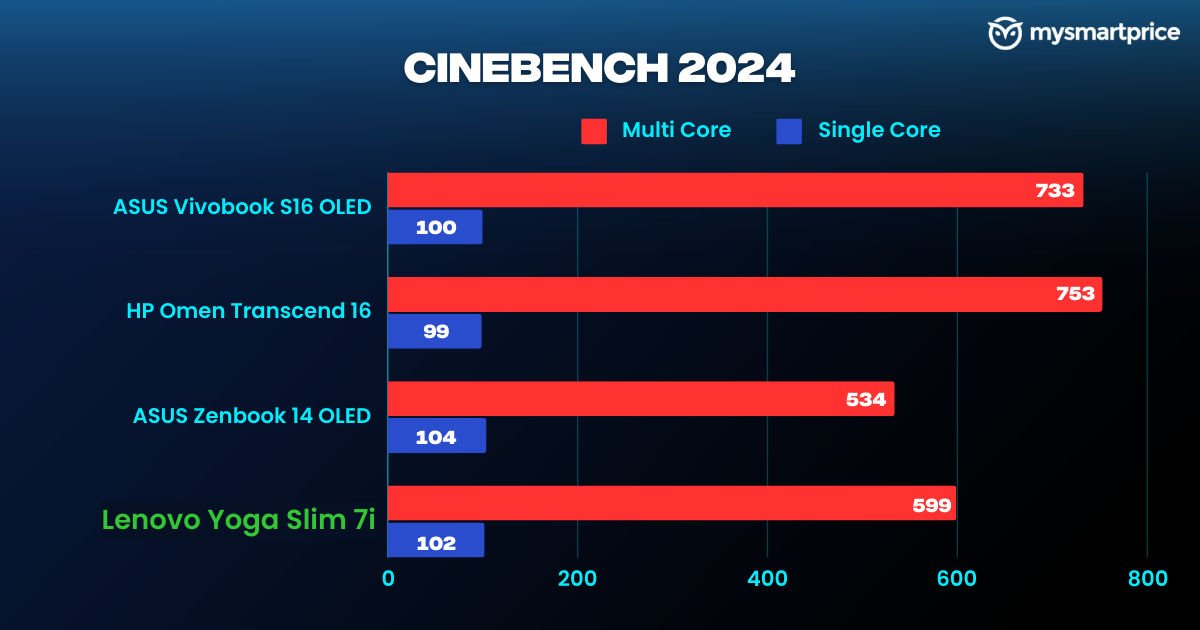
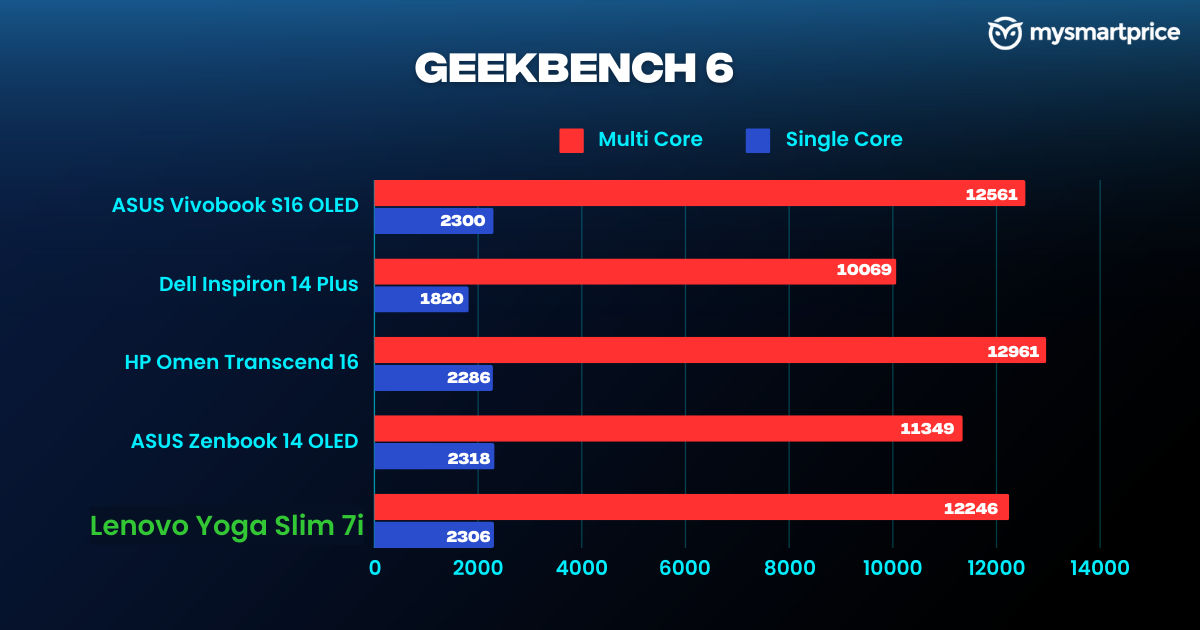
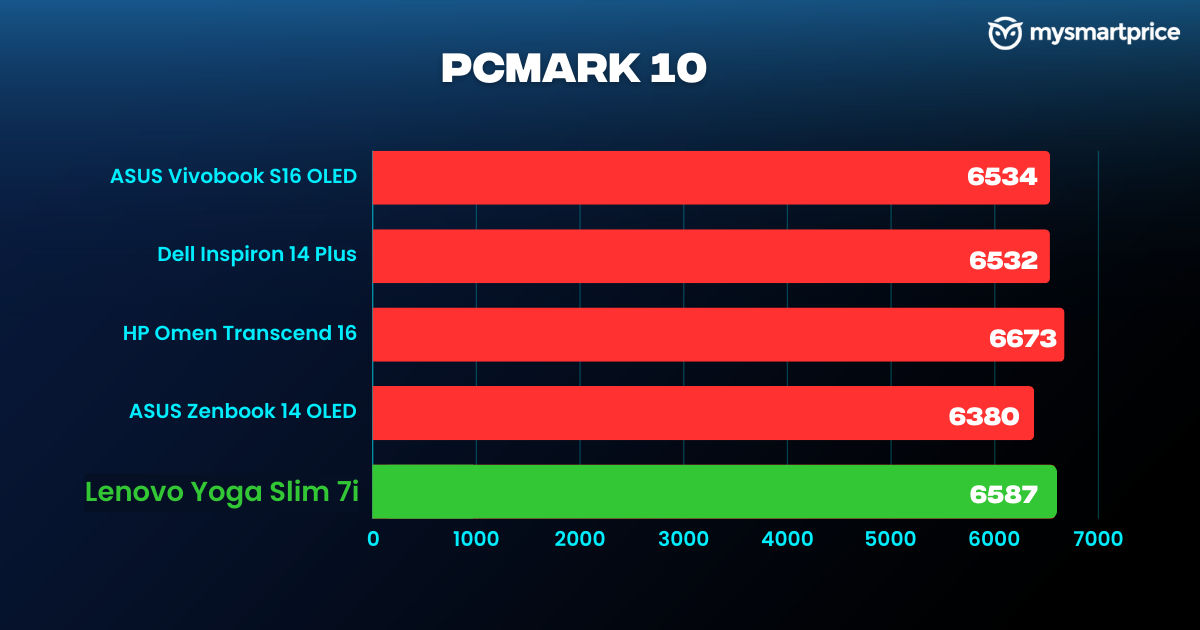
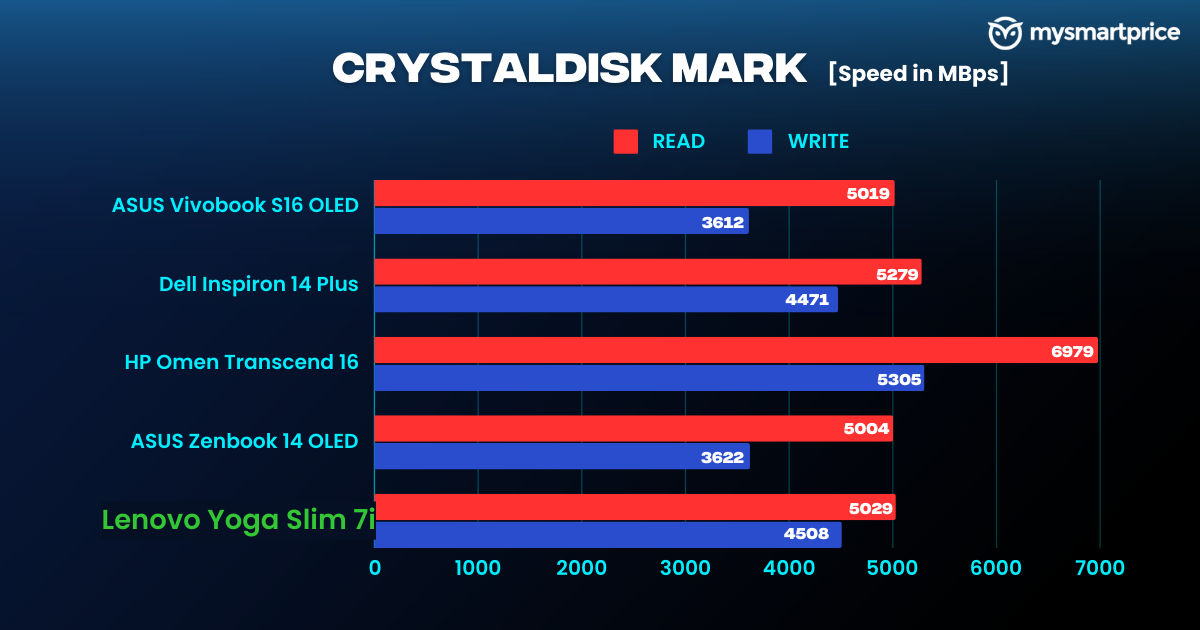
My benchmark testing of the Lenovo Yoga Slim 7i yielded impressive results. Even with its compact form factor, it scored similar to the Asus Vivobook S16 OLED (Review) and the Dell Inspiron 14 Plus (Review) in Geekbench 6 and PCMark 10. All laptops featured the same processor. The Cinebench R23 scores of the Lenovo Yoga Slim 7i were also on par with other laptops in its segment, in both single-core and multi-core tests.
The benchmark results were also close to the Qualcomm Snapdragon X Plus processor from the Dell Inspiron 14 Plus (Review), which is an ARM-based CPU similar to the Apple silicon chipsets. Even though the scores are slightly higher on Snapdragon, the real-world usage is pretty much similar on both CPUs.

For its form factor, the Lenovo Yoga Slim 7i packs excellent specifications and manages to keep the thermals under control which is impressive. When it comes to performance, there are little to no drawbacks with this machine.
However, the Lenovo Yoga Slim 7i is not meant for gaming, I did try playing Counter Strike 2 and Valorant. Both games were playable around the 60fps mark on medium settings, with a few occasional stutters. And, even if the laptop was generating around 90fps in some less crowded situations, the 60Hz refresh meant that 60fps was the best you can get here for visuals.
Lenovo Yoga Slim 7i Review: Battery Life and Charging
The 65Wh battery on the Lenovo Yoga Slim 7i easily provides up to 6-7 hours of screen-o time with regular usage. The laptop lasted 8 hours 6 mins in PCMark Battery Life test, which is impressive for this battery capacity. You can comfortably rely on this machine for a complete day’s usage, without worrying to plug it in.

The laptop supports 65W charging. It takes around two hours to charge it from 0-100% using the bundled charger. But remember that it occupies a Thunderbolt port, so if you use a lot of accessories, you are only left with a Thunderbolt and USB-A port, while charging the laptop.
Lenovo Yoga Slim 7i Review: Verdict
The Lenovo Yoga Slim 7i is an excellent laptop with its compact form factor, powerful performance, and thermal stability. The display, although with a 60Hz refresh rate, produces great colours with superb viewing angles, making it a pleasant experience to work on as your primary workstation.
My variant of the Lenovo Yoga Slim 7i with the Intel Core Ultra 7 155H processor retails for around Rs 1.1 lakh on Flipkart, and other portals. This even goes below Rs 1 lakh with bank discounts during sales. At this price, the Lenovo Yoga Slim 7i is definitely one the best laptops that you can purchase.
If you are looking for a compact laptop for daily commute, and want no compromise in performance and battery life, then the Lenovo Yoga Slim 7i is a perfect fit. If you need a larger display and comparatively better battery life, you can also have a look at the Asus Vivobook S16 OLED, which is priced similarly.