The affordable premium thin-and-light segment has become one of the most contested spaces in the Indian laptop market in 2026. With component prices pushing even basic laptops toward Rs 80,000, buyers spending just under Rs 1 lakh rightly expect more than a spec sheet. They want a machine that feels expensive, is light enough to carry every day, and lasts a full workday without its charger.
Acer Swift Air 14
Rs 94,999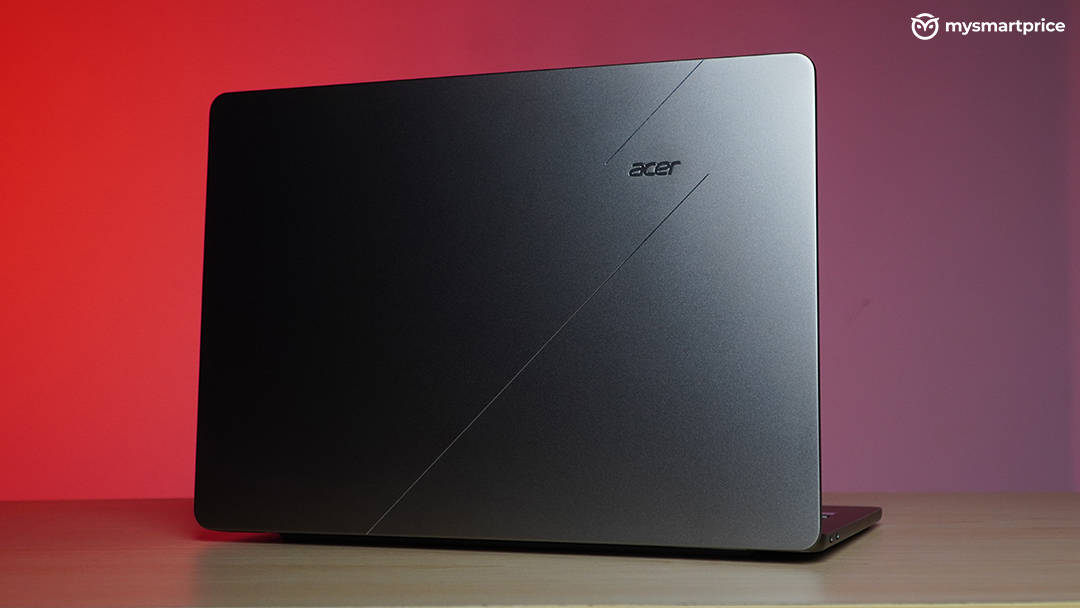
What Is Good?
- Metal chassis with a firm keyboard deck and rounded edges that don't dig into your wrists.
- Smooth 120Hz display with full sRGB coverage.
- Just over 10 hours of battery life, longer than the XPS 13.
- Practical port selection with USB-A and a 3.5mm jack, so no dongle is needed.
- Runs remarkably cool (65°C peak) and quiet (42.1dB peak) under load.
What Is Bad?
- Limited 75.8% DCI-P3 coverage and only 350 nits of brightness.
- Chassis flexes when lifted from the deck, putting stress on the hinge.
- Slower than the XPS 13 despite using the same Core 5 320 processor.
- No haptic trackpad, no HDMI port, and both USB-C ports are on the left side.
- 8GB of soldered RAM, and a bulky 100W charger adds to travel weight.
That is exactly the pitch Acer is making with the Swift Air 14. It has a metal chassis, a 14-inch 120Hz display, a backlit keyboard, a 70Wh battery that Acer rates at up to 19 hours, and a port selection that doesn’t force you to buy a dongle. Acer launched it at Rs 89,999, and it is currently listed at Rs 94,999 on Acer’s official store.
I’ll start by reviewing the Swift Air 14 on its own merits, then look at who it’s actually for. After that, I’ll see how it stacks up against a cheaper mainstream alternative, the Acer Aspire 5, and a pricier premium one, the HP OmniBook 5. Finally, I’ll put it head-to-head with the laptop that currently sets the benchmark for premium thin-and-light Windows machines under Rs 1 lakh, the Dell XPS 13 2026, which I reviewed recently and which uses the exact same processor.
Acer Swift Air 14 Specifications
- Processor: Intel Core 5 320 (6 cores, up to 4.6GHz)
- Graphics: Integrated Intel Graphics
- Display: 14-inch WUXGA (1920 × 1200) IPS, 30–120Hz VRR, 350 nits (measured), 100% sRGB
- Memory: 8GB LPDDR5 at 7,467 MT/s (soldered)
- Storage: 512GB PCIe Gen 3 NVMe SSD
- Battery: 70Wh 3-cell Li-ion, 100W adapter
- Dimensions: 313.99 × 222.65 × 13.3mm
- Weight: 1.19kg (1.58kg with charger)
- Ports: 2 × USB Type-C, 1 × USB 3.2 Gen 1 Type-A, 1 × 3.5mm headphone/mic combo jack
- Connectivity: Intel Wi-Fi 6E AX211, Bluetooth 5.3
- Webcam: 1080p Full HD
- Keyboard: Backlit, 1.3mm key travel
- Operating System: Windows 11 Home
- Warranty: 1 year
- Price: Rs 94,999 on the Acer India store (launched at Rs 89,999)
Acer Swift Air 14 Design and Build Quality
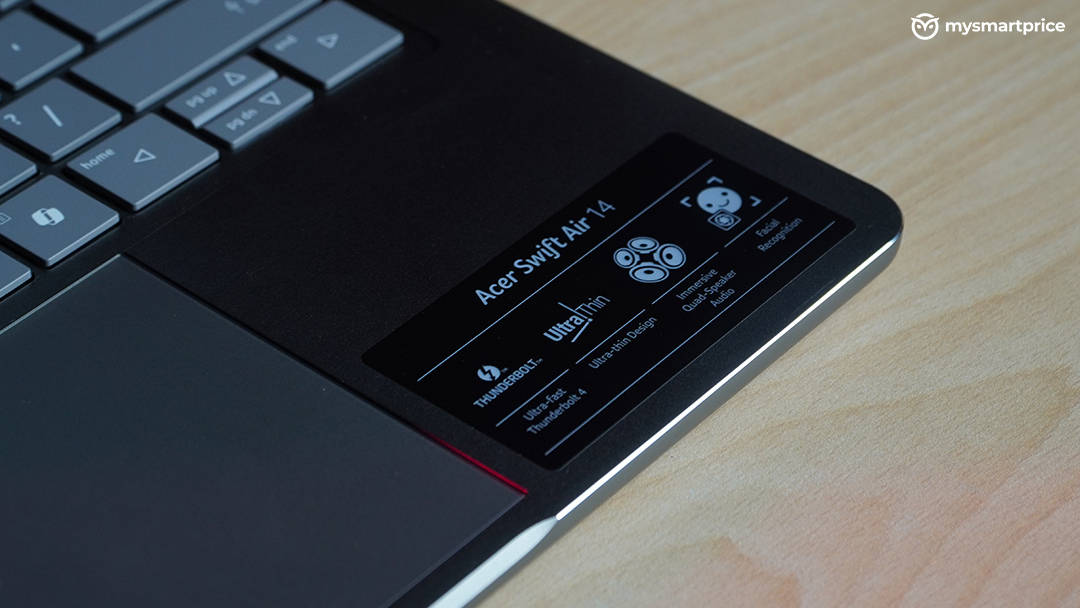
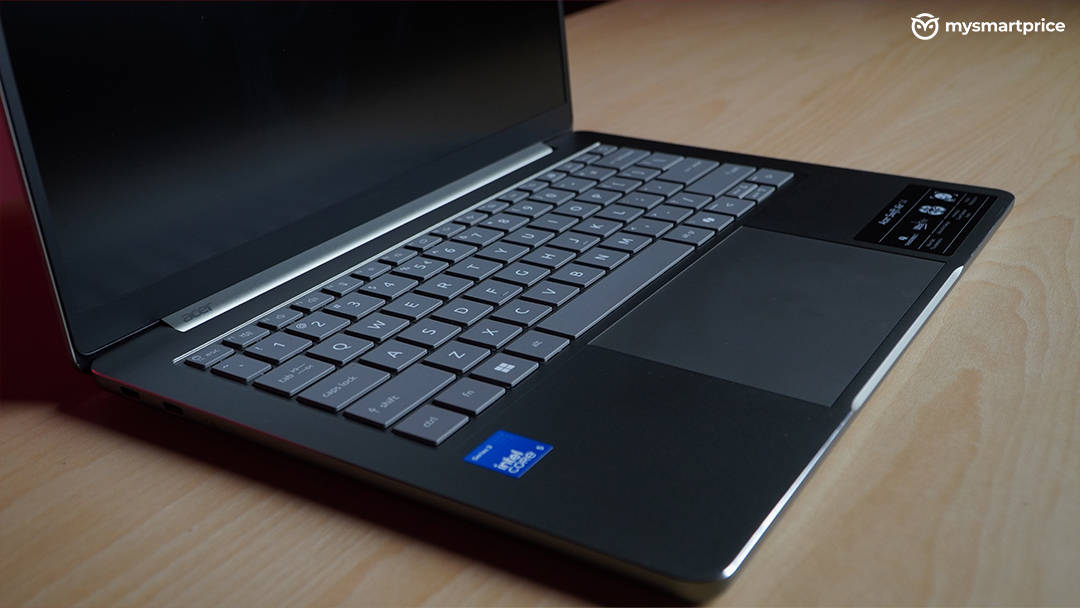
On the whole, the Swift Air 14’s design is good. The metal frame is the highlight. It makes the keyboard deck feel firm, with no noticeable flex while typing. Acer has also rounded off the edges of the chassis, which sounds minor until you’ve used a laptop with sharp edges that dig into your wrists over a long typing session. This one doesn’t.
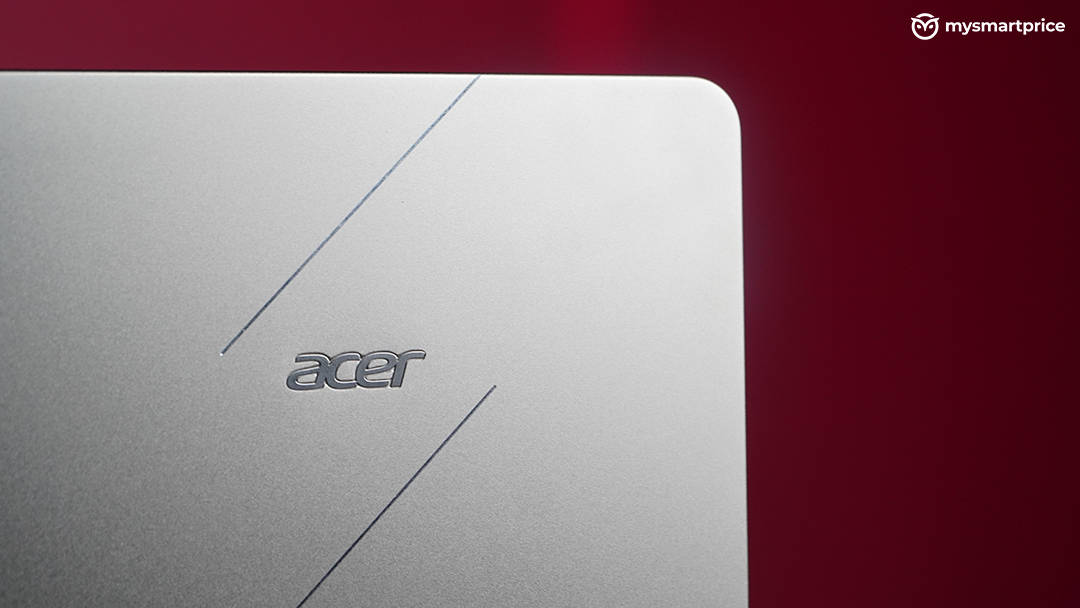
The lid design is also something I haven’t seen on an Acer laptop before, and that is a good thing. The thin-and-light Windows market is a sea of near-identical silver and grey slabs. The Swift Air 14, especially in this Sage Green finish, stands out.
The construction isn’t flawless, though. When I lifted the laptop with one hand from the deck area, the chassis bent slightly. That flex transfers extra stress onto the display hinge, which is a concern for long-term durability on a laptop you’re expected to carry around every day. It’s not something you’ll notice in the first month, but it’s worth being mindful of how you pick it up.
At 13.3mm thick and 1.19kg, the Swift Air 14 is properly portable and easy to slip into a backpack. The charger is less travel-friendly, though. Acer ships a bulky 100W three-pin adapter, which takes the total travel weight to 1.58kg.
Acer Swift Air 14 Keyboard, Trackpad and Ports
The keyboard has 1.3mm of key travel, which is decent for typing and gives each keystroke a reassuring depth. However, the spring action under the keys is very mellow, so you don’t get a crisp, snappy typing experience. It’s comfortable for long sessions, but it doesn’t feel as precise as the best keyboards in this segment.
The trackpad measures 125 × 80mm, which is a decent size for a 14-inch laptop. It’s a traditional mechanical clickpad, and it works fine. That said, at this price and with this positioning in 2026, I would have liked to see a haptic trackpad.
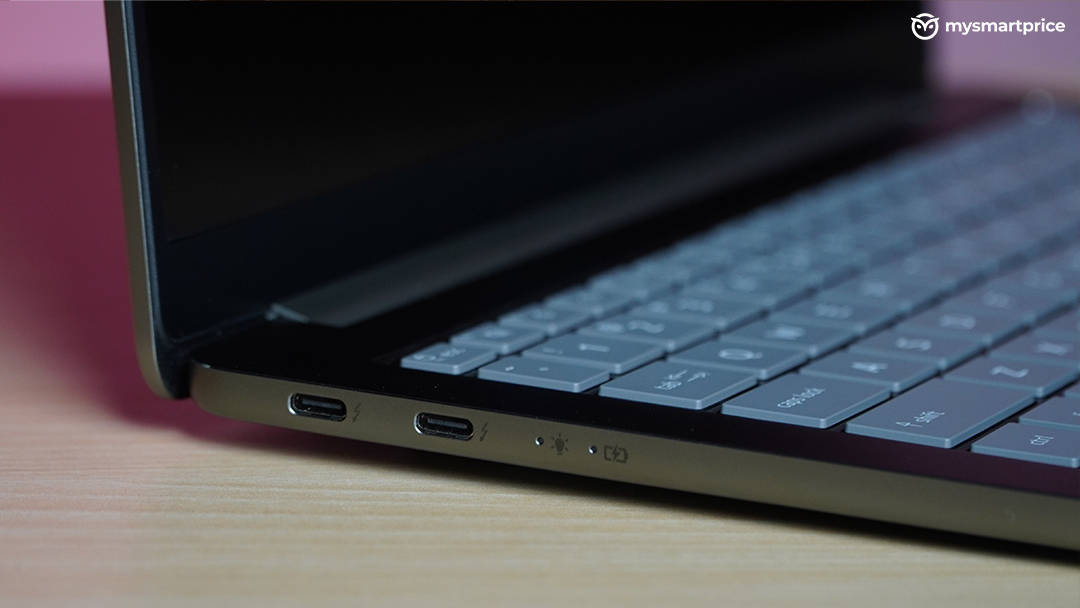
The port selection is one of the laptop’s strengths. You get two USB Type-C ports, a USB 3.2 Gen 1 Type-A port, and a 3.5mm headphone/microphone combo jack. That means your older pen drives, wireless mouse receivers and wired earphones all work without a dongle. There’s no HDMI port, though, so you’ll need a USB-C adapter for projectors and older monitors.
My other complaint is placement. Both USB-C ports sit on the left side, so you can only charge from one side. Depending on your desk setup, that can be a minor annoyance.
Acer Swift Air 14 Display
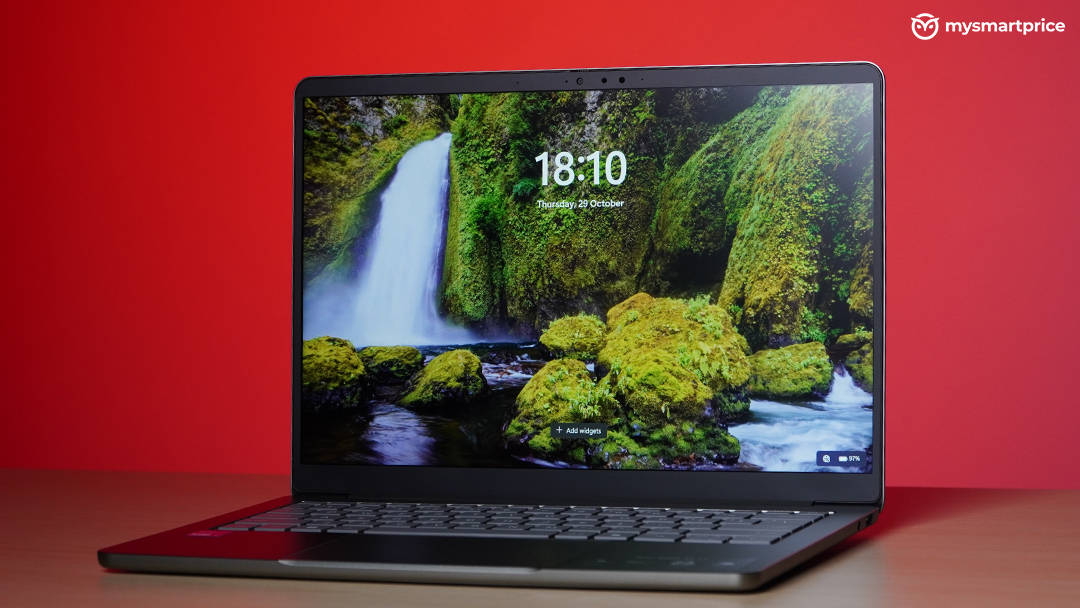
The Swift Air 14 has a fairly competent display. It’s a 14-inch IPS panel with a 1920 × 1200 resolution, a 30–120Hz variable refresh rate, 350 nits of measured peak brightness, and full sRGB coverage. The 16:10 aspect ratio gives you more vertical space for documents and web pages than a traditional 1080p panel, and 120Hz makes scrolling and everyday navigation feel smooth.
However, I did not like how Acer has implemented VRR. The screen tends to drop to 30Hz even when the battery is well above 70 or 80 percent. When that happens, the display suddenly stops feeling smooth while you’re scrolling. VRR is supposed to work in the background without the user ever noticing it. On the Swift Air 14, I noticed it often, and Acer needs to fix this with a firmware or driver update.
Colour coverage is good for general use, but it has limits. The panel covers around 75.8% of the DCI-P3 colour space, with a Delta E of 1.95. That’s fine for basic photo editing and social media content, but not for professional colour grading. The 350-nit peak brightness is adequate indoors, but it can struggle near a bright window or outdoors.
Acer Swift Air 14 Speakers, Webcam and Microphones
The Swift Air 14’s four-speaker setup is loud, reaching 81.1dB in my testing. However, loudness isn’t everything. The speakers lack bass, so music and movies sound hollow. For video calls and YouTube, they’re fine. For anything you’d actually want to listen to, use headphones, which, conveniently, you can plug straight into the 3.5mm jack.
The 1080p webcam and microphones are good for video calls. Your face and voice come through clearly, which is about all you can ask of a laptop webcam at this price.
Acer Swift Air 14 Performance and Benchmarks
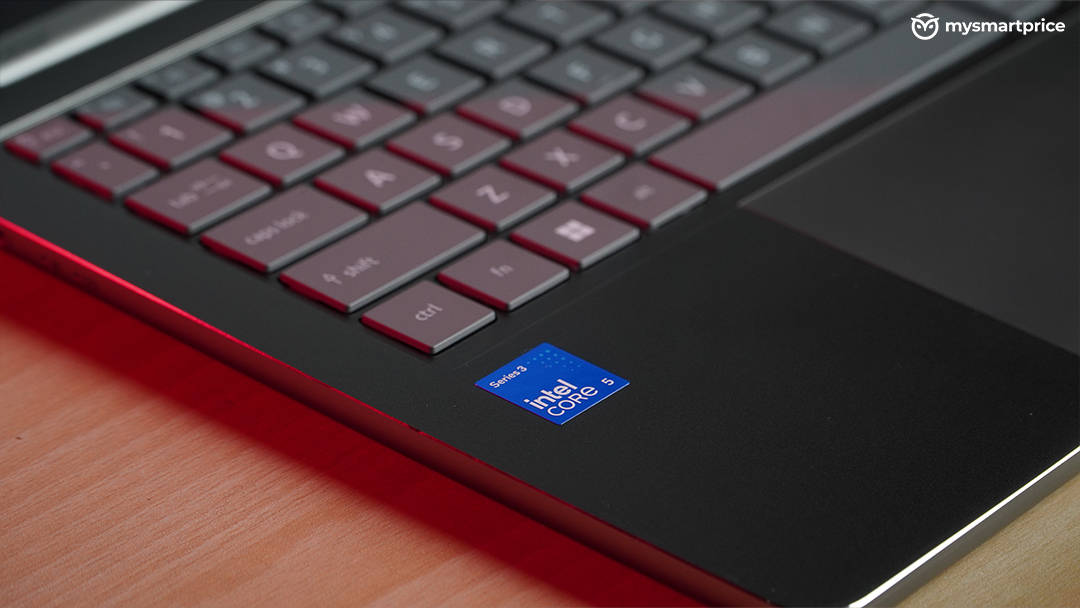
The Swift Air 14 uses the Intel Core 5 320, a Wildcat Lake chip from Intel’s Core Series 3 lineup. It has six cores: two performance cores and four low-power efficient cores. This chip is built for efficiency and performance per watt rather than chasing high benchmark scores. It is paired with 8GB of LPDDR5 RAM at 7,467 MT/s and a 512GB PCIe Gen 3 SSD.
| Benchmark | Acer Swift Air 14 Score |
|---|---|
| Geekbench (Single-Core) | 2,207 |
| Geekbench (Multi-Core) | 6,708 |
| Cinebench R23 (Single-Core) | 1,845 |
| Cinebench R23 (Multi-Core) | 6,393 |
| PCMark 10 Extended | 5,022 |
| Procyon Office Productivity | 232,000 |
| PassMark CPU Mark | 15,732 |
| Puget Bench (DaVinci Resolve) | 16,282 |
| WinRAR | 6,071 KB/s |
| VeraCrypt (Encryption / Decryption) | 7.2 / 7.1 GiB/s |
The numbers match the chip’s design. Single-core performance is strong, with 1,845 in Cinebench R23 and 2,207 in Geekbench. That’s what keeps everyday tasks like opening apps, loading web pages and working in documents feeling snappy.
Multi-core performance is more modest. With only two performance cores, the Core 5 320 doesn’t have much muscle for long, sustained workloads like video exports or large file compression. Those jobs will get done, but they’ll take a while.
Acer also appears to tune the chip conservatively. The Swift Air 14 peaks at 21W under load and maxes out at just 65°C in our stress test. That leaves thermal headroom that Acer simply isn’t using. A more aggressive power profile could probably extract more performance from this chassis.
In daily use, the Swift Air 14 handles office apps, browsing, video calls and streaming without trouble. The real limitation is its 8GB of soldered memory. With dozens of browser tabs and several apps open at once, Windows 11 starts to slow down, and switching between windows becomes noticeably sluggish. The RAM can’t be upgraded later.
Graphics and AI Performance
| Benchmark | Acer Swift Air 14 Score |
|---|---|
| Geekbench GPU | 11,805 |
| 3DMark Stress Test (Highest Loop) | 2,412 |
| 3DMark Stress Test (Lowest Loop) | 2,337 |
| Frame Rate Stability | 96.9% |
| Procyon AI Image Generation | 139 |
| NPU (INT8) | 16 TOPS |
Graphics are not the Core 5 320’s strength. The integrated GPU handles video playback, multiple displays and light photo editing without any trouble, but it isn’t meant for gaming. We didn’t run our AAA gaming suite on it. Realistically, this is a laptop for casual and older titles, not modern games.
What it does well is stay consistent. In the 3DMark stress test, it held 96.9% frame rate stability, so performance barely drops even under sustained load. The 16 TOPS NPU and a score of 139 in Procyon AI Image Generation also mean on-device AI features in Windows and apps run reasonably well.
Acer Swift Air 14 Battery Life, Thermals and Noise
| Test | Acer Swift Air 14 |
|---|---|
| UL Procyon Battery Life | 610 minutes (10 hours 10 minutes) |
| Peak CPU Temp (Browsing/Streaming) | 46°C |
| Peak CPU Temp (Stress Test) | 65°C |
| Fan Noise (Idle / Peak) | 39.1dB / 42.1dB |
| CPU Power Draw (Browsing/Streaming) | 5W |
| CPU Power Draw (Peak) | 21W |
Battery life is the Swift Air 14’s headline feature, and it largely delivers. In the UL Procyon battery life test, it lasted 610 minutes, or just over 10 hours. That’s comfortably a full workday, or a full day of classes, away from the charger.
There are two caveats, though. First, 10 hours is well short of Acer’s 19-hour claim. Manufacturer claims use their own test conditions, but the gap is still large.
Second, the Swift Air 14 relies on its large 70Wh battery more than on efficiency. It draws 5W during light workloads like browsing and streaming, which is on the high side for a chip designed for low power. That works out to about 8.7 minutes of runtime per watt-hour. If Acer could bring the light-load draw down, this battery would be truly class-leading. The higher draw might also explain why the display drops to 30Hz so eagerly.
Thermals and noise are excellent. The Swift Air 14 peaked at just 65°C in our stress test and 46°C during everyday use. The fans are barely audible at idle (39.1dB) and stay quiet under full load (42.1dB). If you work in quiet spaces like libraries or shared offices, you’ll appreciate this.
Who Should Buy the Acer Swift Air 14?
Students: This is the Swift Air 14’s strongest use case. It lasts just over 10 hours, weighs 1.19kg and stays quiet. Its USB-A port and headphone jack also mean you can plug in pen drives, lab equipment and wired earphones without hunting for a dongle. The 8GB of RAM is fine for notes, research, assignments and streaming, but students who run heavy software for engineering or design courses should look for 16GB.
Office and hybrid workers: The Swift Air 14 handles documents, spreadsheets, email and video calls comfortably, and its 1080p webcam and microphones are good for meetings. The 16:10 display is great for documents. Just keep the number of open tabs and apps in check, because 8GB fills up quickly with heavy multitasking.
Frequent travellers: The battery life will get you through a long flight or a full day of meetings. However, the 100W charger adds weight and bulk, pushing the total travel weight to 1.58kg. The 350-nit display can also be hard to read in bright environments.
Content creators and photo editors: It’s suitable for light photo edits, social media content and occasional 1080p video trims. However, with 75.8% DCI-P3 coverage, the display isn’t suited to colour-critical work. The modest multi-core performance also means longer export times for serious video projects.
Gamers: Look elsewhere. The integrated graphics are fine for casual and older titles, but not for modern games.
Small businesses: It’s a dependable, quiet machine for everyday business apps, video calls and presentations, and the ports make it easy to connect common peripherals. Since there’s no HDMI port, keep a USB-C adapter handy for projectors and meeting-room displays.
Heavy multitaskers and developers: Skip this one. The 8GB of soldered RAM will hold you back from day one and can’t be upgraded later.
How the Swift Air 14 Stacks Up Against Cheaper and Pricier Laptops
To judge whether the Swift Air 14 is good value, I compared it with two laptops from either side of its price. The Acer Aspire 5 is a cheaper mainstream laptop with a more powerful processor. The HP OmniBook 5 is a pricier premium machine with an OLED display.
| Acer Aspire 5 | Acer Swift Air 14 | HP OmniBook 5 | |
|---|---|---|---|
| Price | ₹68,900 | ₹94,999 | ₹1,46,499 |
| Processor | Intel Core Ultra 5 125H | Intel Core 5 320 | Intel Core Ultra 7 355 |
| RAM / Storage | 16GB / 512GB | 8GB / 512GB | 16GB / 1TB |
| Display | 14″ IPS, 1920 × 1080, 60Hz | 14″ IPS, 1920 × 1200, 120Hz | 14″ OLED, 1920 × 1200, 60Hz |
| Build | Polycarbonate | Metal | Aluminium |
| Thickness / Weight | 18.0mm / 1.2kg | 13.3mm / 1.19kg | 12.7mm / 1.33kg |
| Battery | 54Wh | 70Wh | 59Wh |
Performance
| Laptop Model | Geekbench (Single / Multi) | Cinebench R23 (Multi) | PCMark 10 Extended | Procyon Office | Geekbench GPU | Procyon AI Image Gen |
|---|---|---|---|---|---|---|
| Acer Aspire 5 | 2,267 / 8,262 | 7,759 | 6,589 | 237,000 | 24,207 | 43 |
| Acer Swift Air 14 | 2,207 / 6,708 | 6,393 | 5,022 | 232,000 | 11,805 | 139 |
| HP OmniBook 5 | 2,763 / 11,346 | 7,896 | 7,200 | 285,000 | 23,403 | 195 |
The cheaper Aspire 5 is faster than the Swift Air 14 in most CPU tests. Its 14-core Core Ultra 5 125H delivers about 23% higher Geekbench multi-core and 21% higher Cinebench R23 multi-core scores. Its GPU is also roughly twice as powerful. In Procyon Office Productivity, though, the two are almost tied.
The HP OmniBook 5 is in a different league. Its Core Ultra 7 355 posts nearly 70% higher Geekbench multi-core scores and leads in Procyon Office by about 23%. The Swift Air 14’s one bright spot is AI image generation, where it scores more than three times higher than the Aspire 5.
Display, Battery and Thermals
| Laptop Model | DCI-P3 | Peak Brightness | Battery Life | Peak Stress Temp | Peak Fan Noise |
|---|---|---|---|---|---|
| Acer Aspire 5 | 38% | 250–300 nits | 234 mins | 83°C | 42.0dB |
| Acer Swift Air 14 | 75.8% | 350 nits | 610 mins | 65°C | 42.1dB |
| HP OmniBook 5 | 100% | 300 nits | 833 mins | 84°C | 48.0dB |
This is where the Swift Air 14 earns its premium over the Aspire 5. It lasts more than two and a half times longer on battery and has a much better display with a 120Hz refresh rate. It’s also thinner and built from metal rather than plastic, and it runs nearly 20°C cooler under load.
The OmniBook 5 justifies its higher price with an OLED panel that has full DCI-P3 coverage, a much faster processor, 16GB of RAM, 1TB of storage and nearly 14 hours of battery life. The Swift Air 14’s only wins over it are its smoother 120Hz refresh rate, quieter fans and cooler thermals.
Price-to-Performance
| Laptop Model | Price (INR) | Procyon Office per ₹1,000 | Geekbench Multi per ₹1,000 | Battery Minutes per ₹1,000 |
|---|---|---|---|---|
| Acer Aspire 5 | ₹68,900 | 3,440 | 119.9 | 3.4 |
| Acer Swift Air 14 | ₹94,999 | 2,442 | 70.6 | 6.4 |
| HP OmniBook 5 | ₹1,46,499 | 1,945 | 77.4 | 5.7 |
Per rupee, the Aspire 5 gives you the most raw performance, though its battery life is poor. The Swift Air 14 offers the best battery life per rupee of the three. However, it gives you less multi-core performance per rupee than even the OmniBook 5, which costs 54% more.
That tells you what the Swift Air 14’s premium pays for: its build, battery, display refresh rate, ports and quiet operation, not raw speed. On those terms, its position between these two laptops makes sense. The real test is how it fares against a laptop that offers the same kind of premium experience.
Acer Swift Air 14 vs Dell XPS 13: The Benchmark Under Rs 1 Lakh
The Dell XPS 13 is the current benchmark for premium thin-and-light Windows laptops under Rs 1 lakh. It uses the same Intel Core 5 320 processor and the same amount of RAM, and it targets the same buyer. It also costs Rs 79,990 for the 8GB model, about Rs 15,000 less than the Swift Air 14.
| Acer Swift Air 14 | Dell XPS 13 (8GB) | |
|---|---|---|
| Price | ₹94,999 | ₹79,990 (₹99,990 for 16GB) |
| Processor / RAM | Core 5 320 / 8GB LPDDR5 | Core 5 320 / 8GB LPDDR5x |
| Storage | 512GB PCIe Gen 3 | 512GB PCIe Gen 4 |
| Display | 14″ 1920 × 1200 IPS, 350 nits, 75.8% DCI-P3, ΔE 1.95 | 13.4″ 2560 × 1600 IPS touch, 539 nits, 98.2% DCI-P3, ΔE 1.2 |
| Thickness / Weight | 13.3mm / 1.19kg | 12.7mm / 1.0kg |
| Travel Weight | 1.58kg | 1.25kg |
| Key Travel | 1.3mm | 0.8mm |
| Trackpad | 125 × 80mm | 118.5 × 68.5mm |
| Ports | 2 × USB-C, 1 × USB-A, 3.5mm jack | 2 × USB-C |
| Wi-Fi | Wi-Fi 6E | Wi-Fi 7 |
| Charger | 100W | 65W USB-C GaN |
Performance
| Benchmark | Acer Swift Air 14 | Dell XPS 13 |
|---|---|---|
| Geekbench (Single / Multi) | 2,207 / 6,708 | 2,609 / 8,089 |
| Cinebench R23 (Single / Multi) | 1,845 / 6,393 | 1,839 / 6,984 |
| PCMark 10 Extended | 5,022 | 5,845 |
| Procyon Office Productivity | 232,000 | 263,000 |
| PassMark CPU Mark | 15,732 | 16,107 |
| Puget Bench (DaVinci) | 16,282 | 16,342 |
| Geekbench GPU | 11,805 | 12,848 |
| 3DMark Highest Loop / Stability | 2,412 / 96.9% | 2,362 / 98.7% |
| Procyon AI Image Gen | 139 | 112 |
Despite near-identical hardware, the XPS 13 is noticeably faster. It leads by about 18% in Geekbench single-core and 21% in multi-core. It’s also 16% ahead in PCMark 10 Extended and 13% ahead in Procyon Office Productivity.
The two laptops are roughly tied in Cinebench R23 single-core and Puget Bench for DaVinci Resolve. The Swift Air 14 wins only in AI image generation and, narrowly, in the 3DMark stress test’s highest loop.
Memory doesn’t explain the gap, since both laptops use 8GB of single-channel memory at 7,467 MT/s. The difference is more likely tuning. Dell lets the chip run at 22W and reach 83°C, while Acer holds it to 21W and 65°C. Dell also uses a faster PCIe Gen 4 SSD, though that mainly affects load times and file transfers rather than CPU scores.
Battery Life, Thermals and Noise
| Test | Acer Swift Air 14 | Dell XPS 13 |
|---|---|---|
| Battery Capacity | 70Wh | 52Wh |
| UL Procyon Battery Life | 610 mins | 545 mins |
| Minutes per Wh | 8.7 | 10.5 |
| CPU Power (Browsing / Peak) | 5W / 21W | 2.8W / 22W |
| Peak CPU Temp (Browsing / Stress) | 46°C / 65°C | 45°C / 83°C |
| Fan Noise (Idle / Peak) | 39.1dB / 42.1dB | 45.2dB / 47.5dB |
The Swift Air 14 lasts 65 minutes longer, but only because its battery is 35% larger. The XPS 13 is the more efficient machine. It draws almost half the power during light workloads and gets more runtime out of every watt-hour.
The Swift Air 14 does run far cooler and quieter. It peaks 18°C lower under stress, and its fans are about 5–6dB quieter at both idle and peak. Some of that comes down to its thicker, larger chassis, which has more room to dissipate heat.
Where Each One Wins
The Swift Air 14 wins on ports, battery life, keyboard travel, thermals and fan noise. It also has a slightly larger screen and trackpad. These are real, practical advantages, especially if you rely on USB-A accessories or wired headphones, or if you dislike fan noise.
The XPS 13 wins nearly everywhere else. It has a much better display, with a sharper resolution, higher brightness, wider colour coverage, touch support and a better VRR implementation. It’s also faster in CPU and productivity tests, as well as thinner, lighter and easier to carry with its charger. In my experience, it also has better audio, a newer Wi-Fi standard, and better overall fit and finish.
Price
| Acer Swift Air 14 | Dell XPS 13 (8GB) | |
|---|---|---|
| Price | ₹94,999 | ₹79,990 |
| Procyon Office per ₹1,000 | 2,442 | 3,288 |
| Geekbench Multi per ₹1,000 | 70.6 | 101.1 |
| Battery Minutes per ₹1,000 | 6.4 | 6.8 |
At Rs 79,990, the 8GB XPS 13 costs about Rs 15,000 less than the Swift Air 14’s current Rs 94,999 listing. Even at Acer’s Rs 89,999 launch price, the Dell is Rs 10,000 cheaper. Per rupee, the XPS 13 delivers about 35% more productivity performance and 43% more multi-core performance, and it even edges ahead on battery life per rupee.
The 16GB XPS 13 costs Rs 99,990, which is about Rs 5,000 more than the Swift Air 14. That small premium gets you twice the memory, which matters a lot on a laptop with soldered RAM that you’ll keep for years.
The Swift Air 14 does have the longer battery life, but the XPS 13 already lasts over nine hours. That’s enough for a full workday, so the extra hour on the Acer is nice to have rather than a dealbreaker.
Intel Core Series 3: How Good Is The Core 5 320 Processor?
Q. Are laptops with Intel Core Series 3 processors a good choice for everyday tasks like email and streaming?
A. Yes. Intel designed its Core Series 3 processors for everyday computing, including email, video calls, documents, web browsing, streaming, basic photo editing and light gaming. They’re meant to work smoothly right out of the box. The Core 5 320 in the Swift Air 14 bears this out in our testing. It handled office workloads comfortably, peaked at just 46°C while browsing and streaming, and stayed quiet at 39.1dB at idle.
Q. Do Intel Core Series 3 processors have AI capabilities?
A. Yes. Intel Core Series 3 processors include built-in AI acceleration that speeds up AI features in apps, such as writing and editing help, photo cleanup, and summarising classes or meetings. The Core 5 320 has an NPU rated at 16 TOPS. In our Procyon AI Image Generation test, the Swift Air 14 scored 139, ahead of both the XPS 13 and the Core Ultra 5 125H-powered Aspire 5.
Q. Are laptops with Intel Core Series 3 processors a good choice for students?
A. They’re a strong fit. Intel positions Core Series 3 laptops for students because they run school apps smoothly, support full-day multitasking with long battery life, and handle streaming and light gaming after class. The Swift Air 14 lasted just over 10 hours in our battery test, weighs 1.19kg, and includes a USB-A port and headphone jack, all of which are useful on campus. Students who keep many apps and tabs open at once should keep the 8GB memory limit in mind.
Q. Can laptops with Intel Core Series 3 processors meet the needs of my small business?
A. For most everyday business work, yes. Intel says Core Series 3 processors deliver dependable performance across common business apps, along with built-in security and AI acceleration. They’re designed to stay reliable for years. The Swift Air 14’s 1080p webcam and clear microphones work well for video meetings, and its office performance is enough for documents, spreadsheets and presentations.
Acer Swift Air 14 Review Verdict
The Acer Swift Air 14 gets a lot right. It has a distinctive design, a firm metal deck, comfortable rounded edges and a keyboard with proper travel. It includes the ports most people actually use, delivers just over 10 hours of battery life, and runs cooler and quieter than anything else in this comparison. Taken on its own, it’s a well-rounded thin-and-light laptop for students and office workers, and it delivers on most of Acer’s pitch.
Against laptops on either side of its price, its position makes sense. It’s a big step up from the Aspire 5 in build, display and battery life, though not in raw performance. It isn’t trying to match the pricier OmniBook 5’s OLED screen and Core Ultra 7 power.
However, the XPS 13 shares its processor and is faster, thinner, lighter and has a far better display, all for less money. The Swift Air 14’s own flaws don’t help either. The chassis flexes when lifted from the deck, the VRR implementation is aggressive and noticeable, the speakers sound hollow, and there’s no haptic trackpad at this price. Its battery life is also far from the 19 hours Acer advertises.
Buy the Swift Air 14 if you need a USB-A port and headphone jack without carrying a dongle, want the longest battery life you can get under Rs 1 lakh, or care about a cool and quiet laptop. For everyone else, the Dell XPS 13 is the better buy. The 8GB model is about Rs 15,000 cheaper and better in most areas. If you can spend around Rs 5,000 more than the Swift Air 14’s price, the 16GB XPS 13 at Rs 99,990 is the one I’d actually buy. If Acer brings the Swift Air 14 closer to the 8GB XPS 13’s Rs 79,990, it becomes much easier to recommend.