The ASUS Pad makes a strong first impression, and it does so for a very simple reason: the display. Turn on its 12.2-inch Tandem OLED panel and the tablet immediately feels more interesting than its ₹43,990 starting price suggests, with the combination of a 2.8K resolution, 144Hz refresh rate, 3:2 aspect ratio, and slim bezels that give it a screen that is difficult to ignore, especially at this price. That also tells you a lot about what ASUS is trying to achieve here. The Pad is not chasing the fastest processor in the segment, nor is it trying particularly hard to convince you that it can replace a laptop. Its strengths lie elsewhere. This is a tablet built around a large, high-quality display and the experience that comes with it, whether that means watching content, reading, browsing or handling everyday work.
ASUS Pad T3201 T3201M5A
Rs 43,990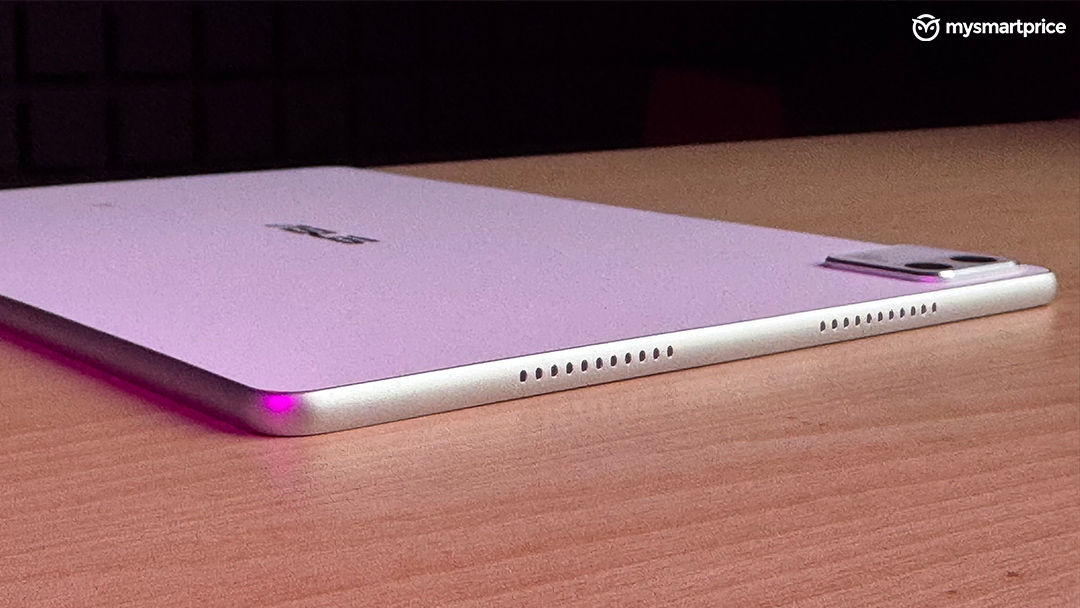
What Is Good?
- Excellent 2.8K Tandem OLED display
- Slim and lightweight design
- Good quad-speaker audio with Dolby Atmos
- Expandable storage up to 1TB
What Is Bad?
- Plastic build feels less premium
- Average battery life
- Software needs more refinement
- Cameras are only average
The ASUS Pad is therefore, a good tablet with a very clear personality. It does not try to win every category. Instead, it makes a particularly strong case for itself if the display is high on your list of priorities.
Design and Build
The ASUS Pad does not quite have the premium feel you might expect from a tablet in this price range. Instead of a metal body, ASUS has opted for plastic, which takes away some of the solidity you get from more expensive tablets, but there is a practical upside. At 523 grams and just 6.5mm thick, the Pad is fairly light and slim for a 12.2-inch tablet. The curved frame helps too. It makes the tablet comfortable to hold, particularly during longer sessions, and it does not feel excessively bulky when carried around. Even with a laptop in the same bag, the Pad does not add a particularly significant amount of weight. There is nothing especially adventurous about the design. The single white colour option is also somewhat limiting. However, the proportions are sensible, and the tablet works well both on a desk and in your hands.
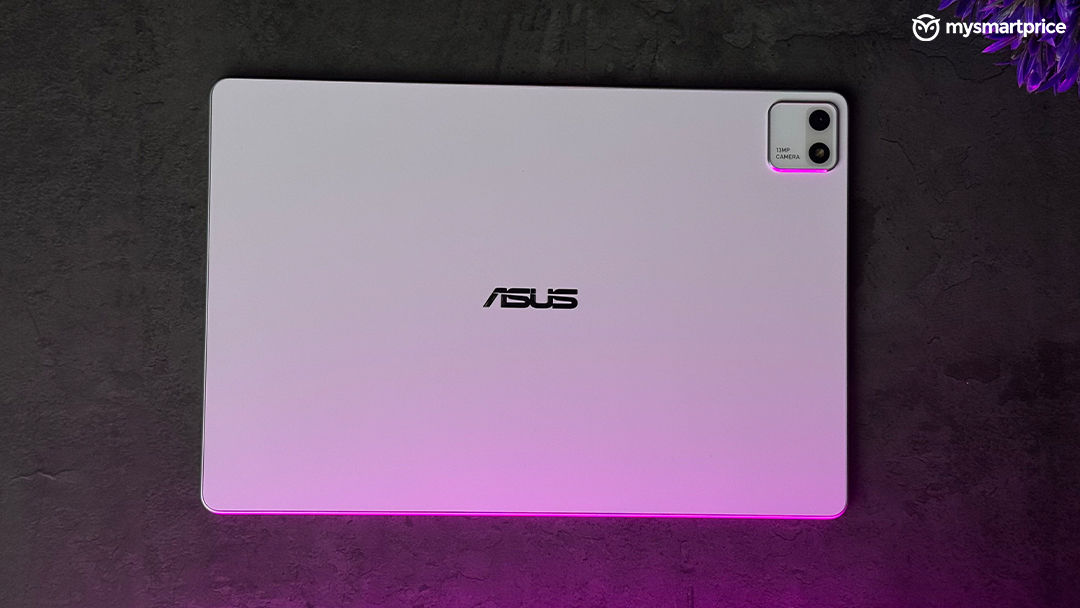
ASUS includes a transparent folio case that doubles as a stand, which is useful when watching content or using the tablet with a keyboard. The case itself, however, could have been better executed. It tends to flap around, the magnets could be stronger, and the transparent material picks up dust easily. It also remains to be seen how well it will hold up aesthetically over time. The tablet itself is easier to appreciate. It is thin, relatively light, and comfortable enough to use for extended periods. It may not feel particularly luxurious, but it gets the basics right.
Display
The display is the ASUS Pad’s biggest selling point, and after spending time with it, that feels justified. The 12.2-inch Tandem OLED panel offers a 2.8K resolution, 144Hz refresh rate and 3:2 aspect ratio. Slim bezels result in a 92% screen-to-body ratio, while the panel covers 100% of the sRGB colour space and 99% of DCI-P3.
ASUS rates the display for 600 nits of typical brightness; it reached around 2,250 nits at maximum brightness, which is particularly impressive for a tablet, and it looks excellent. The usual OLED advantages are all here. Blacks are deep, colours have plenty of punch and the 144Hz refresh rate makes scrolling and navigating the interface feel noticeably smoother.
Then there is the 3:2 aspect ratio, which is perhaps the more interesting choice. It is not ideal for widescreen movies because the black bars are more noticeable, but it works exceptionally well for reading, browsing and documents. There is simply more vertical space, and that makes long-form content feel more natural. For someone who reads a lot on a tablet, this is a meaningful advantage. Articles and documents require less scrolling, while photographs and other visual content benefit from the OLED panel’s strengths.
ASUS has also included TÜV Rheinland certifications for low flicker and low blue light, which makes the screen more comfortable during longer sessions but there are a couple of drawbacks. The panel is quite reflective, particularly around windows or under strong indoor lighting. In a darker room, that is much less of an issue. Display customisation is also somewhat limited, and a panel this capable deserves more control over its colour profile. Those are relatively minor complaints, though. For the money, getting a 12.2-inch 2.8K Tandem OLED panel running at 144Hz is a major part of the Pad’s appeal.
Audio
A great display can only take the entertainment experience so far. Thankfully, ASUS has paired it with a competent quad-speaker setup.
The speakers get sufficiently loud, offer good channel separation and support Dolby Atmos. There is enough spatial character to make movies and games feel immersive, while dialogue remains reasonably clear at higher volumes. Music is also enjoyable for casual listening, with enough body to avoid making the speakers feel thin.
ASUS also provides Dolby Audio X3 profiles, giving some flexibility depending on the content, but the lack of LHDC and LDAC support is worth mentioning if you use compatible wireless headphones and care about higher-quality Bluetooth audio. For most users, however, it is unlikely to be a significant concern. The important thing is that the audio complements the display. Put on a movie and the combination of the large OLED panel and quad speakers makes the Pad particularly enjoyable for long viewing sessions.
Performance
The ASUS Pad is powered by the MediaTek Dimensity 8300, paired with 8GB of LPDDR5X RAM and UFS 3.1 storage, which is a capable mid-range platform, and that is exactly how it feels in day-to-day use. Browsing, streaming, document work, social media and regular multitasking are generally smooth, while heat is managed reasonably well during sustained workloads.
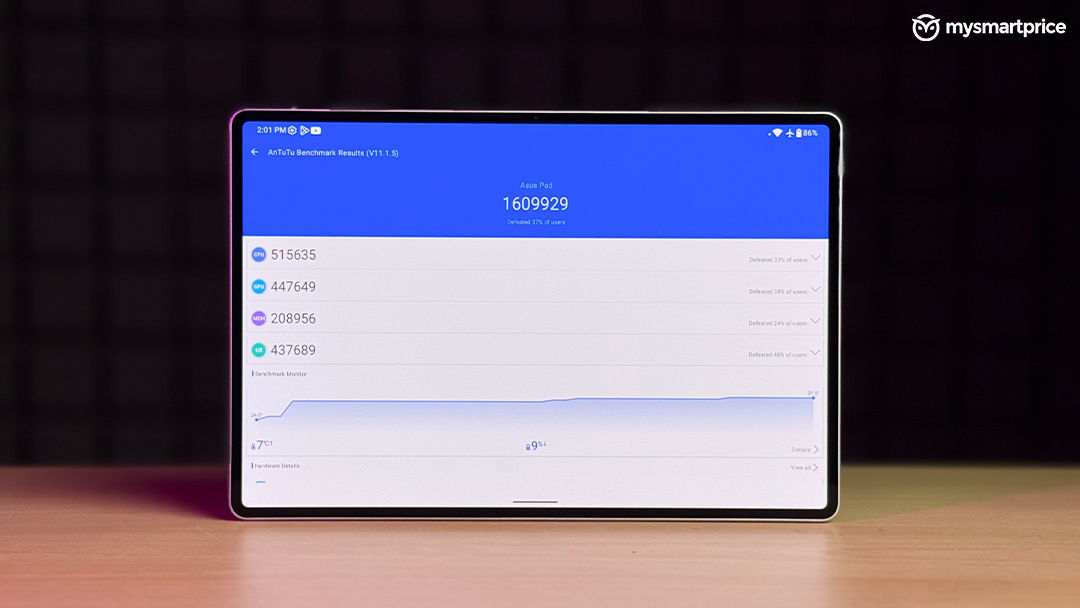
The benchmark numbers are respectable. The tablet scored around 1.61 million on AnTuTu, while Geekbench returned 1,283 points in single-core and 4,338 in multi-core. Those figures also put the tablet’s positioning into perspective and make it clear that the Dimensity 8300 is not competing with tablets built around flagship Snapdragon platforms.
Also, this difference becomes apparent with heavier workloads. Intensive gaming, heavy multitasking and creative applications such as video editing and colour grading can push the hardware closer to its limits. The 8GB RAM configuration is also not particularly generous if numerous demanding applications need to remain open simultaneously.
Storage is a more convincing part of the package. The microSD card slot supports expansion up to 1TB, which is useful for anyone who plans to keep movies, games and other large files on the tablet. In other words, the tablet does its job well. It makes everyday use comfortable without pretending to be workstation-class hardware. That is reasonable for this tablet, provided expectations remain realistic. The 144Hz display naturally makes you expect a strong gaming experience, and the ASUS Pad can certainly handle demanding titles. The catch is that performance varies considerably with the game and graphics settings.
BGMI averaged 58.5fps in testing. Genshin Impact averaged 54.1fps on high settings at 60fps, although the 5% low dropped to 8fps. The numbers paint a fairly consistent picture. Average frame rates can be good, but demanding scenes can still result in noticeable drops because the Dimensity 8300 does not have the headroom of flagship hardware. For casual gaming, that is not a major problem. The large OLED display, 144Hz refresh rate and capable speakers make games enjoyable despite those limitations.
Software
The ASUS Pad runs Android 16 out of the box which is a sensible approach. There is not a lot of unnecessary software clutter, and the interface feels familiar. But clean software is only part of what makes a good tablet experience. Large-screen Android needs to make proper use of the extra space, and this is where the Pad feels less finished. The floating-window support is limited, customisation options are relatively sparse and features such as aspect-ratio adjustment do not always behave as expected. There are also occasional glitches, stutters and inconsistencies in the interface. None of these problems fundamentally affect usability, but they do stand out because the hardware itself feels considerably more polished.
Software support is another concern. ASUS has confirmed three years of security updates, but there is no equally clear commitment around major OS upgrades. For a tablet that could reasonably remain in use for several years, stronger long-term software support would make the proposition more reassuring.
The GlideX is one of the useful features making the tablet to work closely with a PC to even turn it into a secondary display, giving the tablet a practical role in a desktop setup. The absence of major AI features is not particularly concerning. While every company is marketing AI as a mainstream feature, I feel a tablet does not need an AI feature list simply to tick a box, and ASUS still has some polishing to do for getting the fundamentals right.
Cameras
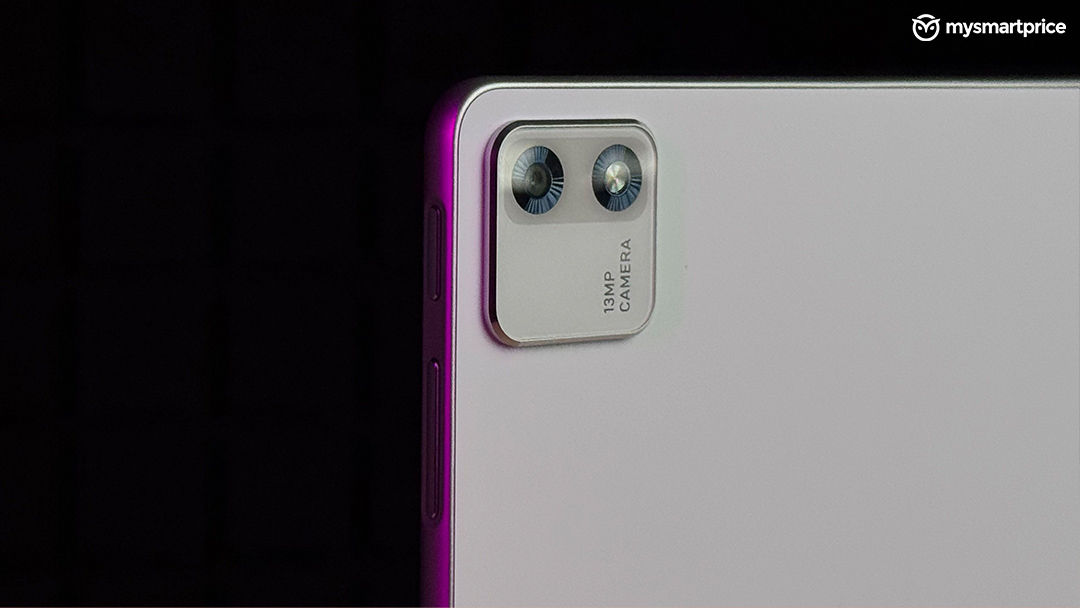
The camera setup is pretty straightforward with a 13-megapixel rear camera and a 5-megapixel front camera. The rear camera is fine for documents and basic photographs, but it is not particularly impressive making the images look flat and strong backlighting a major challenge. This is hardly surprising but not necessarily a major problem because a tablet camera does not need to compete with a good smartphone camera, instead just getting the work done.
The front camera is more relevant because video calls are a natural use case for a tablet. In good lighting, it performs reasonably well, although the relatively tight field of view can make group calls and wider framing more difficult. Overall, the cameras are functional rather than noteworthy. They do what they are supposed to, but they are not part of the reason to buy the ASUS Pad.
Accessories
The ₹47,990 starting price is one of the Pad’s strongest arguments, but it is worth looking beyond that number.
ASUS includes the folio case, but the stylus and keyboard are sold separately which matters because the Pad’s hardware naturally encourages you to consider a more complete setup. The 3:2 display is well suited to productivity and GlideX makes the tablet more useful alongside a PC. The problem is that the total cost rises if you add a keyboard or a stylus. The included case also does not feel quite as refined as the tablet itself. Its tendency to flap around and collect dust is something you are likely to notice with regular use. The ASUS Pad is not poor value because of this but the more accurate way to look at it is that ₹43,990 gets you the tablet, not the complete ecosystem.
Battery
The ASUS Pad packs a 9,000mAh battery, which sounds substantial for a tablet of this size. In regular use, it can get through a normal day, but endurance is not particularly impressive compared with some competing tablets.
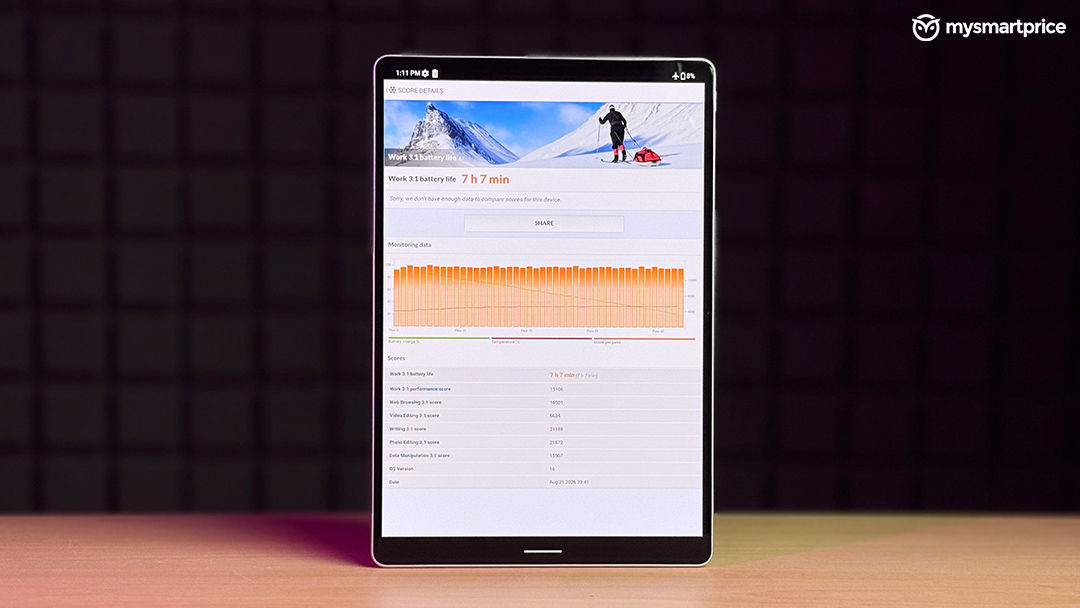
The PCMark battery test lasted around 7 hours and 7 minutes, with the display brightness set to approximately 50% which is an average result rather than a standout one making the display likely the part of the reason. A 2.8K OLED panel running at 144Hz looks excellent, but it also demands more from the battery, particularly during gaming and high-resolution video playback.
Charging is considerably better. The ASUS Pad supports 45W charging and can go from 20% to 100% in approximately 48 minutes making the middling endurance easier to live with. When the battery is low, you do not have to leave the tablet plugged in for an extended period to get back to full charge. Battery life is therefore not a strength, but charging performance does a good job of making that weakness less frustrating.
Verdict
The ASUS Pad is one of those tablets where the buying decision becomes much easier once you understand what ASUS has prioritised. If raw performance is the main concern, this may disappoint you a lot. It is very capable tablet, but not the best in the class. It is also not the obvious choice for professional creative work, particularly for workloads such as video editing and colour grading.
The appeal is elsewhere. The 12.2-inch Tandem OLED display is genuinely excellent. The combination of 2.8K resolution, 144Hz refresh rate and 3:2 aspect ratio works particularly well for reading, browsing, watching content and gaming. The quad speakers complement it nicely, while the thin and relatively lightweight design makes the tablet easy to carry.
Additionally, the software needs more refinement, long-term OS support could be better and battery life is only average and the accessories also push the overall cost higher if the intention is to build a proper productivity setup.
At ₹43,990 for the 128GB model and ₹47,990 for 256GB, a 12.2-inch Tandem OLED panel with a 144Hz refresh rate and 2.8K resolution for under ₹50,000 is a meaningful advantage, especially for users who spend most of their time watching content, reading, browsing or playing games.
There are alternatives, though, and they make the decision more interesting. If OLED is not a priority, the iPad 11th generation remains a strong option, particularly for users who value Apple’s software ecosystem, app optimisation and longer-term platform support. The Xiaomi Pad 8 is worth considering if performance matters more and you are willing to give up some of the ASUS Pad’s display advantages in exchange for stronger hardware.