Buying a premium smartwatch in 2026 comes with a different set of expectations. Smartwatches have been around long enough for a bright display, a comfortable fit and a generous list of features to feel fairly routine. Even budget options promise to track your sleep, monitor your heart rate and handle calls, with some offering conveniences such as USB-C charging. When you spend considerably more, it is fair to ask what that extra money actually gets you.
Samsung Galaxy Watch9
Rs 41,999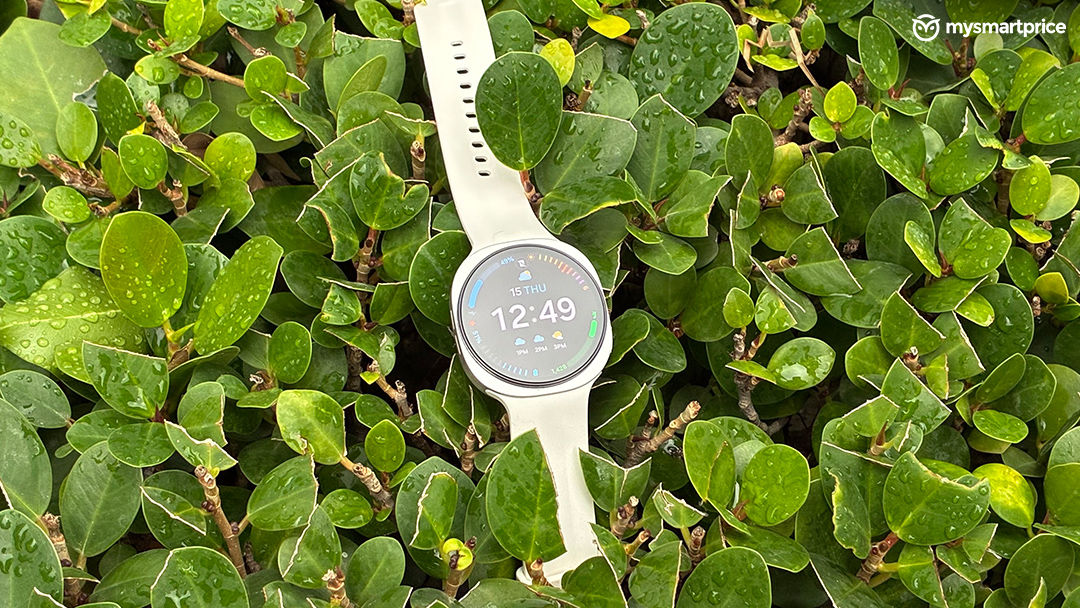
What Is Good?
- Detailed sleep tracking and health insights
- Excellent AMOLED display with 3000-nit peak brightness
- Comfortable and less bulky than the Ultra
- ECG, blood pressure monitoring and heart health insights
- Sleep Coaching, Energy Score and Vitals tracking
What Is Bad?
- Battery lasts around a day with heavier use
- Takes time to learn the Samsung Health appTakes time to learn the Samsung Health app
- Sporty design may not appeal to everyone
- ECG requires a compatible Samsung phone
- Takes around 1.5 to 2 hours to charge fully
So when I look at any premium watch such as the one that I am currently reviewing, my question goes beyond whether it feels comfortable on the wrist, looks worth its price, and makes everyday tasks easy. If you are wondering whether it feels comfortable, has a good display and handles everyday smartwatch duties, the short answer is yes. But after about a month of use, its health tracking is what has given me the strongest reason to keep coming back to it.
My interest in this watch began a few days before its launch, when I started suspecting that my brother might have sleep apnea. Once I got the Watch9 and began tracking his sleep, among other things. I kept a close eye on the repeated oxygen dips and disrupted nights appeared to support my suspicion. Since we as Indians are a little skeptical about going to the doctor with just our suspicions, I went to mine with all this data and the observations. The doctor ordered a sleep study, which confirmed sleep apnea and corroborated the pattern of oxygen drops flagged by the watch. That experience changed what I wanted from a smartwatch. Step counts and activity goals became a much smaller part of the picture.
That experience changed what I wanted from a smartwatch. Step counts and activity goals became a much smaller part of the picture. It also made something as ordinary as comfort more consequential: a watch needs to be easy to keep on if you want it recording through the night.
Design and Comfort: An Easier Fit Than the Ultra
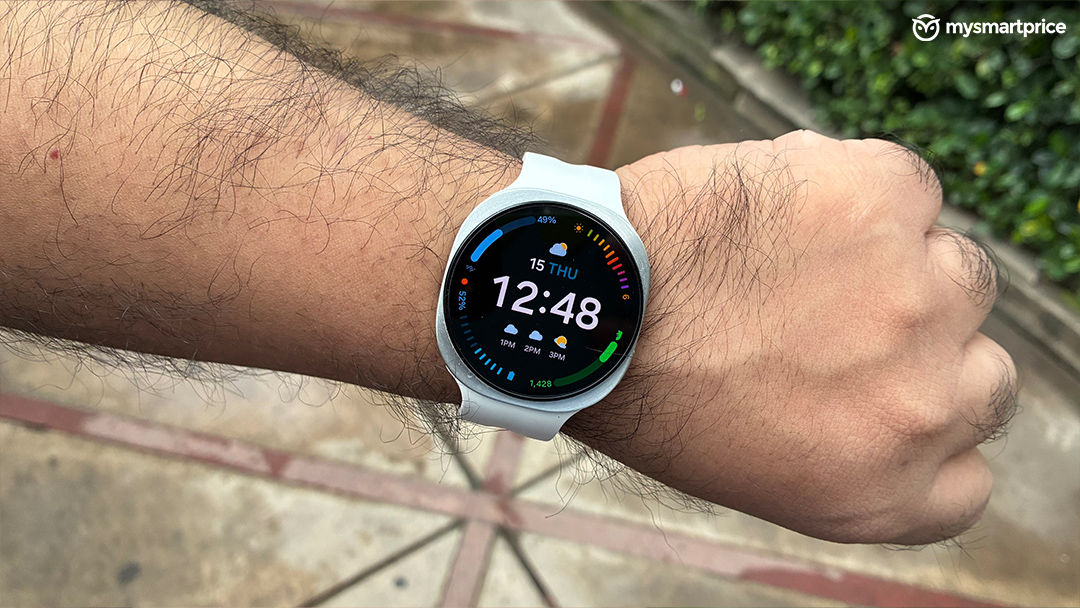
The Watch9 gets this part right. Unlike the Ultra, it does not have the same bulky, oversized presence. It sits comfortably on my wrist without looking disproportionately large, making it a more approachable option for women who find Samsung’s bigger watch too imposing.
Fit and styling are slightly different matters, though. While I am happy with how it wears, the sporty case and strap combination leans masculine to my eye. That is a personal preference, but I would have liked a slightly more understated appearance for everyday dressing.
The white strap softens the look considerably. I was initially concerned about how quickly it would start looking grubby, but after roughly a month, I have managed to keep it clean. I still wonder how it will hold up over a longer period, although there is nothing to complain about on that front so far.
Changing the strap offers some flexibility. Samsung’s Indian accessory listings include Sport and Fabric bands, while its band guide also lists a Misty option. The newer Sport and Fabric bands support Watch9, Watch8 and Watch8 Classic, with S/M and M/L sizes. The Dynamic Lug system makes compatible bands easy to swap, but you do need to check the fitting rather than assume an older Galaxy Watch strap will work. A fabric band is worth considering if overnight comfort is a priority.
Display: Excellent Visibility, Even in Harsh Sunlight
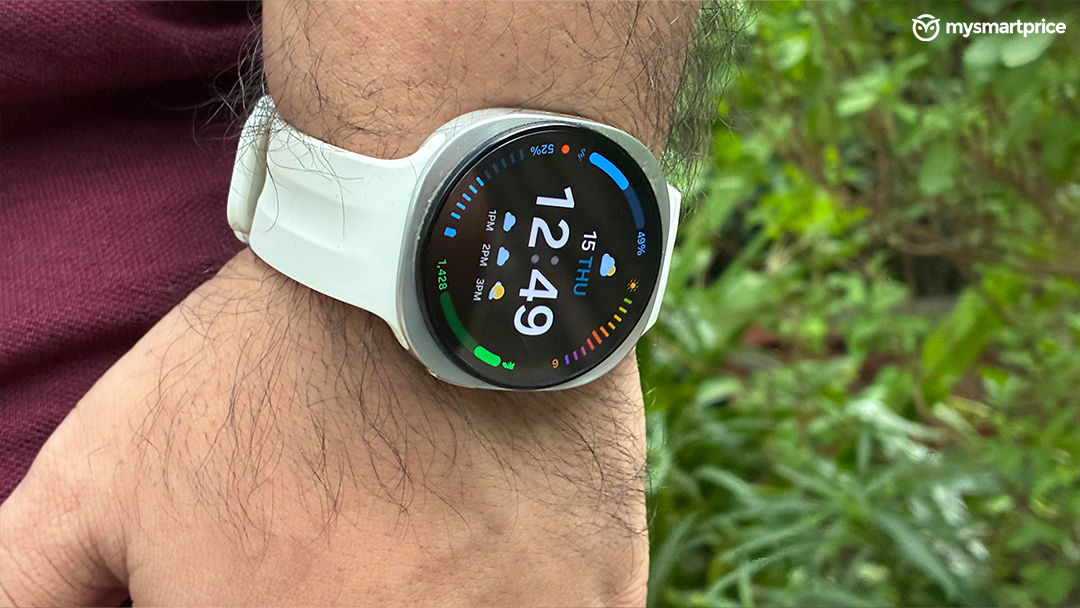
The display is one of the Watch9’s strongest everyday features. Samsung’s AMOLED panel delivers crisp text, rich colours and the deep blacks that make watch faces look particularly good. Its advertised peak brightness reaches 3,000 nits, and outdoor readability is a clear strength. Checking the time, identifying an incoming caller or reading workout information under the sun does not become an exercise in finding the right angle.
Readability matters on a watch more than a specification sheet might suggest. Most interactions are brief, often while you are doing something else. You want to pick out a number or read a label immediately. The Watch9’s sharp presentation and strong contrast help it do that well.
It also makes the health summaries easier to navigate. Scores, progress indicators and individual readings are clear enough for a quick check on the wrist. For the more detailed sleep and oxygen graphs, I still prefer the larger screen of the phone, but that is about the amount of information involved.
Always-on display adds to the convenience. A glance is enough to check the time without deliberately waking the screen. There is a battery cost to keeping it enabled, but as a display experience, the Watch9 leaves very little to complain about.
Sleep Tracking: Watch9 Is Now A Part of My Routine
After the sleep study, which recorded episodes of my brother’s blood oxygen saturation falling to around 80 per cent, he began using a BiPAP machine. My attention to the overnight records continued.
I looked at how long he was sleeping, how interrupted those nights appeared and whether the oxygen graph continued to show the patterns I had noticed earlier. Around 5am became a particular point of interest because that was when the drops had often appeared.
During the process of comparing BiPaP machines, I also followed which nights showed longer recorded sleep and fewer apparent oxygen dips. Those observations helped me keep track of his experience, although the watch could not establish which machine or settings were medically appropriate. It cannot measure a BiPAP mask leak either; suspected leaks need to be checked through the equipment’s data and the treating team. Its role was to provide an additional record of the night.
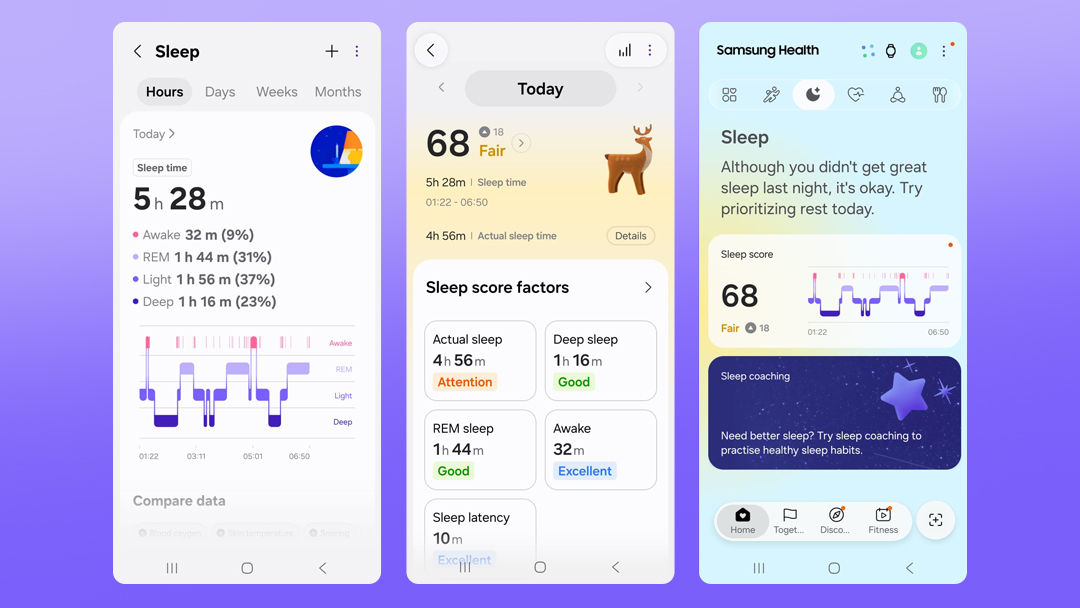
Checking the sleep report has since become part of my morning routine. On 11 October, the sleep score reached 80 for the first time, with roughly seven and a half hours of recorded sleep. After repeatedly seeing short nights and disrupted sleep, I was genuinely happy to open that report. It was an encouraging change, even though a better score alone could not tell us whether the condition was adequately controlled.
Understanding the Night Beyond a Single Score
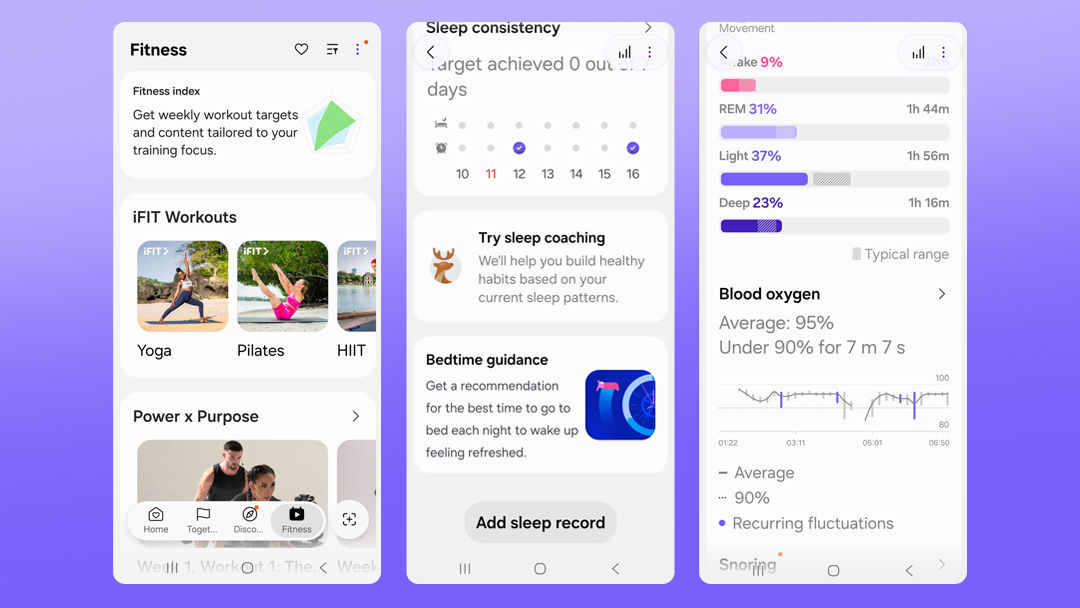
The sleep score is the obvious starting point, but the detail underneath it is more useful. Samsung Health shows when the recorded sleep session began and ended, alongside the estimated time spent asleep. The timeline divides the night into light, deep and REM sleep, with awake periods showing where sleep was interrupted. That helps distinguish a long recorded night from one that was reasonably continuous.
Sleep latency estimates how long it took to fall asleep, while time in bed provides context for the actual sleep duration. Nighttime movement adds another indication of how settled the night was. There is also a consistency view that looks at how regularly bedtime and waking time align with the goals set in the app.
For my needs, the overnight blood-oxygen graph was particularly relevant. Being able to examine estimated readings across the night, rather than look at one isolated number, helped me identify the recurring pattern. With advanced measurements enabled, Samsung Health also records skin temperature during sleep. This is a skin-temperature reading, rather than a clinical measurement of body temperature.
The related Vitals view brings together overnight heart rate, heart-rate variability, respiratory rate, skin temperature and blood oxygen. Heart-rate variability refers to variation in the intervals between heartbeats, while respiratory rate estimates breathing frequency. Vitals compares these measurements against an established personal baseline to highlight changes from what is usual for the wearer.
Snore detection adds another layer, showing snoring duration and offering optional audio recordings. This requires the connected phone’s microphone, with the phone positioned near the sleeper and the feature enabled. It is useful to know that this part of the report depends on the phone as well as the watch. The only downside is that, the watch can record this data only when the phone is charging. So not everyone would be charging their phones overnight every night and thus not be able to get this data.
There is enough information here to look past the headline score and understand why two nights with similar durations might feel different. In my case, the timing of interruptions and the oxygen graph mattered much more than how much deep sleep the app estimated.
These are still wearable estimates. Samsung also provides a separate sleep-apnea screening feature through Samsung Health Monitor, distinct from the ordinary sleep and oxygen graphs discussed here. Samsung says that screening feature should not be used by people already diagnosed with sleep apnea or as a replacement for medical care. And thus I followed it with two sleep specialists and continue to discuss data and treatment with them on a frequent basis. However, the watch did help me navigate through these much better than what I might have without it.
Samsung Health: Detailed, but Give It Some Time
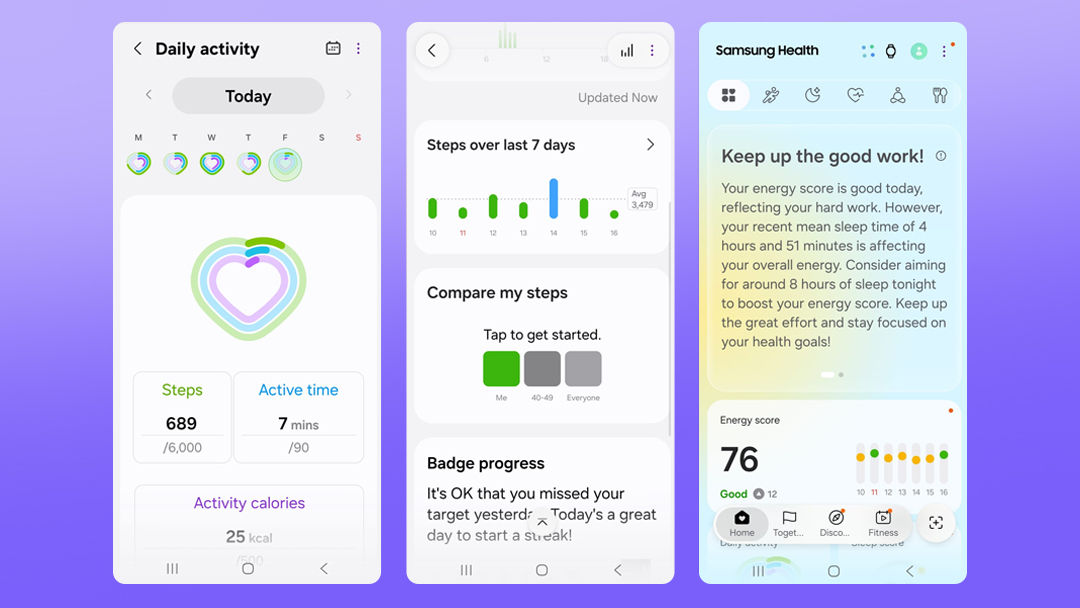
The amount of information is both a strength and something you need time to get used to. I spent much of the first 15 days figuring out which data lived where and how the different views related to each other. The app offers explanations and summaries, but I would not describe the entire experience as immediately obvious.
My focus was mostly on sleep, so that was the section I became familiar with first. Sleep Coaching made it more approachable by assigning me a sleep animal based on my pattern. It is an accessible way to introduce your sleeping habits, although the useful part is what the app suggests doing next.
The coaching programme includes tasks, checklists and guidance. Bedtime Guidance uses recent sleep and a chosen wake-up time to suggest when to turn in. That gives the advice a practical direction: work backwards from the morning alarm, allow time to wind down and try to make bedtime more consistent. A low score becomes something you can respond to, rather than simply another disappointing number on a screen.
Energy Score is separate from the sleep score. It draws on recent sleep and activity to provide a daily readiness estimate. I would still consider how I actually feel, but the additional context can help connect an unsettled night with the following day.
Other Health Features: More Context for Everyday Habits
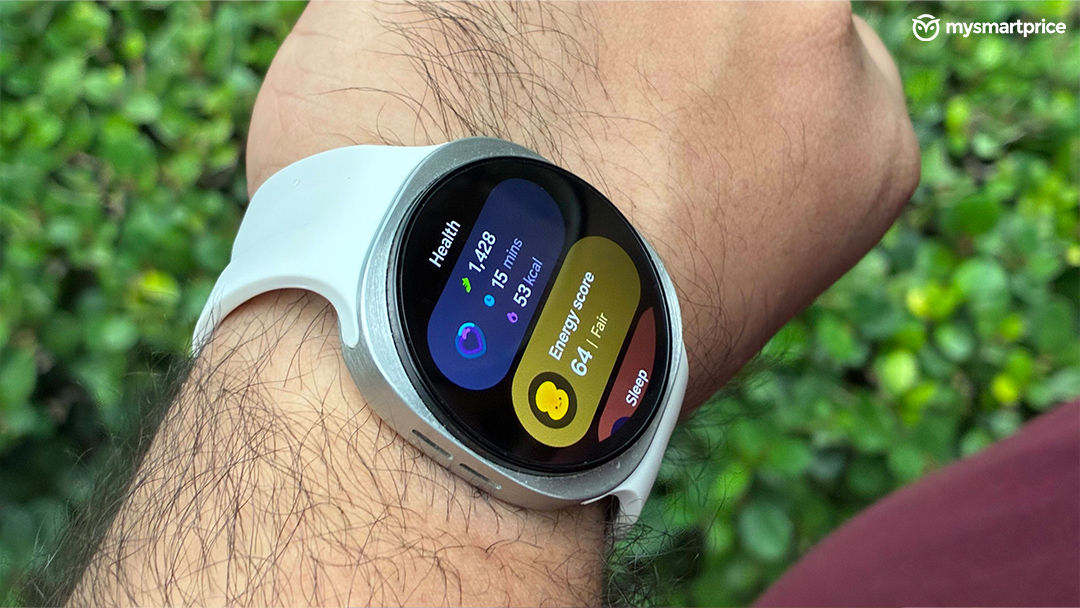
Beyond sleep, the Watch9 offers heart-rate monitoring for resting and active readings, along with an ECG function that records the heart’s electrical activity for a rhythm assessment. ECG sits within Samsung Health Monitor and requires a compatible Samsung phone. That restriction is relevant if you are considering the watch for use with another Android brand.
Blood-pressure monitoring is another useful addition, but it needs some preparation. The watch requires calibration against an upper-arm cuff, followed by recalibration every four weeks, and readings should be taken at rest. It adds a convenient way to follow measurements between cuff checks, rather than removing the need for a conventional monitor.
Heart Health Score attempts to connect several parts of your routine. It combines information about sleep, activity and body composition with vascular-load insights to provide a wellness indicator you can follow over time. It should be understood as guidance about habits, rather than a medical assessment of the heart.
Daily Cardio Load looks at accumulated physical strain and recovery, while Fitness Index uses measures including heart rate, VO2 max and activity to build a broader picture of fitness. Body-composition estimates add information beyond weight alone. Together, these tools give users more to work with than a daily step target, although my time with the Watch9 has been much more focused on sleep than on assessing every training feature.
For me, that depth is the stronger argument for a premium smartwatch. The value depends on whether you spend enough time with the information to find what is relevant to you.
For people tracking thier proteins and wanthing to be a calorie deficit the Samsung Health app also allows adding whatever you have had in the day and there was extensive Indian database, which seems to be expanding as we speak.
Battery and Charging: A Routine You Need to Plan Around
With connected calls and very few other notifications, I get around a day and a half. With always-on display, GPS, and about an hour of workout tracking, that falls to roughly a day, even with other notifications disabled and calling left available.
While this is manageable, it does mean that people like me who use the watch overnight need to find a charging window during the day or before bed. You cannot simply leave it charging all night if sleep tracking is the feature you care about most.
Another point to keep in mind is that fully charging the watch takes about 1.5 to 2 hours, which on a daily level might not work out for a few.
Verdict: The Value Is in What You Do With the Data
The Galaxy Watch9 delivers the everyday experience I expect from a premium smartwatch. It is a comfortable alternative to the bulkier Ultra, and the display is excellent. The sporty styling will not suit everyone, and charging every day or so requires some planning, particularly for overnight use.
Its stronger appeal lies in the depth of its health information and the effort Samsung Health makes to explain it. There is a learning period, and you are unlikely to use every feature equally. But if you have a reason to pay closer attention to your sleep, activity or longer-term habits, there is plenty here to explore.
In my case, the watch helped document a concern that I then took to a specialist. The sleep study provided the diagnosis, and medical care remains central to my brother’s treatment. The watch has given me an additional way to follow his nights and notice changes worth discussing. After a month of use, this is the thing that has stayed with me. I still use it to check the time and take calls, but the screen I now look forward to opening each morning is the sleep report.