
Samsung Galaxy S26 Ultra 1TB, 16GB RAM
+ Compare
Market Status: Out of Stock
★
4.8/5 648 Ratings
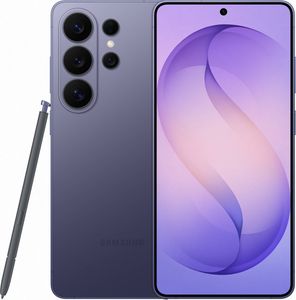

View Gallery
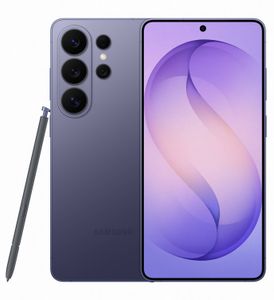
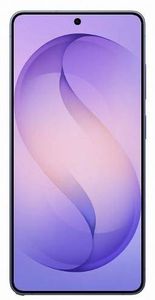
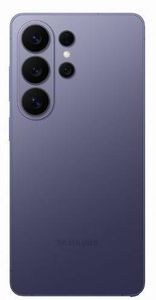
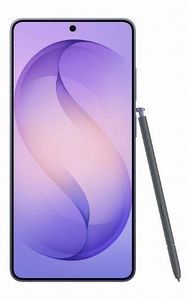

Key Specifications
Processor
Snapdragon 8 Elite Gen 5 Octa coreDisplay
6.9″ (17.53 cm) 120Hz Dynamic AMOLED 2xRear Camera
200+10+50+50 MPFront Camera
12 MPRAM | Storage
16 GB | 1 TBBattery
5000 mAh | 60W Fast ChargingNetwork
Dual SIM: 5G & 5GOS
Android v16
View Full Specs
Samsung Galaxy S26 Ultra 1TB, 16GB RAM Prices
12 GB + 256 GB
Starting from ₹130,999
View All
Samsung
₹130,999
Go To Store
Amazon
₹130,999
Go To Store
12 GB + 512 GB
Starting from ₹150,999
View All
Amazon
₹150,999
Go To Store
16 GB + 1 TB
Starting from ₹174,999
View All
Last Price
₹174,999
(Out of Stock)
Frequently Asked Questions
Does the Samsung Galaxy S26 Ultra have an under-display fingerprint sensor?
Yes. The Galaxy S26 Ultra features an advanced ultrasonic under-display fingerprint sensor that creates a 3D map of your fingerprint, making it more secure than optical sensors. It works reliably even with slightly damp fingers and unlocks the phone quickly and accurately.
Does the Galaxy S26 Ultra have a privacy screen mode?
Yes. The Galaxy S26 Ultra is the world's first smartphone with a built-in hardware-level Privacy Display. It narrows the screen's viewing angle so only the person looking straight at the phone can see the content. You can turn it on via the Quick Settings panel or go to Settings > Privacy > Privacy Display. It can also be set to activate automatically for specific apps, password fields, or incoming notifications.
How does Samsung Knox protect data on the Galaxy S26 Ultra?
Samsung Knox is a multi-layered security platform built into the Galaxy S26 Ultra at the hardware level. It continuously monitors for threats, encrypts sensitive data in a secure vault, and is trusted by governments and enterprises worldwide for protecting classified information.
Can I control app permissions and AI access on the Galaxy S26 Ultra?
Yes. One UI on the S26 Ultra gives you granular control over every app's permissions, including camera, microphone, location, and Galaxy AI features. You can manage these at any time in Settings > Privacy > Permission Manager.
Does Samsung share Galaxy AI data with third parties on the S26 Ultra?
Many Galaxy AI features on the S26 Ultra process data entirely on-device, so your personal content never leaves the phone. Where cloud processing is used, Samsung provides clear disclosure and does not sell or share your personal data with advertisers.
Is there a Secure Folder on the Galaxy S26 Ultra?
Yes. Secure Folder creates a private, Knox-encrypted space on the S26 Ultra that is protected by a separate password, PIN, pattern, or biometric. Apps, files, and photos stored inside are completely isolated from the rest of the phone and invisible to other apps.
Can I use Private DNS on the Galaxy S26 Ultra for safer browsing?
Yes. The S26 Ultra supports Private DNS configuration, letting you route all DNS queries through an encrypted resolver for enhanced browsing privacy. You can set this up in Settings > Connections > More Connection Settings > Private DNS.
How does the Galaxy S26 Ultra handle location privacy?
One UI on the S26 Ultra lets you grant each app either precise or approximate location access, or restrict it entirely. A clear indicator appears in the status bar whenever any app accesses your location in the background, so you always know what is happening.
Does the Galaxy S26 Ultra support biometric authentication beyond fingerprint?
Yes. The S26 Ultra supports both the ultrasonic under-display fingerprint sensor and face recognition using the front camera with liveness detection. You can use either or both together for flexible and secure device access.
Can I lock individual apps on the Galaxy S26 Ultra?
Yes. One UI's App Lock feature lets you require biometric or PIN authentication before opening specific apps, adding an extra layer of protection beyond the lock screen, ideal for banking, messaging, or private photo apps.
Does the Samsung Galaxy S26 Ultra receive regular security updates?
Yes. Samsung provides monthly security patches for the Galaxy S26 Ultra and guarantees 7 years of both OS upgrades and security updates, one of the longest software support commitments available on any Android smartphone.
How does the S26 Ultra protect against phishing and malicious links?
Samsung's built-in Link Protection feature and Knox-powered threat detection scan URLs and downloads in real time, warning you before you reach potentially harmful content. This keeps you safer whether you are browsing, messaging, or checking email.
Can I hide my Galaxy S26 Ultra's real phone number using Samsung features?
Yes. The S26 Ultra supports dual Nano-SIM plus dual eSIM, allowing you to keep two separate numbers active at once. You can use a secondary SIM or eSIM for less trusted contacts or services, keeping your primary number private.
What display technology does the Samsung Galaxy S26 Ultra use?
The Galaxy S26 Ultra features a 6.9-inch Dynamic LTPO AMOLED 2X display with a variable refresh rate of 1 to 120Hz, HDR10+ support, 10-bit colour depth, and peak brightness of 2,600 nits. The resolution is 1440 x 3120 pixels at approximately 500 ppi, making it one of the sharpest and most vivid screens on any smartphone.
How big is the screen on the Galaxy S26 Ultra?
The Galaxy S26 Ultra has a 6.9-inch display, offering an expansive canvas that is ideal for S Pen note-taking, video streaming, gaming, and productivity work. Despite its large size, the slim 7.9mm profile keeps the phone manageable in hand.
Does the Galaxy S26 Ultra have always-on display?
Yes. The Always-On Display on the S26 Ultra can show the time, notifications, S Pen notes, and customised clock styles at a glance without fully waking the screen. The LTPO panel drops to 1Hz when displaying the AOD, keeping battery impact minimal.
Does the S26 Ultra screen support HDR content?
Yes. The S26 Ultra is HDR10+ certified and supports 10-bit colour depth, so streaming services and locally stored content display a wide, accurate colour range with rich contrast and vibrant detail. The display covers the DCI-P3 colour gamut for professional-grade colour reproduction.
How does the S26 Ultra display compare to the S25 Ultra?
The S26 Ultra maintains the same display size and peak brightness as the S25 Ultra but adds 10-bit colour depth support and the new hardware-level Privacy Display, the world's first on a smartphone. The Gorilla Glass Armor 2 protection with DX anti-reflective coating also reduces glare by up to 40%.
What is the resolution of the Galaxy S26 Ultra display?
The Galaxy S26 Ultra has a Quad HD+ resolution of 1440 x 3120 pixels at approximately 500 ppi. At this density, individual pixels are completely imperceptible, making text crisp and images beautifully sharp at any viewing distance.
Does the Galaxy S26 Ultra support 120Hz refresh rate?
Yes. The S26 Ultra's LTPO panel automatically adjusts between 1Hz and 120Hz depending on what is on screen. This means buttery-smooth scrolling and animations at full speed while intelligently saving battery when viewing static content.
How does the S26 Ultra display perform in direct sunlight?
With peak brightness of 2,600 nits, the S26 Ultra display remains highly readable in direct sunlight. The Gorilla Glass Armor 2 with DX anti-reflective coating further reduces glare, making outdoor use comfortable without needing to shield the screen.
Does the resolution setting affect battery life on the Galaxy S26 Ultra?
Yes. You can choose between FHD+ and QHD+ resolution in display settings. Running at FHD+ noticeably extends daily battery life, while QHD+ gives you the maximum visual sharpness for media consumption and S Pen work.
Is the Galaxy S26 Ultra display good for gaming?
Yes. The 120Hz AMOLED panel delivers smooth, fluid motion in fast-paced games, while the 2,600 nit peak brightness ensures visibility in bright environments. The display's low touch latency and rapid response time make it an excellent gaming screen.
Does the S26 Ultra have an anti-reflective coating?
Yes. The S26 Ultra is protected by Corning Gorilla Glass Armor 2, which features a DX anti-reflective coating that reduces glare by up to 40% compared to standard glass. This makes the display noticeably clearer in bright indoor and outdoor lighting conditions.
What colour accuracy does the Samsung Galaxy S26 Ultra display offer?
The S26 Ultra supports 10-bit colour depth and the DCI-P3 wide colour gamut, allowing it to display over a billion colours with high accuracy. Colour calibration is excellent out of the box, making it a great screen for photo and video editing.
How long does the battery last on the Samsung Galaxy S26 Ultra?
The Galaxy S26 Ultra has a 5,000mAh battery. Combined with the power-efficient Snapdragon 8 Elite Gen 5 processor and the LTPO display that drops to 1Hz when idle, it delivers strong all-day battery life for most users, with lighter users often getting into a second day.
Does the Galaxy S26 Ultra support fast charging?
Yes. The S26 Ultra supports 60W Super Fast Charging 3.0, the fastest wired charging ever offered on a Galaxy smartphone. It can reach 0 to 75% charge in approximately 30 minutes, so a short charge tops up the battery significantly.
Does the Samsung Galaxy S26 Ultra support wireless charging?
Yes. The S26 Ultra supports 25W wireless charging via the Qi2.2 standard, a significant upgrade over previous models. It also supports 4.5W reverse wireless charging (Wireless PowerShare), letting you charge Galaxy Buds or a Galaxy Watch by placing them on the back of the phone.
How long does the S Pen battery last on the Galaxy S26 Ultra?
The built-in S Pen does not require any charging for standard stylus use, as it draws power from the phone using capacitive technology. Bluetooth-based Air Action gestures also use the phone's power, so the S Pen itself is always ready without a separate battery to manage.
What is the best way to get a Samsung Galaxy S26 Ultra battery replaced?
Samsung's official service centres offer Galaxy S26 Ultra battery replacement using genuine components, which preserves the phone's IP68 water resistance rating and warranty. Samsung Care+ subscribers receive priority service, often with same-day turnaround at authorised repair locations.
How can I reset battery usage learning on the Samsung Galaxy S26 Ultra?
Go to Settings > Battery and Device Care > Battery > More Battery Settings, then toggle Adaptive Battery off and back on. This resets the AI learning cycle, prompting the phone to recalibrate its charging and usage predictions to your current habits.
What settings should I adjust to improve battery life on the Galaxy S26 Ultra?
Enable Power Saving mode, lower the screen resolution to FHD+, use Dark Mode to take advantage of the AMOLED display turning off black pixels, and limit background app activity in Battery settings. Letting Adaptive Battery learn your routines over a few days will also meaningfully extend screen-on time.
Does the Galaxy S26 Ultra have good battery health over the long term?
Yes. Samsung's Battery Protection feature can cap charging at 85% to slow the chemical degradation of the battery cell, helping it retain more of its original capacity over months and years of use. This is especially useful if you tend to keep the phone plugged in overnight.
What is the battery capacity of the Samsung Galaxy S26 Ultra?
The Galaxy S26 Ultra has a 5,000mAh battery, providing ample capacity for its large display and powerful processor. It is large enough to comfortably power a full day of heavy use including photography, navigation, and streaming.
Can I use a 25W charger with the Samsung Galaxy S26 Ultra?
Yes. The S26 Ultra accepts any compatible USB-C PD charger and will charge at the maximum rate the charger supports, up to 60W. Using a 25W charger will still charge the phone, just at 25W rather than the maximum 60W speed.
Does charging the Galaxy S26 Ultra generate excessive heat?
The S26 Ultra includes intelligent charge management that moderates heat during fast charging. Adaptive Charging also learns your overnight schedule and slows the final charge stage to reduce both heat and long-term battery wear automatically.
Does the Galaxy S26 Ultra support battery share for other devices?
Yes. Wireless PowerShare on the S26 Ultra lets you charge other Qi-compatible devices by placing them on the back of the phone. This works with Galaxy Watch, Galaxy Buds, and other Qi-compatible phones, giving you a convenient way to top up accessories on the go.
How is the performance of the S26 Ultra's processor?
The Galaxy S26 Ultra is powered by the Snapdragon 8 Elite Gen 5 for Galaxy, a chipset custom-tuned for Samsung. It delivers up to 19% faster CPU performance, 24% better GPU performance, and 39% faster NPU performance compared to the previous generation, making it the fastest Galaxy ever.
Is the Galaxy S26 Ultra suitable for gaming in terms of sustained performance?
Yes. The S26 Ultra features a redesigned vapor chamber with thermal interface material along the sides of the processor, spreading heat more efficiently. This improved cooling allows the Snapdragon 8 Elite GPU to maintain high frame rates during extended gaming sessions without significant throttling.
What are the results of the Samsung Galaxy S26 Ultra performance test?
In independent benchmarks, the S26 Ultra achieves top-tier scores in CPU, GPU, and storage tests, regularly placing among the very best Android flagships. The Snapdragon 8 Elite Gen 5 GPU delivers a 24% performance boost over its predecessor, resulting in noticeably better graphics in demanding games.
Does the Galaxy S26 Ultra overheat during gaming?
The S26 Ultra's redesigned vapor chamber dissipates heat effectively during intensive gaming. In comparative tests, the Galaxy's improved thermal management maintains stronger sustained performance over long gaming sessions compared to previous models.
How much RAM does the Galaxy S26 Ultra have?
The S26 Ultra comes with 12GB of LPDDR5X RAM on the 256GB and 512GB models, and 16GB of LPDDR5X RAM on the 1TB model. Both configurations provide excellent multitasking capability, keeping many apps active in memory simultaneously without slowdowns.
What storage options are available for the Galaxy S26 Ultra?
The S26 Ultra is available in 256GB, 512GB, and 1TB configurations, all using UFS 4.0 storage for fast read and write speeds. This makes app launches, photo saves, and large file transfers noticeably quick in everyday use.
Which Samsung Galaxy model has the strongest GPU performance?
The Galaxy S26 Ultra leads the Samsung lineup with the Snapdragon 8 Elite Gen 5 GPU, offering 24% better graphics performance than the previous generation. It handles demanding titles with high frame rates and detailed visuals, making it the top choice for mobile gaming within the Galaxy range.
Does the Galaxy S26 Ultra support DeX mode for desktop use?
Yes. Galaxy DeX on the S26 Ultra gives you a full desktop-style interface when connected to a monitor, with resizable windows, keyboard and mouse support, and the ability to run multiple apps simultaneously. It is a practical way to use the phone as a lightweight productivity workstation.
How does the S26 Ultra handle multitasking?
With up to 16GB of RAM and One UI's multitasking tools, including App Pair, the Taskbar, and Multi-Window, the S26 Ultra keeps many apps active simultaneously. Switching between tasks is immediate, and background apps resume where you left them without reloading.
Does the Galaxy S26 Ultra support 5G?
Yes. The S26 Ultra supports both sub-6GHz and mmWave 5G bands, providing access to the fastest available mobile data speeds for cloud gaming, video streaming, and large file transfers wherever 5G coverage is available.
Does the S26 Ultra have Wi-Fi 7 support?
Yes. The Galaxy S26 Ultra supports Wi-Fi 7 (802.11be), enabling significantly higher wireless throughput and lower latency than Wi-Fi 6E. This is especially noticeable for cloud gaming, 4K video streaming, and transferring large files over a home network.
Is the Galaxy S26 Ultra's performance stable over long periods of use?
Yes. The combination of the Snapdragon 8 Elite Gen 5 chip, Samsung's One UI software optimisations, and the improved vapor chamber cooling system means the S26 Ultra sustains strong performance throughout the day and continues to run smoothly after extended periods of ownership.
Does the Galaxy S26 Ultra support Samsung DeX?
Yes. The S26 Ultra supports both wired and wireless Samsung DeX, transforming the phone into a desktop computing experience. Connect to any compatible monitor via USB-C or wirelessly, and use a Bluetooth keyboard and mouse to run a full windowed productivity environment.
What are the camera specs of the Samsung Galaxy S26 Ultra?
The Galaxy S26 Ultra has a quad-camera system on the rear: a 200MP wide main sensor with an f/1.4 aperture, a 50MP ultrawide, a 50MP periscope telephoto with 5x optical zoom, and a 10MP telephoto with 3x optical zoom. The front has a 12MP selfie camera. This setup gives you exceptional range and flexibility across all focal lengths.
What is the main camera sensor resolution on the Galaxy S26 Ultra?
The S26 Ultra's main camera uses a 200-megapixel sensor. In everyday shooting it uses pixel binning to produce sharp 12MP photos with excellent dynamic range, while the full 200MP mode captures extraordinary detail for large prints or heavy cropping.
Can the Galaxy S26 Ultra take moon pictures?
Yes. The S26 Ultra's 100x Space Zoom, combined with its AI Scene Optimiser, automatically detects lunar subjects and enhances fine surface detail, producing strikingly detailed moon shots that are a signature feature of the Ultra lineup.
Does the Samsung Galaxy S26 Ultra support RAW shooting?
Yes. The S26 Ultra supports RAW (DNG) file capture in both Pro Mode and Expert RAW. Shooting in RAW preserves all the sensor data without compression, giving photographers maximum flexibility when editing in apps like Lightroom, Photoshop, or Samsung's own Expert RAW application.
What AI camera features does the Galaxy S26 Ultra offer?
Galaxy AI on the S26 Ultra includes Photo Assist with Generative Edit (add, remove, or recompose elements), Sketch to Image, Object Eraser, Shadow Eraser, Reflection Eraser, Portrait Studio, AI Scene Optimiser, and Creative Studio for generating stickers, wallpapers, and custom images from prompts.
How does the S26 Ultra camera perform in low light?
The S26 Ultra's f/1.4 aperture on the main camera allows 47% more light than the S25 Ultra's main camera, significantly improving low-light brightness and detail. Combined with AI-enhanced Nightography and multi-frame noise reduction, it delivers bright, sharp results in challenging lighting conditions.
What are the different camera lenses on the S26 Ultra?
The S26 Ultra has four rear cameras: a 200MP wide main (f/1.4), a 50MP ultrawide, a 50MP periscope telephoto with 5x optical zoom (f/2.9), and a 10MP telephoto with 3x optical zoom. Together, these cover a huge range from wide architectural shots to distant subjects at 100x Space Zoom.
Does the Galaxy S26 Ultra have video stabilisation?
Yes. The S26 Ultra features Optical Image Stabilisation (OIS) on the main camera, plus AI-powered Super Steady video mode for additional electronic stabilisation. It also supports Horizontal Lock, which keeps the frame level even as you rotate the phone during recording.
Can the Galaxy S26 Ultra record 4K video at 120fps?
Yes. The S26 Ultra can record 4K video at up to 120fps, producing smooth slow-motion footage with excellent detail. It also records 8K video at up to 30fps and supports the APV (Advanced Professional Video) codec for high-quality, near-lossless video capture aimed at professional workflows.
Which camera sensor is used in the Samsung Galaxy S26 Ultra?
The S26 Ultra uses a 200MP primary sensor with multi-directional PDAF (Phase Detection Autofocus) and OIS. The sensor's large 1/1.3-inch format gives it a significant advantage in low-light conditions by capturing more light per pixel, even when using pixel binning for standard shots.
How does the S26 Ultra camera compare to the S26 Plus for ultrawide shots?
The S26 Ultra's 50MP ultrawide captures considerably more detail than the S26 Plus's 12MP ultrawide, with better corner sharpness and improved low-light performance. For users who frequently shoot wide-angle scenes, this is one of the clearest hardware differences between the two models.
Does the S26 Ultra offer AI video editing features?
Yes. Galaxy AI video tools on the S26 Ultra include Audio Eraser, which removes unwanted background noise such as wind or crowd sound from video, plus AI-assisted reframing and object recognition. Audio Eraser now also works directly within YouTube, Netflix, and Instagram without leaving the app.
Which is better the Galaxy S26 Ultra or the iPhone 17 Pro Max?
The Galaxy S26 Ultra offers a broader feature set: a 200MP camera with 100x Space Zoom, a built-in S Pen, the world's first hardware Privacy Display, 7 years of OS and security updates, and Samsung DeX for desktop use. It gives power users and photographers more tools than the iPhone 17 Pro Max.
Which phone camera is better the S26 Ultra or the iPhone 17 Pro Max?
The S26 Ultra's camera system is more versatile, with a 200MP main sensor, a 50MP 5x telephoto, and a 10MP 3x telephoto giving four focal lengths versus the iPhone 17 Pro Max's three. The f/1.4 aperture also lets in more light, and Galaxy AI tools like Generative Edit add extensive post-capture creative options.
How does the S26 Ultra vs iPhone 17 Pro Max handle heat during gaming?
The S26 Ultra's redesigned vapor chamber is engineered to spread heat away from the processor more efficiently, helping it sustain higher performance over longer gaming sessions. Samsung's Game Booster also optimises resource allocation to reduce thermal build-up during intense gameplay.
Galaxy S26 Ultra vs iPhone 17 Pro Max which performs better while streaming gameplay?
The S26 Ultra handles simultaneous gaming and live streaming efficiently, thanks to its Snapdragon 8 Elite Gen 5 chip and up to 16GB RAM, which allocates resources between the game and the streaming app without significant frame-rate drops on platforms like YouTube Live or Twitch.
Which has better screen recording during gaming S26 Ultra or iPhone 17 Pro Max?
The S26 Ultra includes a built-in Game Recording tool with audio mixing options, front-camera picture-in-picture overlay, and selectable resolution, giving gaming content creators more control than the standard screen recording available on the iPhone 17 Pro Max.
How does the S26 Ultra compare to iPhone 17 Pro Max for 5G gaming stability?
Both phones offer strong 5G connectivity, but the S26 Ultra's Wi-Fi 7 support provides a meaningful advantage for low-latency wireless gaming on compatible routers. In mobile data scenarios, both deliver good 5G performance depending on network conditions.
Which is better for competitive mobile gaming S26 Ultra or iPhone 17 Pro Max?
The S26 Ultra's 120Hz AMOLED display with low touch latency, Snapdragon 8 Elite Gen 5 GPU, Game Booster settings, and improved vapor chamber cooling make it a strong competitor for serious mobile gamers looking for sustained frame rates and smooth controls.
In what aspects does the Galaxy S26 Ultra offer advantages over the iPhone 17 Pro Max?
The S26 Ultra stands out with its 200MP camera and 100x zoom range, built-in S Pen, hardware Privacy Display, 7-year update guarantee, Samsung DeX desktop mode, up to 1TB storage, and greater Android customisation. These are features the iPhone 17 Pro Max does not offer.
How does the S26 Ultra battery life compare to the iPhone 17 Pro Max?
The S26 Ultra's 5,000mAh battery and LTPO display that drops to 1Hz when idle give it strong all-day endurance. It also charges significantly faster at 60W versus the iPhone 17 Pro Max's slower wired charging, meaning less time plugged in when you do need to top up.
Which phone camera is better for portrait photography during travel S26 Ultra or iPhone 17 Pro Max?
The S26 Ultra's combination of a 200MP main sensor, two telephoto focal lengths, and Galaxy AI's Portrait Studio gives it more versatility for travel portraits, allowing natural background compression at 3x or 5x, as well as strong low-light portrait performance thanks to the f/1.4 aperture.
How does the S26 Ultra compare to iPhone 17 Pro Max for PUBG Mobile?
The S26 Ultra's Snapdragon 8 Elite Gen 5 GPU and 120Hz display handle PUBG Mobile's high-graphics mode smoothly, and Game Booster lets you fine-tune performance and notifications during play. Its improved thermal management also helps maintain consistent frame rates in extended ranked matches.
Are Samsung Galaxy S26 Ultra AI features better than iPhone 17 Pro Max?
Galaxy AI on the S26 Ultra covers a broad range of daily tasks: Generative Edit for photos, real-time call translation, Circle to Search, AI note summarisation, and Creative Studio for generating custom images and stickers. Apple Intelligence on the iPhone 17 Pro Max also offers strong AI tools, but Galaxy AI includes more on-device creative and productivity features.
How does the S26 Ultra's S Pen compare to Apple Pencil on iPhone?
The S26 Ultra's S Pen is built directly into the phone with no separate purchase required, no pairing, and no charging needed for stylus input. Apple Pencil is a separate accessory that only works with iPad, not iPhone, making the S26 Ultra a far more integrated and convenient experience for note-taking and drawing.
What Galaxy AI features are available on the Samsung Galaxy S26 Ultra?
The S26 Ultra ships with the full Galaxy AI suite in One UI 8.5, including Circle to Search, Live Translate (real-time call translation), Call Screening (AI answers calls on your behalf), Now Nudge, Now Brief, Note Assist, Transcript Assist, Chat Assist, Photo Assist with Generative Edit, Sketch to Image, Creative Studio, AI Wallpaper, Audio Eraser, and Browsing Assist. Core Galaxy AI features are free with a Samsung account.
What is Circle to Search on the Galaxy S26 Ultra and how do I use it?
Circle to Search lets you search anything on your screen without leaving the app you are using. Simply long-press the home button or navigation bar, then draw a circle, scribble, or tap on any text, image, or object on screen. Google search results appear in a panel beneath, so you can get information instantly and return to what you were doing.
Can the Galaxy S26 Ultra translate phone calls in real time?
Yes. Live Translate on the S26 Ultra translates both sides of a phone call in real time directly on the device. Both speakers hear a translated voice and can read translated text on screen. It supports over 20 languages including English, Spanish, French, German, Hindi, Japanese, Korean, Portuguese, Italian, Polish, Vietnamese, Thai, Chinese, Arabic, Indonesian, Russian, and more. Enable it by going to Settings > Galaxy AI > Call Assist > Live Translate.
What is Now Nudge on the Samsung Galaxy S26 Ultra?
Now Nudge is a proactive Galaxy AI feature introduced with the S26 series. It analyses what is on your screen and surfaces relevant action suggestions directly in the Samsung Keyboard toolbar, the same area where predictive text appears. For example, if a message mentions a date, Now Nudge can offer to add it to your calendar with a single tap. It can also suggest contacts to call, photos to share, locations to open in Maps, and form fields to autofill. Note that Now Nudge requires Samsung Keyboard to be active. Enable it via Settings > Galaxy AI > Now Nudge.
What is Note Assist on the Galaxy S26 Ultra?
Note Assist is a Galaxy AI tool built into Samsung Notes on the S26 Ultra. It can automatically summarise long notes into concise bullet points, format unstructured text into organised templates, translate notes into another language, and generate a cover page. It is useful for turning meeting notes or research into structured, readable summaries in seconds.
Can the Galaxy S26 Ultra generate AI images?
Yes. Creative Studio on the S26 Ultra lets you generate images from text prompts, transform your own photos into different artistic styles, create custom stickers, design wallpapers, and produce personalised invitations or social graphics. Sketch to Image also lets you draw a rough shape and Galaxy AI turns it into a polished realistic or stylised image.
Is Samsung Galaxy AI free to use on the S26 Ultra?
Yes. Core Galaxy AI features on the S26 Ultra are free with a Samsung account and do not require a subscription. This includes Live Translate, Circle to Search, Photo Assist, Note Assist, Now Nudge, Chat Assist, and AI Wallpaper. Samsung has confirmed that these fundamental Galaxy AI features will remain free for Galaxy S26 users.
Is it safe to use Galaxy AI on the Galaxy S26 Ultra?
Yes. Samsung processes many Galaxy AI features entirely on the S26 Ultra's device, meaning your photos, voice recordings, and personal data never leave the phone for those features. For cloud-assisted features, Samsung provides clear disclosure, encrypts data in transit, and does not use your personal content to train models or share it with advertisers. You can review and control permissions for every AI feature in Settings > Privacy.
Does the Galaxy S26 Ultra's AI work without an internet connection?
Many Galaxy AI features on the S26 Ultra are processed on-device using the Snapdragon 8 Elite Gen 5's Neural Processing Unit, and work without internet access. These include some photo editing tools, voice transcription, and local AI suggestions. Features such as Circle to Search, web-based translation, and Generative Edit require a connection as they use cloud or Google services.
What AI features does the Voice Recorder app have on the S26 Ultra?
The Voice Recorder app on the S26 Ultra includes Transcript Assist, which automatically transcribes recorded audio into text with speaker identification. It can summarise the transcript into key points, translate it into another language, and supports multiple languages for transcription. This makes it practical for recording meetings, lectures, or interviews and getting a structured written summary immediately after.
Can Galaxy AI on the S26 Ultra summarise web pages or documents?
Yes. Browsing Assist in Samsung Internet on the S26 Ultra can summarise the content of any web page into a concise brief with a single tap. You can also use Note Assist to summarise imported documents in Samsung Notes. Additionally, Now Nudge can surface relevant information from pages you are viewing and offer contextual actions.
How do I turn off Galaxy AI features on the Samsung Galaxy S26 Ultra?
You can manage individual Galaxy AI features by going to Settings > Galaxy AI. From there you can toggle specific features such as Live Translate, Chat Assist, Now Nudge, Now Brief, and Call Screening on or off independently. You can also control which AI features have access to your microphone, camera, or location through Settings > Privacy > Permission Manager.
What AI writing features are available on the Galaxy S26 Ultra?
Chat Assist on the S26 Ultra helps you write, reformat, and adjust the tone of messages across messaging apps and email. It can rephrase text to sound more professional, casual, or concise, and can translate messages into another language before you send. Writing Assist also works in Samsung Notes and other supported apps, offering suggestions and grammar improvements as you type.
What is Horizontal Lock on the Galaxy S26 Ultra and how does it work?
Horizontal Lock is a video stabilisation feature within the S26 Ultra's Super Steady mode that keeps the horizon perfectly level even when you rotate or tilt the phone up to 360 degrees. It acts like a built-in digital gimbal, using the phone's gyroscope, accelerometer, and AI image processing to analyse motion in real time and counteract it. To use it, open the Camera app, switch to Video mode, tap the Super Steady icon (the running figure), then select Horizontal Lock. It records up to 4K resolution, making it one of the most capable software-based stabilisation systems on any smartphone.
What is Agentic AI on the Galaxy S26 series and what tasks can it handle?
Agentic AI is the ability of the Galaxy S26 series to handle complex, multi-step tasks across apps autonomously on your behalf. Powered by Gemini and Perplexity (alongside Bixby), you can simply say or type a task such as 'Book me a taxi to the airport' and the AI opens the relevant app, fills in the destination, and prepares the booking for your one-tap confirmation. Other examples include ordering food, researching information across apps, and coordinating actions without you switching manually between screens. You only need to review and confirm the result — the AI handles the steps in between.
Can I edit photos by describing what I want in words on the Galaxy S26 Ultra?
Yes. Photo Assist on the S26 Ultra now supports natural language prompts, so you can describe what you want to change rather than adjusting sliders. For example, type or say 'change the lighting to evening glow' or 'edit this to look like night time' and the AI reimagines the scene accordingly while keeping the subjects intact. You can also restore missing parts of objects, reframe compositions, or add elements, all by describing the result you want. This makes professional-style photo editing accessible to anyone, without needing to know editing tools.
Does the Samsung Galaxy S26 Ultra come with 512GB internal storage?
Yes, the Samsung Galaxy S26 Ultra is available in a 512GB storage variant, giving users ample space for high-resolution photos, 8K videos, games, apps, and work files.
Is 512GB storage enough for gaming and content creation on the Samsung Galaxy S26 Ultra?
The 512GB storage option on the Samsung Galaxy S26 Ultra is ideal for heavy users who regularly install large games, shoot high-quality videos, and store extensive media libraries.
Who should choose the 512GB variant of the Samsung Galaxy S26 Ultra?
The 512GB variant is best suited for gamers, creators, professionals, and users who prefer storing most of their content directly on the device.
Does the Samsung Galaxy S26 Ultra support fast charging?
Yes, the Samsung Galaxy S26 Ultra supports fast charging technology, allowing users to quickly recharge the battery and spend less time plugged in.
How useful is fast charging on the Samsung Galaxy S26 Ultra?
Fast charging is especially useful for power users, gamers, and travellers who need quick battery top-ups during busy days.
Is the Samsung Galaxy S26 Ultra considered a good fast charging flagship phone?
The Samsung Galaxy S26 Ultra combines fast charging with a large battery and AI-powered battery optimisation, making it a strong premium flagship option.
Is the Samsung Galaxy S26 Ultra a good gaming phone?
Yes, the Samsung Galaxy S26 Ultra is designed for high-end gaming with flagship performance, advanced cooling, a smooth display, and a large battery.
Why is the Samsung Galaxy S26 Ultra considered one of the best gaming phones?
The Samsung Galaxy S26 Ultra offers powerful performance, immersive visuals, responsive touch controls, and AI-driven optimisation for demanding games.
Can the Samsung Galaxy S26 Ultra handle heavy gaming for long hours?
Yes, the Samsung Galaxy S26 Ultra is built to support extended gaming sessions with efficient thermal management and battery optimisation.
Is the Samsung Galaxy S26 Ultra 256GB variant good for gaming?
Yes, the Samsung Galaxy S26 Ultra 256GB variant offers flagship-level gaming performance with enough storage for multiple large games and media files.
Can the Samsung Galaxy S26 Ultra 256GB handle heavy games efficiently?
The Samsung Galaxy S26 Ultra 256GB is designed to deliver smooth gaming performance with advanced processing power and thermal management.
Why is the Samsung Galaxy S26 Ultra 256GB considered among the best gaming smartphones?
The Samsung Galaxy S26 Ultra 256GB combines premium hardware, a smooth display, efficient cooling, and long battery life for demanding gaming sessions.
Does the Samsung Galaxy S26 Ultra camera produce natural colours?
Yes, the Samsung Galaxy S26 Ultra camera is designed to deliver detailed images with balanced and natural-looking colours.
Are the colour results from the Samsung Galaxy S26 Ultra camera well reviewed?
The Samsung Galaxy S26 Ultra is generally appreciated for producing vibrant yet realistic colour tones across different lighting conditions.
Is the Samsung Galaxy S26 Ultra good for natural-looking photography?
Yes, the Samsung Galaxy S26 Ultra combines advanced imaging hardware and AI processing to deliver natural-looking photos with accurate tones and detail.
How is the Samsung Galaxy S26 Ultra different from other Galaxy S26 models?
The Samsung Galaxy S26 Ultra offers the most advanced camera system, larger display, bigger battery, and premium flagship features in the Galaxy S26 lineup.
Which Galaxy S26 model is best for power users?
The Samsung Galaxy S26 Ultra is best suited for power users who prioritise advanced photography, productivity, gaming, and premium features.
Is the Samsung Galaxy S26 Ultra the top model in the Galaxy S26 series?
Yes, the Samsung Galaxy S26 Ultra is positioned as the most feature-rich and premium smartphone in the Galaxy S26 series.
Does the Samsung Galaxy S26 Ultra have a bigger battery than the Samsung Galaxy S26?
Yes, the Samsung Galaxy S26 Ultra features a larger battery compared to the Samsung Galaxy S26 for extended usage and heavy workloads.
Is the Samsung Galaxy S26 Ultra better for heavy users because of its battery?
Yes, the Samsung Galaxy S26 Ultra packs a 5000mAh battery with 60W fast charging, making it better suited for heavy gaming, 8K video recording, multitasking, and extended entertainment sessions compared to the Galaxy S26.
How does battery life on the Samsung Galaxy S26 Ultra compare within the series?
The Samsung Galaxy S26 Ultra offers one of the biggest batteries in the Galaxy S26 lineup with a 5000mAh capacity, paired with AI-powered battery optimisation for longer daily usage.
Does the Samsung Galaxy S26 Ultra support fast charging?
Yes, the Samsung Galaxy S26 Ultra supports 60W fast charging, allowing users to quickly recharge the large 5000mAh battery.
Popular Comparisons for Samsung Galaxy S26 Ultra 1TB, 16GB RAM and Similar Mobiles
Samsung Galaxy Z Fold 8 Ultra
VS
Samsung Galaxy Z Fold7
Motorola Edge 70 Fusion
VS
Motorola Edge 70
Samsung Galaxy S26 Ultra
VS
Samsung Galaxy S25 Ultra
vivo S2 5G
VS
vivo T5 5G
Samsung Galaxy Z Flip 8
VS
Samsung Galaxy Z Flip7
Apple iPhone 18 Pro
VS
Apple iPhone 17 Pro Max
Samsung Galaxy S26
VS
Samsung Galaxy S25
Motorola Edge 70 Fusion
VS
Motorola Edge 60 Fusion
Motorola Edge 70 Pro 5G
VS
Motorola Edge 60 Pro
Apple iPhone 18 Pro
VS
Apple iPhone 17
Mobiles ›
Samsung Mobile Phones ›
Samsung Galaxy S26 Ultra 1TB, 16GB RAM
Updated On: Sep 18, 2026
Popular Mobile Price Lists
Popular Mobiles
- Samsung Galaxy Z Fold8
- vivo S2 5G
- Xiaomi Redmi Note 17 5G
- Xiaomi Redmi Note 17 Pro 5G
- Samsung Galaxy Z Fold 8 Ultra
- Motorola Edge 70 Fusion
- iQOO Z11
- Samsung Galaxy F70 Pro 5G
- Samsung Galaxy Z Flip 8
- realme P3
- OnePlus N6x 5G
- vivo T4X
- vivo T5x
- OnePlus N6 5G
- POCO M8 Power 5G
- Samsung Galaxy M47 5G
- Motorola Edge 70
- Apple iPhone 18 Pro
- Xiaomi Redmi Turbo 5
- Motorola Edge 60 Pro