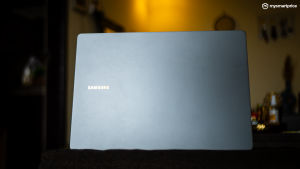
I’ve been using the Samsung Galaxy Book5 Pro for a while now, and what really stood out to me first was the design — clean, subtle, and just effortlessly premium. It doesn’t try to grab attention, and yet it ends up doing exactly that. It’s also ultra-slim, so carrying it around is not an added task. While Samsung does have a Core Ultra 7 256V option, I tested the Core Ultra 5 226V for this review, which costs about Rs 1.31 lakhs for the 14-inch model. Therefore, it’s clearly positioned as a premium ultrabook, competing directly with the MacBook Air.
Samsung Galaxy Book5 Pro
Rs 1,31,900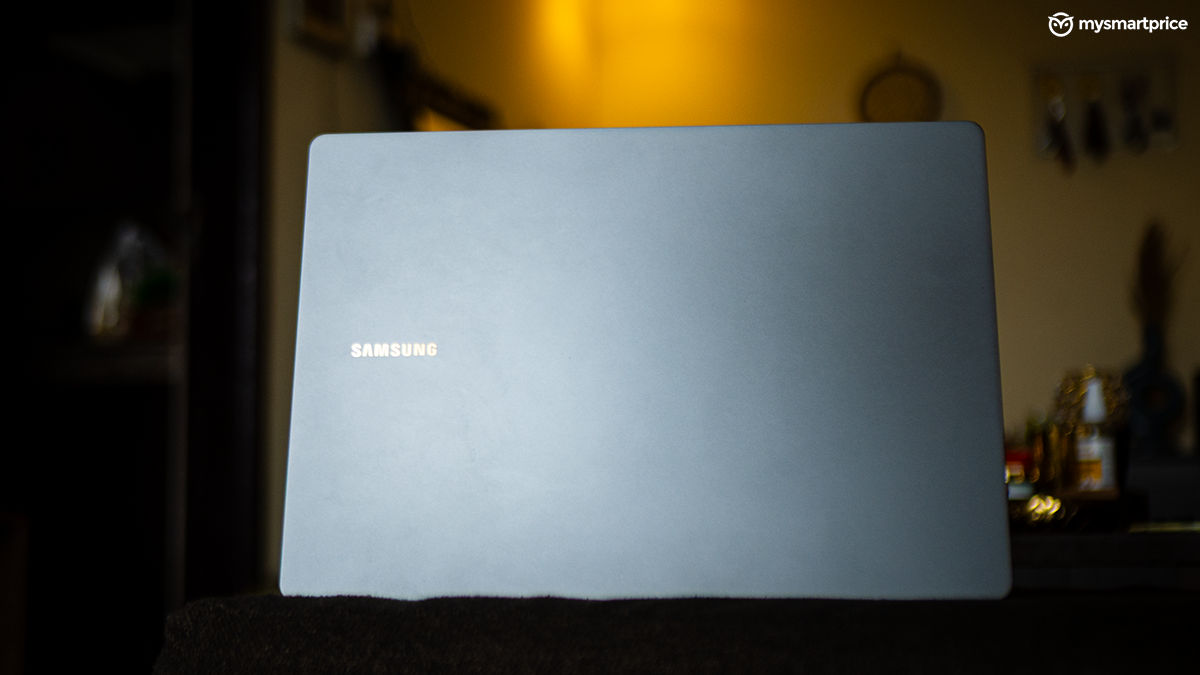
What Is Good?
- Excellent, vibrant and fast display
- Slim, sleek and portable
- Good keyboard and trackpad layout
- Decent performance for everyday work
- Excellent array of ports
- Quick Share and Samsung Ecosystem features are handy
What Is Bad?
- More affordable and powerful alternatives available
- No privacy shutter on the webcam
What really nudged me toward the Galaxy Book5 Pro was the Samsung ecosystem. Since I already use a Galaxy S24 Ultra, the way everything syncs up — from file transfers to call and notification mirroring — adds a nice layer of convenience to daily use. That said, while there’s a lot to like here, my experience with the Galaxy Book5 Pro hasn’t been entirely smooth sailing. After using it for over a month, here’s how things shaped up.
Pricing and Availability in India
The Galaxy Book5 Pro is available via Samsung’s official store and Flipkart. If you plan on buying this laptop, my suggestion is to go via the Flipkart route, where the listed price is Rs 1,26,990 as opposed to the Rs 1,31,990 sticker price on the Samsung store. Here’s a pricing table below for the Core Ultra 5 and 7 variants.
| Variants | Pricing |
| Galaxy Book5 Pro 14-inch (Core Ultra 5 226V) | Rs 1,31,990 |
| Galaxy Book5 Pro 14-inch (Core Ultra 7 256V) | Rs 1,39,990 |
| Galaxy Book5 Pro 16-inch (Core Ultra 7 256V) | Rs 1,49,990 |
Design and Build Quality
The Galaxy Book5 Pro opts for a very minimal, sleek and smart look with an all-metal casing. At a glance, it might even be mistaken for a MacBook Air — the resemblance is clear — but Samsung’s take holds its own with a refined and elegant aesthetic. The lid has a simple Samsung logo on the rightmost side, and the Graphite Grey colour continues to add to the entire subtle theme.

At around 1.23kg, the Galaxy Book5 Pro is shockingly lightweight and thin, making it an absolute joy to carry around when commuting. In fact, I had the choice of choosing this or the MacBook Pro M2 Pro 14-inch for a recent trip to Computex, and I opted for the Book5 Pro purely because my back and I both agreed I am getting old. It’s also one of those laptops that easily slip into the ‘tablet’ compartments in your backpacks, so you don’t really need extra space to accommodate it. The lid does not register fingerprint smudges, and the hinge is also quite sturdy. Plus, you can open it with one hand, which is always good.
| Ports | Specification |
| Ports (Right side) | 3.5mm combo jack, USB Type A 3.2, microSD card slot |
| Ports (Left side) | HDMI 2.1, 2x Thunderbolt 4 (USB Type C) port |
| Connectivity Options | Wi-Fi 6e (802.11ax), Bluetooth 5.3 |
The port selection on the Galaxy Book5 Pro is also quite generous, considering its slim form factor. You get a full-size HDMI port on the left side, and the right side also accommodates a USB-A port, something the MacBook Airs skip.
Keyboard, Trackpad and Webcam
If you come from the Galaxy Book4 Pro, you won’t find any major differences in this department. The keys have decent spacing in between them, avoiding any misspellings. The keys are snappy and have good travel. You also get a fingerprint sensor embedded in the power button. This works flawlessly without needing a second attempt, unless your fingers are wet from water or sweat.

The trackpad is also sized well, giving you enough space to perform thumb acrobatics. It’s responsive and does not collect smudge marks. The palm rejection is also splendid, so it doesn’t really come in the way when you are writing an article on deadline.

The 1080p webcam on the Galaxy Book5 Pro is good enough for virtual meetings, provided you have good lighting on your face. But, it does skip out on a privacy shutter of any kind.
You also get Windows Studio Effects like background removal, automatic framing, eye contact, voice focus and more. While most of them worked well, the eye contact feature wasn’t really consistent.
Display and Speaker Quality
Samsung’s display across its products has been top-notch, and the Galaxy Book5 Pro continues on that front. This is probably one of the major selling points of this laptop, purely because of its excellent quality.

The 14-inch AMOLED panel produces excellent brightness, deep blacks, and punchy, vivid colours that look great right out of the box. The touchscreen is an added bonus and has been quite useful in my workflow. Viewing angles are solid too — there’s barely any colour shift or brightness loss even when seen from the sides, which makes it ideal for sharing the screen or working from different positions. It’s a 120Hz panel, something that gives it an extra edge over the MacBook Airs in the market.
The bezels are fairly thin, which helps keep the focus on the content and adds to the overall premium feel. I tested it by watching Thudarum, a film with plenty of pitch-dark scenes, and the display handled them beautifully. It’s an equally good display if you are into creative workflows like video and photo editing.

The quad-speaker setup on the Galaxy Book5 Pro is also more than sufficient for multimedia purposes. It has decent bass to it, and the vocals, when watching movies or listening to music, are good. I spent some time editing videos on this machine, and the speakers could do justice to the editing timeline by separating the background music and voiceover properly.
Performance
The Intel Core Ultra 5 226V inside the Galaxy Book5 Pro features a total of 8 cores, divided into 4 performance cores and 4 efficiency cores. It has a thread count of 8 and a maximum turbo frequency of 4.5GHz. On paper, the Core Ultra 5 226V runs at a maximum turbo power of 37W, and our testing bears the same results.
The Galaxy Book5 Pro comes with 16GB of RAM that runs at 8533MT/s. While this is more than enough to run major tasks swiftly, my usage found the laptop lacking when forced with multiple Chrome tabs. That said, this issue can be majorly attributed to Chrome’s poor memory management, because multitasking on the Book5 Pro was still quite smooth, even when Adobe Premiere Pro and Photoshop were involved.
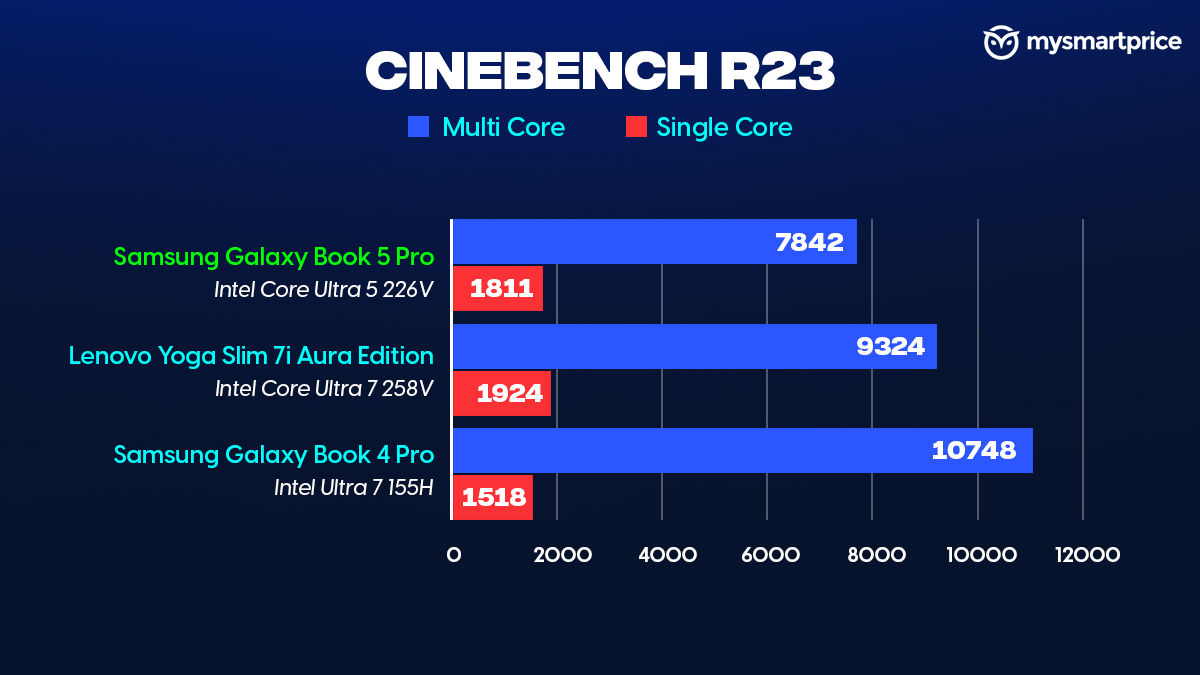
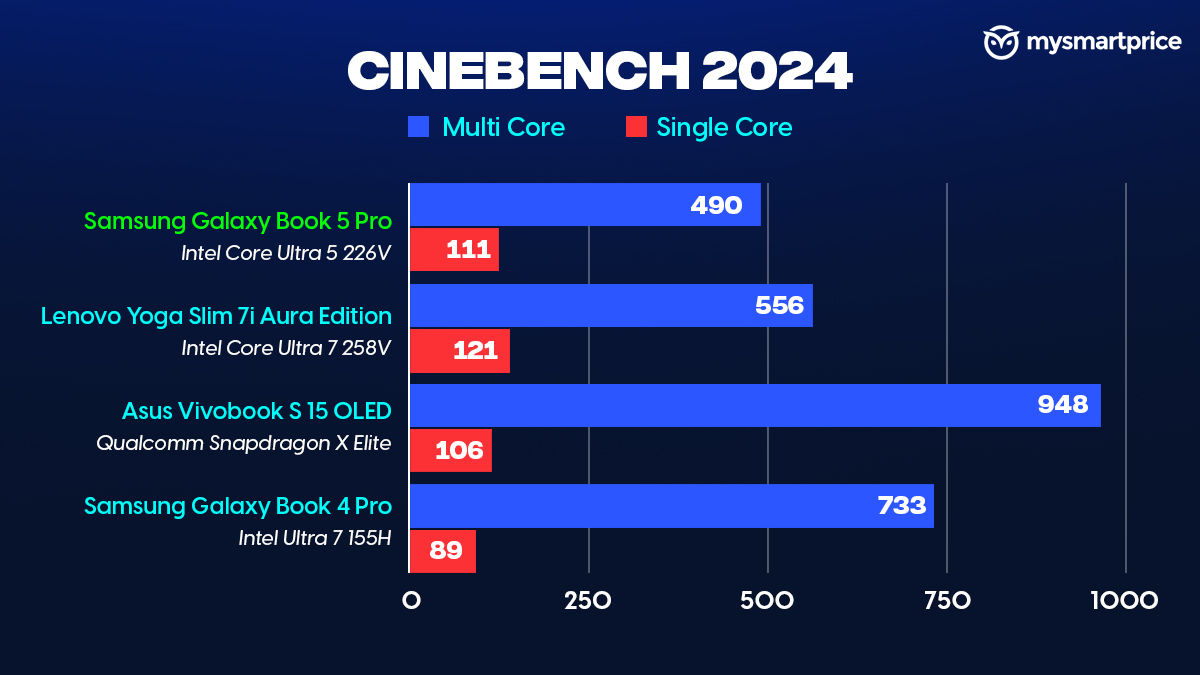
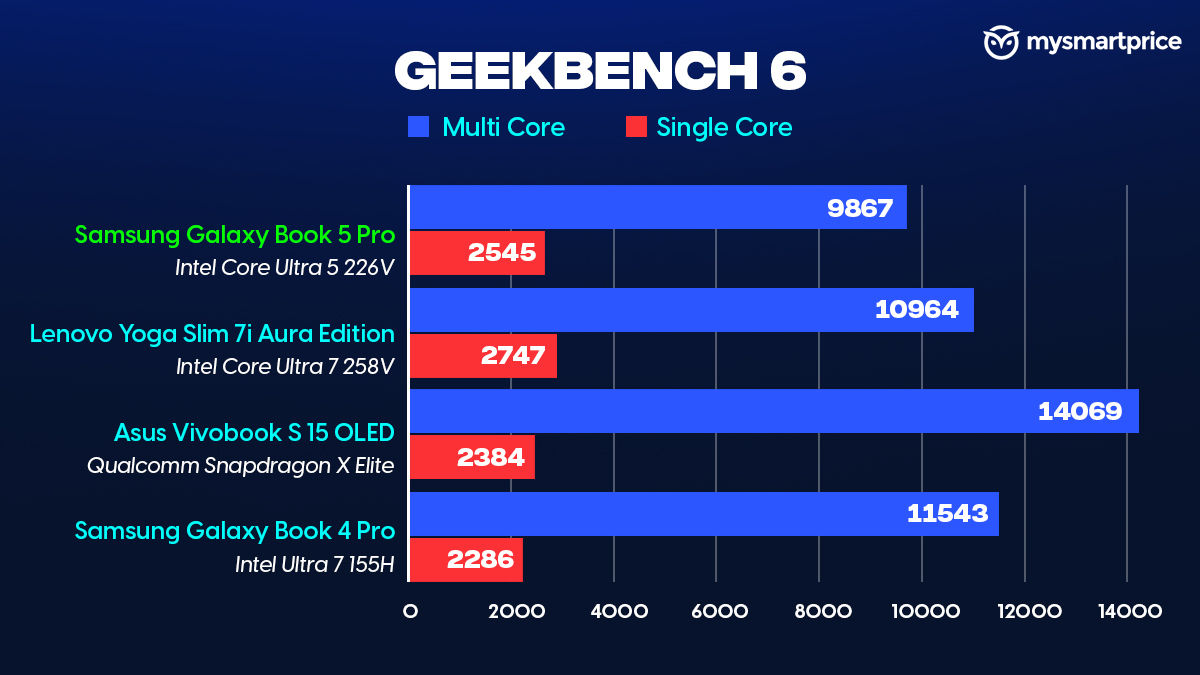
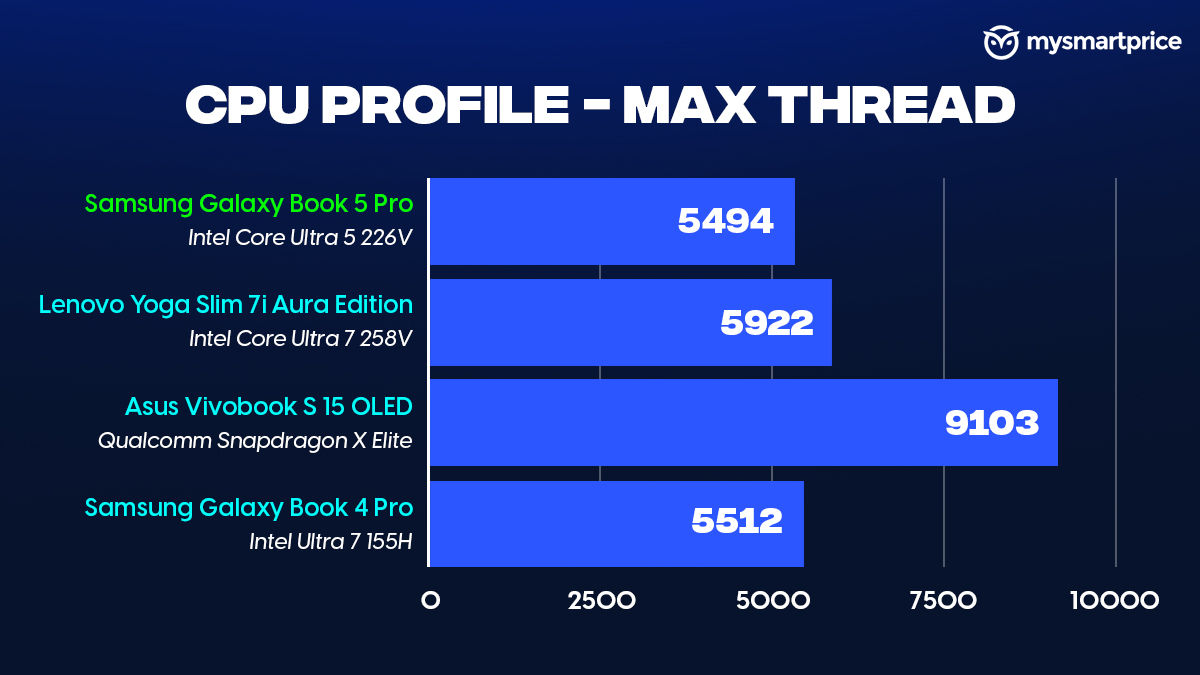
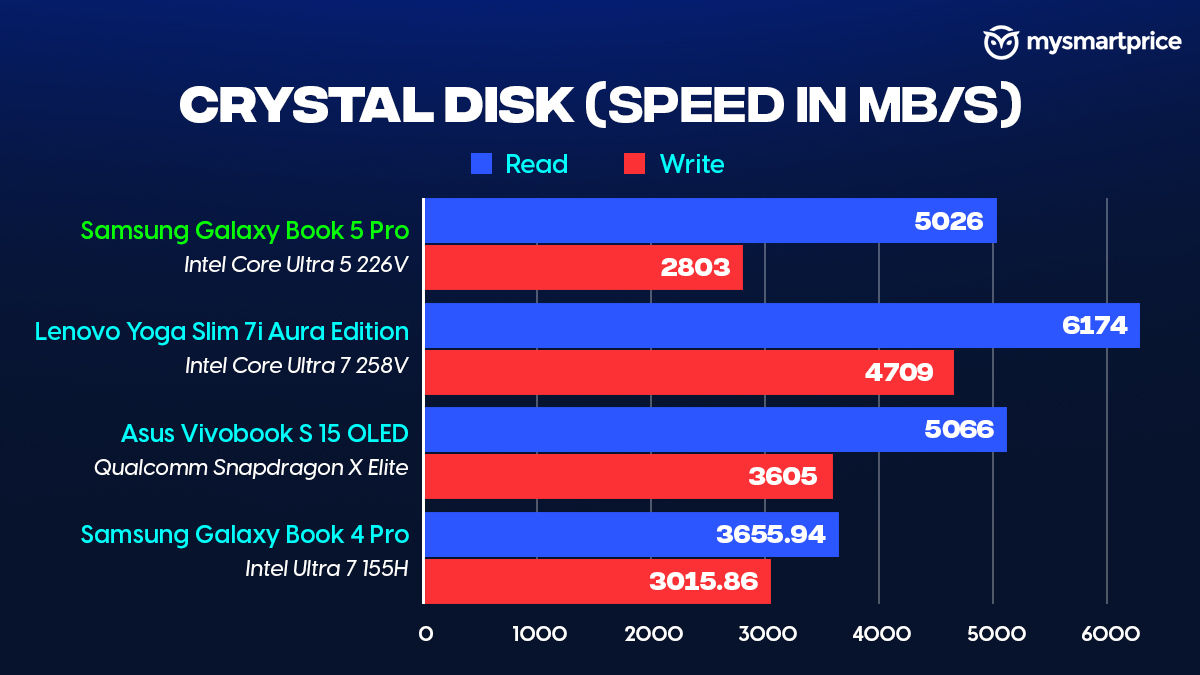
In 3DMark’s CPU Profile benchmark, the max thread score for the Galaxy Book5 Pro and Book4 Pro were quite close, despite the latter using the Intel Core Ultra 7 155H, which had 16 cores, compared to the 8 on the newer model. In Cinebench R23, it falls slightly behind the Yoga Slim 7i Aura Edition, which uses the Core Ultra 7 258V. The 512GB Samsung SSD inside the Book5 Pro also performs excellently, excelling in transferring files and also scoring well in our benchmarks.
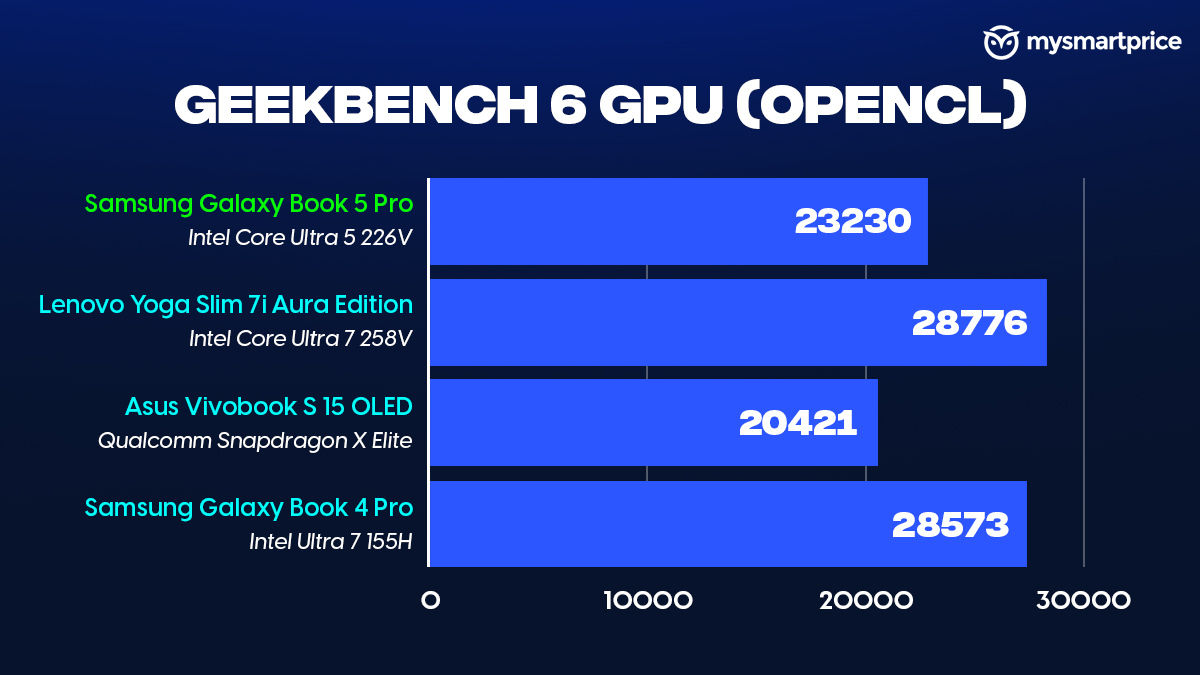
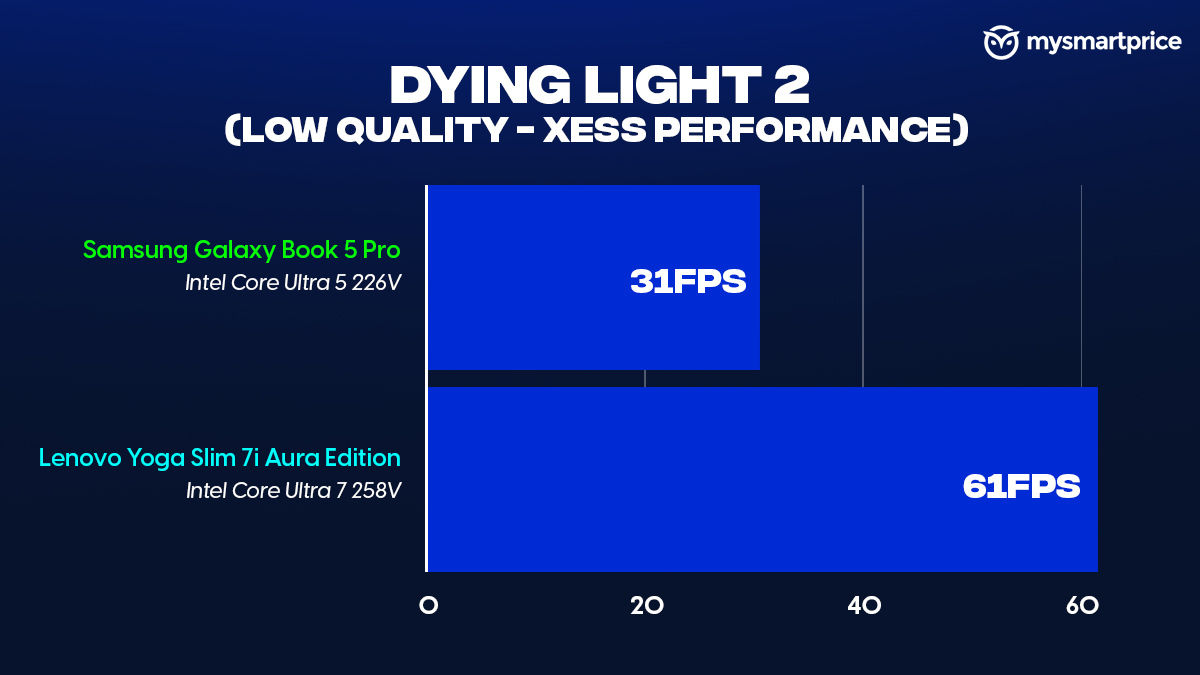
The Intel Arc 130V integrated GPU inside the Galaxy Book5 Pro returned decent scores in our benchmarks. In the Geekbench 6 GPU test, the 130V outperformed the Snapdragon X Elite’s Adreno GPU by a decent margin. But obviously, falls behind Intel’s powerful siblings. While gaming is nowhere near the Book5 Pro’s forte, we tested Dying Light 2 at Low Quality graphic preset with XeSS set to performance. The game returned 31fps, which is good enough for casual play. That said, the Core Ultra 7 258V can double this performance inside the Lenovo Yoga Slim 7i Aura Edition.
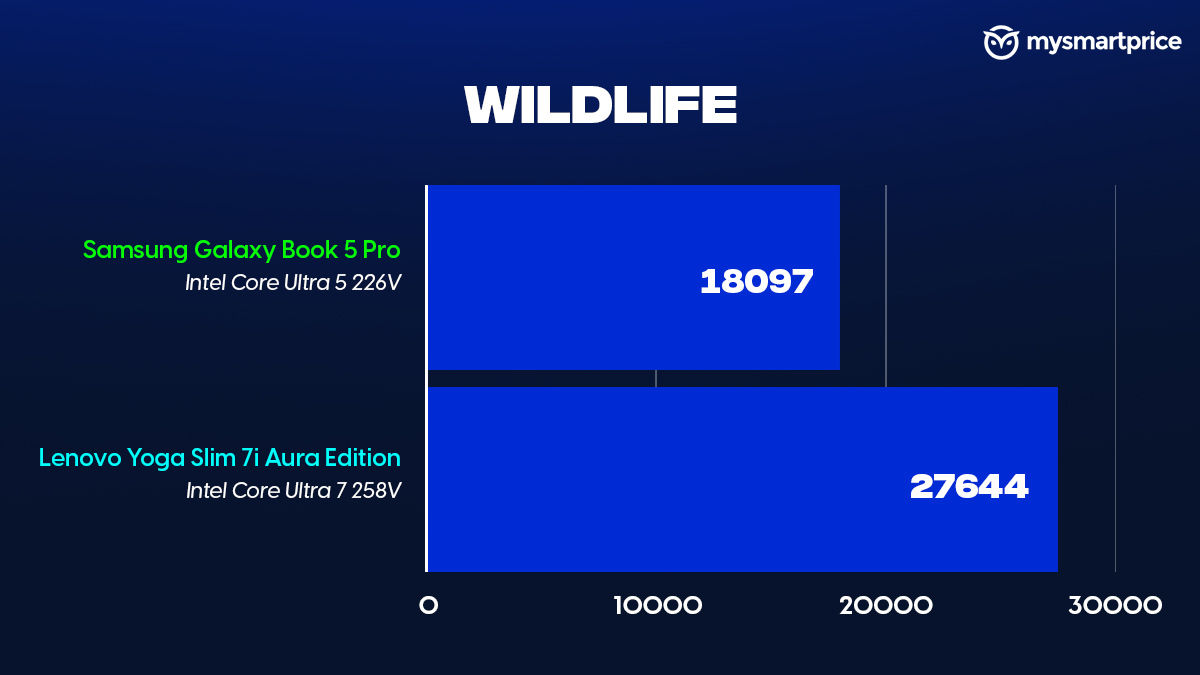
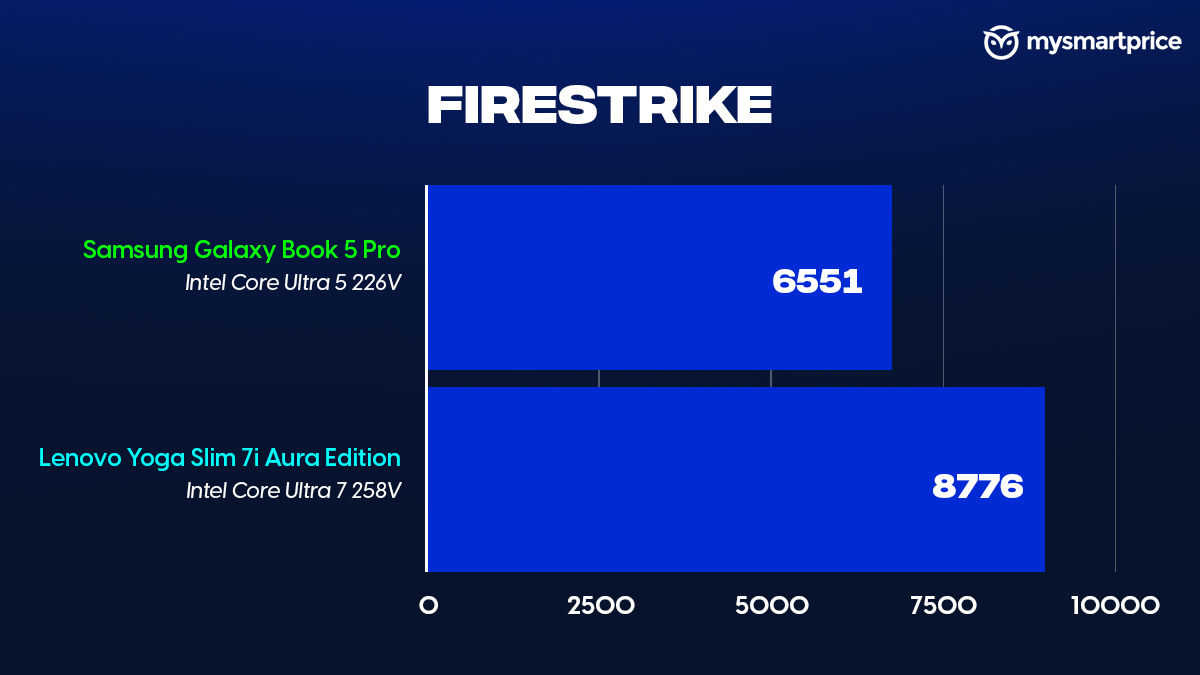
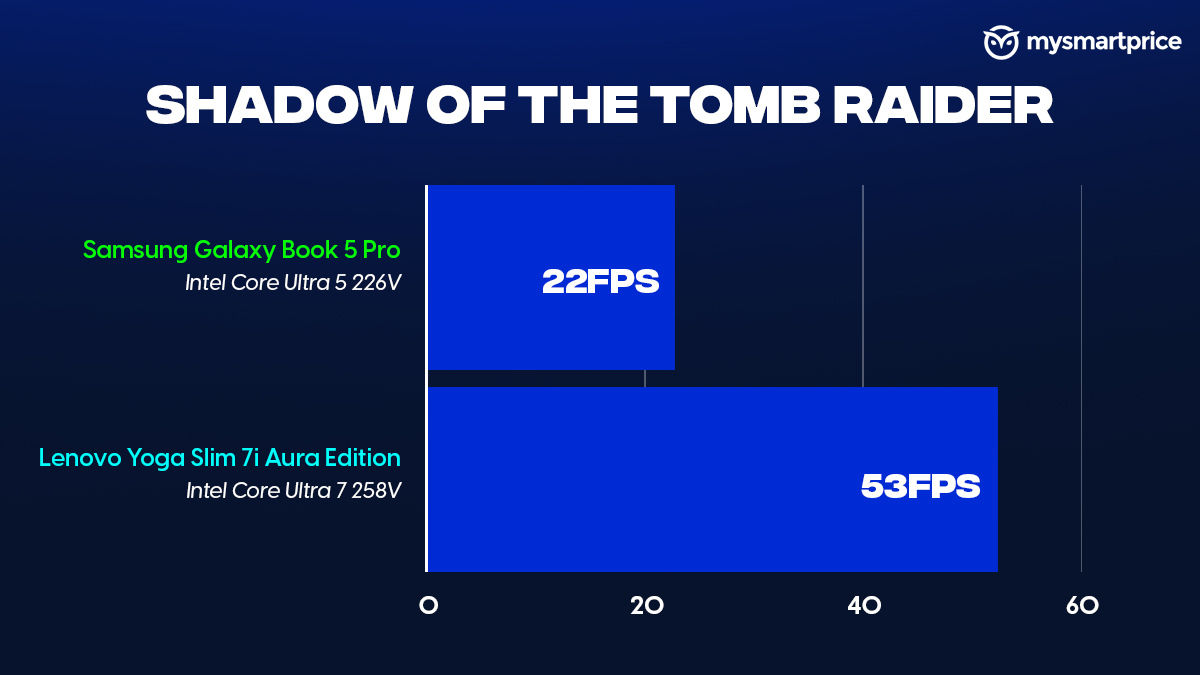
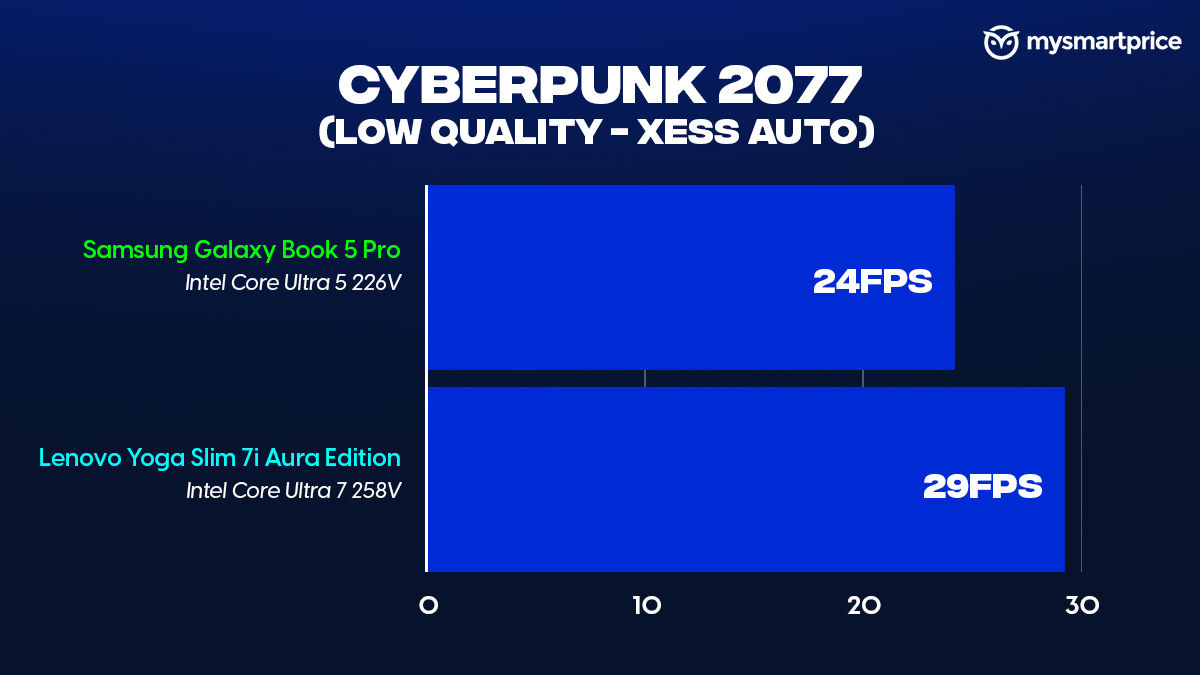
The performance falls slightly in Shadow of the Tomb Raider, and the same goes for Cyberpunk 2077. All that said, it’s not a laptop targeted for gaming, but it’s good to know it can handle a few titles, albeit at lower settings. So, if you need to pass some time after work, playing casual and not-so-graphic-intensive games like Counter-Strike 2, Valorant, Apex Legends, EA Sports FC 25, and more.
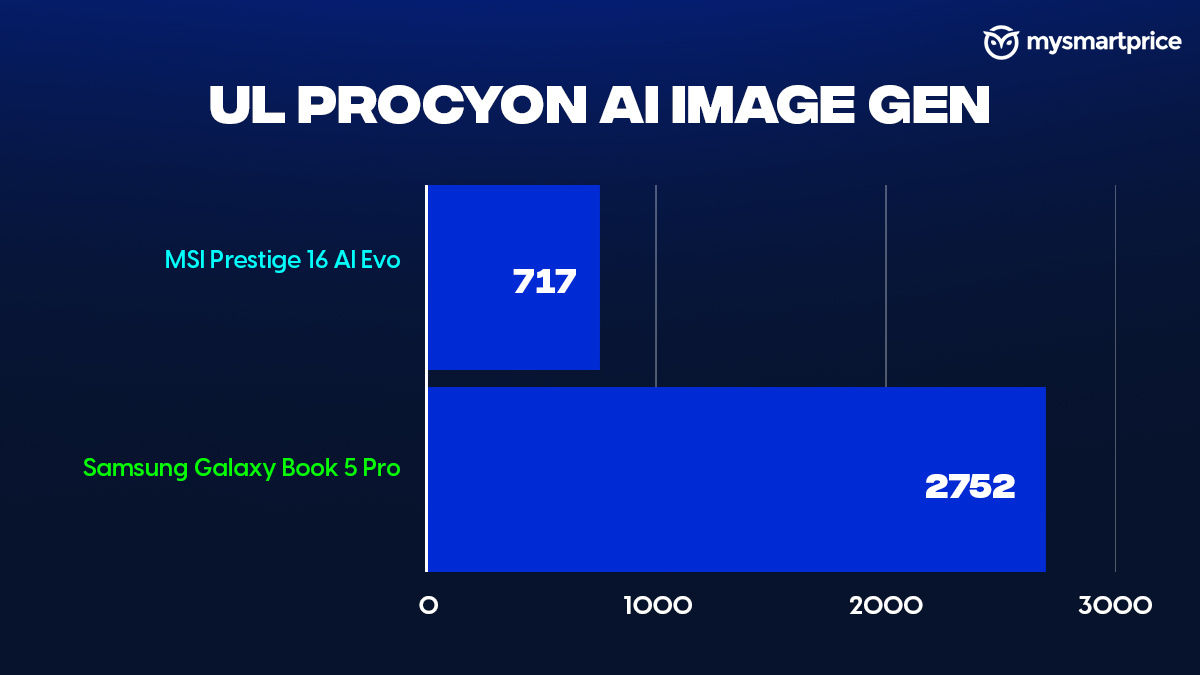
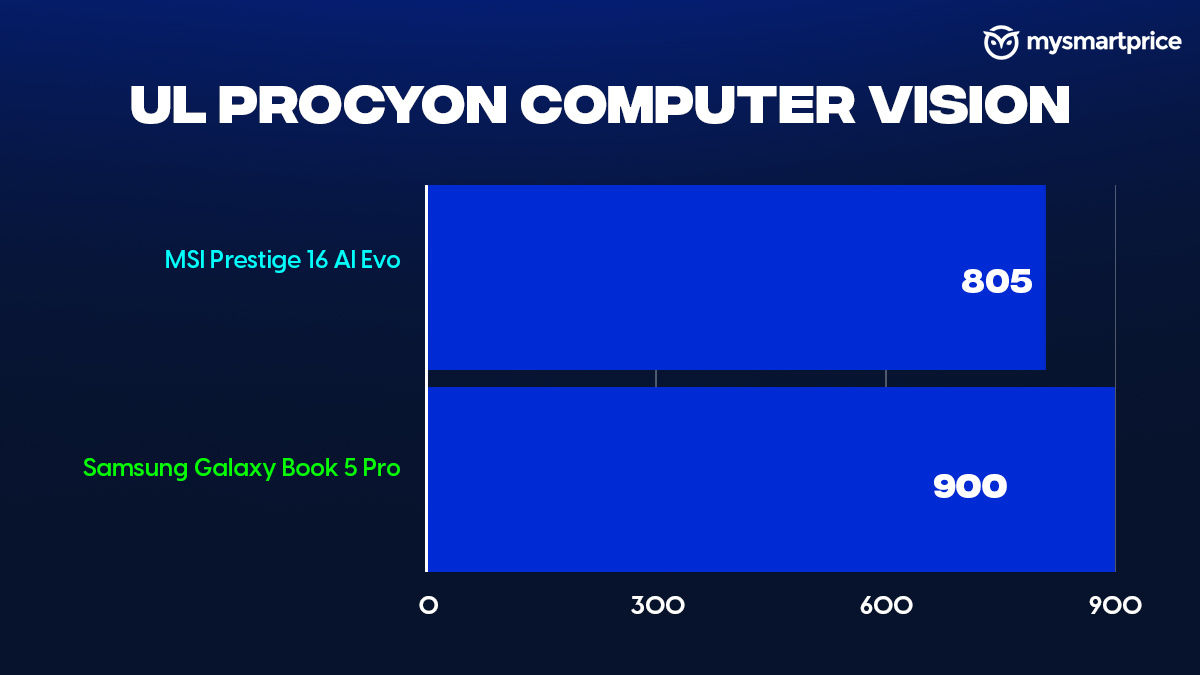
While I’m yet to find out a practical usage of built-in NPUs in my workflow, the Core Ultra 5 226V comes with a 40TOPS NPU. Which has managed to score well in our benchmarks. It outperforms the MSI Prestige 16 AI Evo in both UL Procyon AI Image Gen and Computer Vision.
Battery and Charging
The Galaxy Book5 Pro has been a reliable device ever since I started using it. It has been to Computex, Nothing’s Phone (3) launch in London and my usual commute to the Noida office. The laptop has managed to get around 6-7 hours of screen-on time across different continents, and this has been consistent. In the PCMark Battery Test, the Book5 Pro came short of a few laptops, especially the Snapdragon X Elite counterparts, which have been excellent in terms of battery life. That said, the Book5 Pro beats the outgoing Galaxy Book4 Pro by a considerable margin.

The in-box 65W charger takes about an hour and a half to fully charge the laptop from dead.
Samsung Ecosystem Makes Productivity Easier
I was using the Galaxy Book5 Pro with the Galaxy S24 Ultra, and this made life easier. I’ve always been jealous of the ecosystem that Apple provides if you have an iPhone/iPad and a MacBook. The Book5 Pro closes that gap on the Android side of things. A simple feature like copying text on the S24 Ultra and having it ready to be pasted on the Book5 Pro has helped me majorly during work.
My work involves sharing files and footage across different devices multiple times a day. And this is when Quick Share came in handy because it made sharing images and other documents on my phone easier. That said, I found multiple occasions when the Book5 Pro was not able to recognise the device properly, causing delays.
Besides this, Samsung also missed a major opportunity by skipping Object Eraser, something that you can find on the S24 and S25 Ultra. This could have been a great addition to the entire feature set.
Verdict
The Samsung Galaxy Book5 Pro gets a lot of things right — it’s slim, lightweight, and built for people who are constantly on the move. The AMOLED display is easily one of the best in its class, with vibrant colours, deep blacks, and touchscreen functionality that’s rare to find in this segment. Performance is solid for day-to-day tasks and even handles creative workloads like photo and video editing fairly well. Add to that the reliable battery life, fast charging, and Samsung’s growing ecosystem — especially if you’re using a Galaxy phone — and you’ve got yourself a genuinely productive machine.
That said, the pricing does feel a bit out of reach for what it’s offering. At Rs 1.31 lakh, it’s positioned in the same space as some seriously capable laptops. Also, on the flip side, the newer MacBook Air M4, which starts at just ₹89,900 and offers better raw efficiency, longer battery life, and a similarly polished user experience, even if you’re not in the Apple ecosystem.
Still, what sets the Galaxy Book5 Pro apart is its stunning touchscreen AMOLED display and how tightly it integrates with Samsung phones. If those are priorities for you, and you value a laptop that looks and feels great while being genuinely portable, this could be a smart pick — just know that you’re paying a premium for that polish.